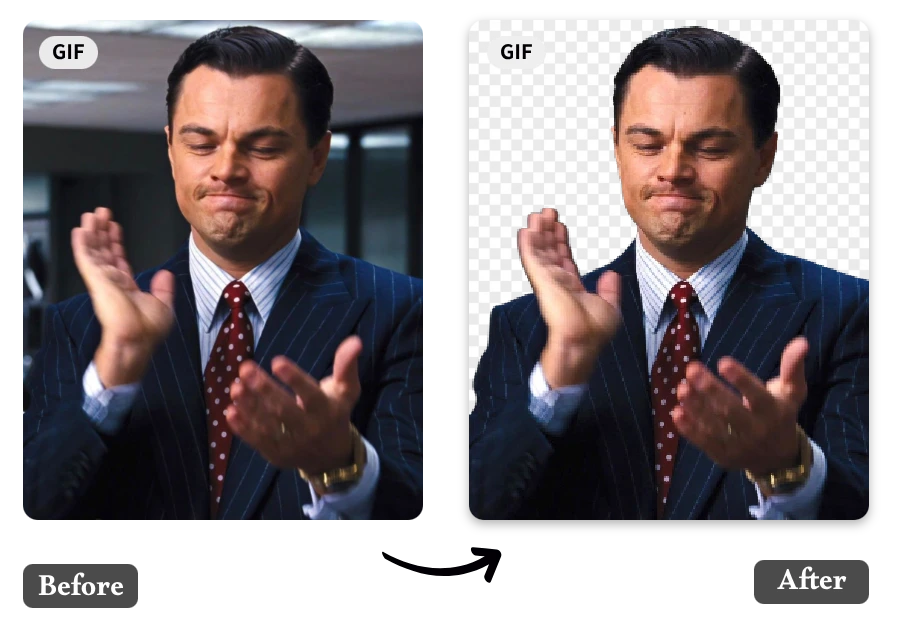
Editing images is now a normal part of content creation. Whether you are working on social media posts, product listings, or personal projects, clean visuals matter. One of the most common editing tasks is removing image backgrounds to make subjects stand out clearly.
The good news is that you no longer need complex software for this. You can now easily remove background from image online using simple AI tools. In this guide, we’ll walk through how it works, why it matters, and how a Background Remove tool can help you get fast results without technical skills.
Why Remove Background from Images?
Removing backgrounds is not just about making images look clean. It has many practical uses.
Better Focus on the Subject
A clean background helps viewers focus on the main object.
Professional Appearance
Images without distractions look more polished and usable.
Flexible Usage
You can place the subject on any background or design.
Useful for Marketing
Product images with clean backgrounds perform better in online stores
What Is Online Background Removal?
Online background removal means using a web-based tool to separate the main subject of an image from its background. Instead of manually editing in software, AI handles the process automatically.
The system:
- Detects the subject in the image
- Separates it from the background
- Produces a transparent or edited version
This makes editing faster and more accessible for everyone.
How AI Background Removal Works
AI tools use machine learning models trained on large image datasets. These models understand shapes, edges, and objects.
Here’s what happens in the background:
- The AI scans the image
- It identifies the main subject
- It separates foreground from background
- It removes or replaces the background
This process takes only a few seconds in most cases
Step-by-Step Guide to Remove Background Online
If you are new, follow this simple process.
Step 1: Upload Your Image
Go to a reliable online tool and upload your image.
Tips:
- Use high-quality images
- Make sure the subject is clearly visible
- Avoid very dark or blurry images
Step 2: Let AI Process the Image
Once uploaded, the AI will automatically start working.
It will:
- Detect the subject
- Separate background
- Prepare a clean output
Step 3: Review the Result
Check the output carefully:
- Are edges clean?
- Is the subject properly separated?
- Does anything look missing?
Step 4: Download Your Image
Once satisfied:
- Download the image
- Save it as PNG for transparency
- Use it in your project
Why Use Online Tools Instead of Software?
Earlier, people used software like Photoshop for background removal. But that required time and skill.
Now online tools offer:
No Installation Needed
Everything works in your browser.
Faster Results
Processing takes seconds instead of minutes or hours.
Easy for Beginners
No editing experience required.
Free Access
Many tools offer free usage options.
Features of a Good Background Removal Tool
Not all tools are the same. A good tool should offer:
Accuracy
It should clearly separate subject and background.
Speed
Fast processing improves productivity.
Ease of Use
Simple interface is important for beginners.
High-Quality Output
Images should remain sharp and clear after editing.
Common Use Cases
Background removal is used in many industries.
E-commerce
Clean product photos help increase sales.
Social Media
Better visuals improve engagement.
Graphic Design
Designers use transparent images in banners and ads.
Personal Projects
People use it for resumes, invitations, and creative work.
Tips for Better Results
Even with AI tools, input quality matters.
Use Clear Images
Better clarity improves accuracy.
Avoid Busy Backgrounds
Simple backgrounds give better results.
Keep Subject in Focus
Make sure the object is clearly visible.
Check Before Downloading
Always preview the final output.
Common Mistakes to Avoid
Many users make small mistakes that affect results:
- Uploading low-resolution images
- Using heavily blurred photos
- Ignoring preview results
- Expecting perfect output every time
Avoiding these improves your final image quality.
AI vs Manual Editing
Let’s compare both methods.
Manual Editing
- Requires software skills
- Time-consuming
- Offers full control
AI Background Removal
- Fast and automatic
- No technical skills needed
- Suitable for everyday use
For most users, AI tools are now the preferred option.
Are Free Tools Reliable?
Yes, many free tools are reliable for basic needs.
A good Background Remove tool can handle:
- Social media images
- Product photos
- Personal use cases
However, advanced users may need premium features for complex tasks.
How AI Is Changing Image Editing
AI is transforming how we edit images. What used to take hours can now be done in seconds.
Modern tools offer:
- Automatic detection
- Better edge accuracy
- Faster processing
- Simple user experience
In the future, we can expect even more improvements.
Final Thoughts
Learning how to remove backgrounds from images is useful for almost everyone today. Whether you are a content creator, business owner, or student, clean visuals help improve your work.
With modern tools, you can easily remove background from image online without any technical skills. A simple Background Remove tool makes the process fast, free, and accessible.
If you are just starting, try simple images first and practice regularly. Over time, you will get better results and understand how to choose the right images for editing.
The key is to keep things simple, use good-quality images, and rely on AI tools to handle the technical work.