Bad resolution used to be a dead end. You either went back to the source, paid someone to fix it, or published something that looked like it was screenshotted off a 2009 forum. None of those options were good. The AI Image Upscaler inside Pixella is a direct answer to that specific frustration — and this Pixella review looks at how well it actually delivers.
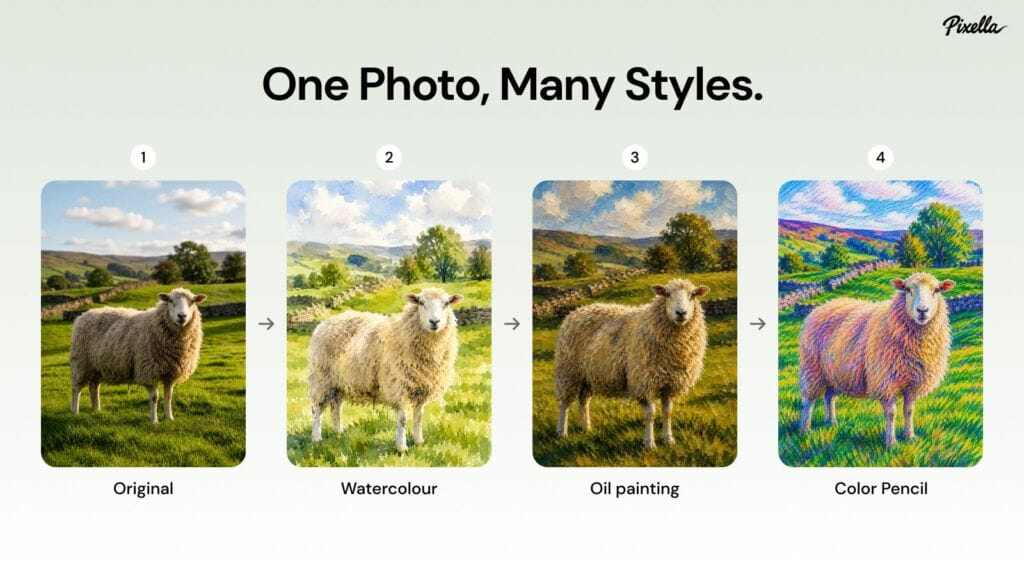
The AI image upscaler market is sitting at $8.08 billion in 2026, on a trajectory toward $73.47 billion by 2035 — 27.8% CAGR, per EconMarketResearch. That kind of growth doesn’t happen around tools that don’t work. It happens when a large enough group of people find something genuinely useful and keep using it.
The resolution problem, and what Pixella does about it
The upscaler handles output up to 8K and 16K. A file that came in at web resolution — fine for a social post, useless for a print run — can be pushed into territory where it actually works for larger formats. No exporting to a separate app required. The upscaler shares a canvas at pixella.ai with the AI Image Generator, AI Background Remover, Image Resizer, AI Image Editor, and Logo Generator — the whole workflow stays in one place. Load an image, hit the upscaling option in the toolbar, watch the progress indicator — done in around 30 seconds.
Before tools like this existed, getting a low-res file to a usable state had three options: work through it manually in Photoshop, send it to a freelancer and wait, or go back to the original source. That last option disappears fast — three-year-old shoots, suppliers in different timezones, files from a previous contractor who’s no longer around. Anyone reading a Pixella review specifically about the upscaler will find this scenario comes up more than any other: an image that existed, was usable once, and needed to be usable again at a different scale.
Three people, three different problems
Gary, a UK reviewer, came with one task — turn a low-resolution image into something high definition. Done in seconds. Five stars, no hesitation (May 2026, unprompted).
Maki Jared from the UK used Pixella to sort out passport photos for his daughter, cutting out a £30 professional service fee in the process. He gave it five stars without being prompted (May 2026).
Kenneth Cole, based in the US, flagged the variety of options and how little time the whole thing took. Three reviews on his account, recommended the platform twice in a single write-up (May 2026).
Three different entry points, three different use cases. None of them came in as power users. All of them left satisfied.
Why resolution recovery matters more than it used to
AI photo editing platforms collectively saved photographers around 89 million hours of manual processing in 2025, processing roughly 8.8 billion images in that time. The volume alone signals something about how central this kind of tooling has become to everyday visual work — not just for photographers, but for anyone producing content at scale.
The Image Resizer inside Pixella covers 30+ platform formats, from Instagram Story (1080 x 1920 px) to large print sizes like Poster 11×17 (3300 x 5100 px). That range creates a natural problem: an image sized for Instagram isn’t going to hold up if someone later needs it at poster scale. Upscaling after resizing for larger formats is where the gap shows up most clearly, and where the tool earns its place in the workflow. Anyone tracking Pixella reviews around this specific use case will find the same pattern: the resizer and upscaler used together, not separately.
What this Pixella review found the upscaler doesn’t handle well
The limitations are real and worth being clear about. Compression artifacts are a ceiling — upscaling adds pixels, it doesn’t manufacture detail that was never captured. A heavily compressed JPEG from ten years ago will come out sharper, but not necessarily clean. Similarly, some shooting styles and color treatments shift during AI processing in ways that weren’t intended, which can be a problem for images where the original rendering matters. And anyone whose workflow depends on granular manual control at each step will find that AI inference isn’t the right fit — the tool makes decisions, and those decisions aren’t always the ones a specialist would make.
The upscaler as part of something larger
86% of creators were already using generative AI in their work by 2025, per Adobe. The direction of travel is settled. What’s still being worked out is which tools actually slot into a real workflow without creating more friction than they remove.
The upscaler inside Pixella passes that test because it doesn’t ask much. Load an image, run the tool, download the result. The Brand Kit feature adds a layer on top — upscaled logos can be saved directly into a brand kit and pulled into future designs without repeating the process. For anyone managing a brand across multiple formats, that’s a meaningful time save.
Browsing Pixella reviews across Trustpilot, the consistent thread isn’t about any single feature. It’s about things working without a manual. The upscaler fits that description — it handles a specific, recurring problem, and it does it without asking the user to understand what’s happening behind it.