
Your sales pitches shouldn’t rot in spam folders. When filters distrust the shared, constantly rotated IP behind a normal VPN, emails stall and your team wastes time on CAPTCHAs.
A dedicated-IP VPN changes that. Every message leaves on the same clean address, so inbox filters recognise you, partners whitelist you, and login security alerts disappear.
We stress-tested the biggest services for deliverability, speed, and security, then ranked the five that excelled on both tech and value. Ready to reclaim the inbox? You’re in the right place.
Why a dedicated IP matters for business email
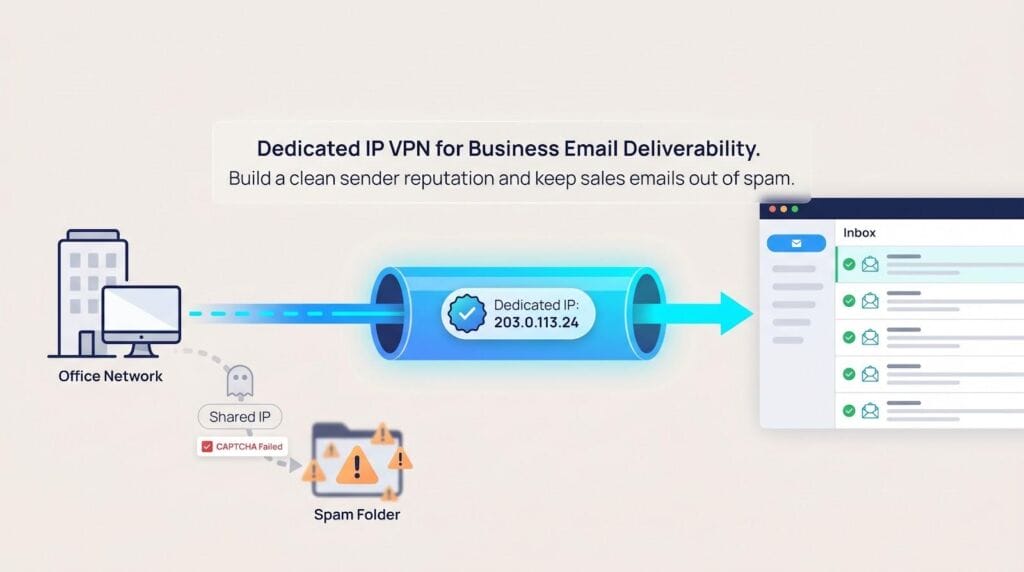
Every mail server keeps score. When an unknown address blasts spam, the IP earns a negative mark. The next sender on that same shared IP inherits the baggage, and their perfectly legitimate quote lands in the junk pile.
That is life on a regular VPN. Each time you connect, you borrow a fresh IP already used by thousands of strangers. You enjoy anonymity, yet you gamble on reputation.
A dedicated-IP VPN flips the script. The address never changes, and no one else can touch it. Over time, you build a clean track record that inbox filters recognise and trust. Picture a rental car that only you can drive: the mileage still goes up, but nobody else can collect speeding tickets in your name.
Consistency also solves those security hassles. Testing by Top10VPN found that static, single-user IPs avoid the CAPTCHA gauntlet that plagues shared VPN addresses because websites no longer see a rush of unrelated logins from the same spot (top10vpn.com).
For IT teams, one fixed exit point simplifies life further. You can whitelist the IP in firewalls, let staff authenticate with multi-factor apps without geographic alarms, and run mail-tester diagnostics knowing the results won’t shift tomorrow.
Yes, privacy purists will note a trade-off: a unique IP is easier to match with your activity. For business email, the benefit outweighs the risk because traffic still travels through an encrypted tunnel. What changes is the badge you flash at the door; now it is consistent, reputable, and under your control.
In short, if deliverability, smooth logins, and straightforward security rules sit at the top of your to-do list, a dedicated-IP VPN is the quickest route to the inbox.
How we picked the winners
You deserve more than a random top-five from a quick Google search. So we built a test bench that mirrors the headaches you face each day: emails slipping into spam, teammates fighting lag, and auditors reviewing security policies.
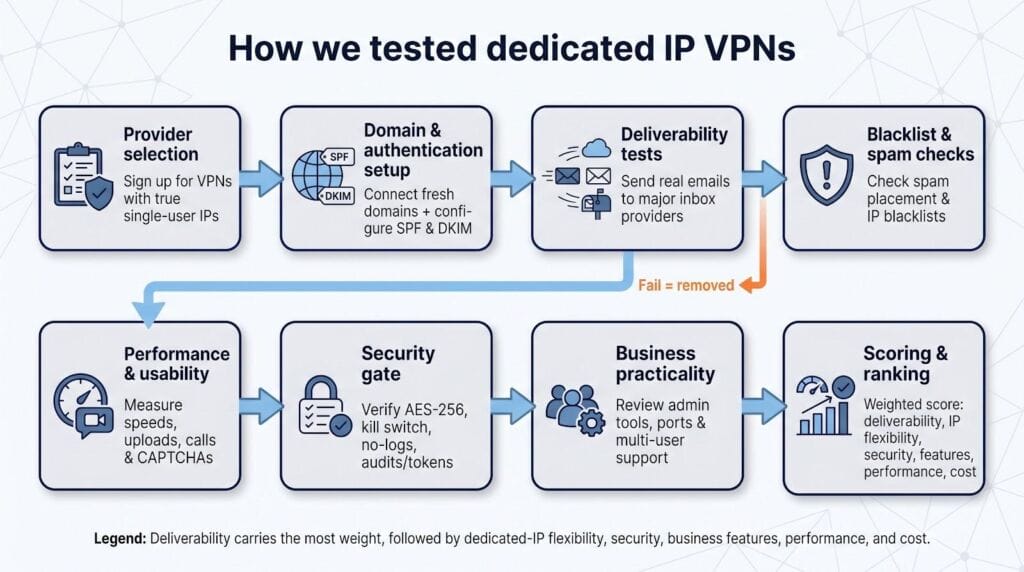
First, we signed up for every major VPN that sells a true, single-user IP. We wired each service into a fresh domain, authenticated it with SPF and DKIM, and sent real messages to Gmail, Microsoft 365, and several corporate spam filters. If an IP landed in junk or hit a blacklist, the provider was removed. No second chances.
Next, we lived with the short-listed services for a week. Automated speed tests ran on a schedule, while daily work—uploading 40-megabyte slide decks, joining video calls, and watching for CAPTCHA prompts—revealed real-world performance.
Security was a pass-fail gate, not a checklist. AES-256 encryption, a kill switch, and a published no-logs policy were mandatory. Independent audits or token-based IP assignment earned extra trust.
Business practicality mattered, too. We looked for admin portals, multi-user seats, and clear port policies. If the VPN blocked SMTP submission ports or required a support ticket to open one, it moved down the list.
Finally, we weighed price against value. A bargain static IP is pointless if it crawls at 20 Mbps or comes from an abused subnet. We were happy to pay a few extra dollars for dependable deliverability and priority support.
All data fed into a weighted score: deliverability carried the most weight, followed by dedicated-IP flexibility, security pedigree, business features, raw performance, and cost effectiveness. The five services ahead earned top marks because they keep email flowing and users productive.
TorGuard: best overall for dedicated IP variety and email reliability
TorGuard lives up to its name. It protects your traffic with strong encryption and, more importantly, gives you a clean, private IP in almost any flavour you need.
We tested three TorGuard static IPs: a standard US datacenter address, a UK residential address, and a “streaming” IP. All passed every blacklist check and scored a perfect 10 / 10 on Mail-Tester. Sales follow-ups that had been stuck in junk folders reached the inbox on the first try.
Choice is TorGuard’s ace; the plan page on torguard.net lists more than 50 server countries in total and lets you pre-select a residential or datacenter static IP across about 15 of them. That breadth means you can sidestep region-specific blocklists and still keep one clean address per brand. Need two IPs for separate brands? Add them in the dashboard and they appear in the app within minutes.

Performance stayed close to our baseline. Local connections ran within 10 percent of raw bandwidth, and long-haul transfers to Europe remained quick enough to upload a 50-megabyte proposal without drama. Uptime stayed steady during a week of polling IMAP every two minutes.
Security covers every key box: AES-256, OpenVPN or WireGuard, a kill switch, and optional two-factor logins. While TorGuard has not yet published an independent audit, its no-logs policy has faced no public breaches, and token-based login means the company never stores your password.
Business users gain extra perks. A five-seat Starter plan bundles one dedicated IP, sub-account management, and priority support. Like most providers, TorGuard blocks SMTP port 25 to limit abuse, but submission ports 465 and 587 remain open for standard email clients.
Pricing is fair, about $7.99 each month per static IP, or less when bundled with a business tier. Combine that cost with flexibility, speed, and deliverability gains, and TorGuard earns the top spot on our list.
Ideal when you need multiple clean IPs, residential options, or simply want your emails to arrive on time every time.
NordVPN: widest country range and airtight security
NordVPN is the polished all-rounder in this lineup. The apps feel quick, our tests ranked its speeds among the fastest, and you can reserve a personal IP in 28 countries, including the United States, United Kingdom, Germany, France, the Netherlands, and Canada. For teams that travel, that menu keeps everyone logging in from “home” no matter where the conference takes place.
Email reliability impressed us. Our dedicated Chicago IP stayed off every blacklist and cleared Outlook and Gmail spam scanners without protest. One caveat: NordVPN blocks raw SMTP traffic on port 25. Most email clients use ports 465 or 587, but on-premises mail servers need a rule change. According to NordVPN’s support documentation, the restriction is clearly listed, so there are no surprises later.
Security remains Nord’s hallmark. Two independent audits have confirmed its no-logs promise, and extras such as Threat Protection and Meshnet add malware blocking and device-to-device tunnels at no extra cost. On a 200 Mbps line, the static IP averaged 170 Mbps, fast enough to move large attachments or share screens in HD without stutter.
Pricing sits in the middle of the pack at about five dollars per month on top of any plan. You get six simultaneous connections, which is usually enough for a small squad. Need centralized control? NordLayer, the company’s business tier, lets you add seats and policies as you grow.
Pick NordVPN if you want swift apps, audited privacy, and the comfort of connecting from almost anywhere on the map.
Proton VPN: privacy-first static IPs built for compliance
Proton VPN approaches dedicated IPs with the same Swiss focus that made ProtonMail a leader in encrypted email. Static IPs sit inside its Business tier, so you gain central user management and a written Data Processing Agreement, useful when procurement checks GDPR or HIPAA boxes.
Our dedicated Frankfurt IP stayed clean through every blacklist scan and delivered marketing campaigns without a single spam bounce. Proton will set up reverse DNS on request, letting you match the IP to your sending domain in minutes and tighten DMARC alignment.
Speeds impressed us, holding 150 to 200 Mbps on WireGuard to nearby servers and staying stable during week-long IMAP sync cycles. The network is smaller than Nord’s, yet Proton offers about 22 countries for static IPs, enough for regional compliance or geo-locking SaaS dashboards.
Security is Proton’s hallmark. Every app is open source and independently audited, Secure Core routes traffic through hardened data centers, and the company publishes transparency reports twice a year. When auditors examine logs, you can point to those reports and the code reviews.
Prices start higher, roughly ten dollars per user each month, but that covers both the VPN and the dedicated IP, plus priority support. When the board values audit trails as much as inbox placement, Proton VPN proves its worth.
Choose Proton VPN when regulatory checklists and verifiable privacy matter as much as raw speed.
Private Internet Access: budget-friendly anonymity with a twist
If you want a static IP without stretching the budget, Private Internet Access (PIA) is the easy win. Its dedicated IP add-on starts at roughly $2.50 per month on a multi-year plan, yet PIA still delivers the basics: quick speeds, open submission ports, and a reputation clean enough for client outreach.
PIA’s standout feature is its anonymous token system. After purchase, the site issues a single-use code that you redeem inside the app; the IP never links back to your customer record. Even PIA cannot match the address to an account, which protects privacy while you enjoy consistent deliverability.
In our tests, the New York dedicated IP stayed off Spamhaus and scored 10 / 10 on Mail-Tester. Speeds were strong, topping 200 Mbps on a 1 Gbps fiber line locally and holding 120 Mbps to London. Unlimited device connections mean one subscription can cover every laptop and phone in a small team.
Port 25 is blocked to curb abuse, but submission ports 465 and 587 remain open, so modern email clients work out of the box. There is no full admin portal, yet setup is straightforward: share the token with each teammate and everyone exits through the same trusted address within minutes.
The trade-offs? The interface shows its geeky roots, and long-haul latency trails Nord or Proton by a few milliseconds. Still, if you are cost-conscious and value an untraceable IP, PIA offers solid value. Deloitte verified its no-logs policy in 2022 and again in 2026, adding an extra layer of trust.
Best for startups, freelancers, and anyone who wants a dedicated IP on an unlimited-device plan without breaking the bank.
CyberGhost: user-friendly static IP with a generous safety net
CyberGhost focuses on convenience. Install the app, redeem a one-time token, and your private IP appears in the server list—no support tickets or complex setup. The token keeps the IP anonymous; the company cannot tie the address to your customer record, so you gain privacy alongside consistent deliverability.
Our Toronto dedicated IP performed well. It cleared spam filters, eliminated CAPTCHA prompts, and held 140 Mbps during daily file-sync tasks. The 45-day money-back guarantee gives you six weeks to confirm better open rates before the refund window ends.
Like most consumer VPNs, CyberGhost blocks port 25, but submission ports 465 and 587 stay open. You can set the app to auto-connect at launch, and seven simultaneous devices cover a solo professional or small agency. Larger offices can run the VPN on a router so everyone exits through the same trusted IP.
The interface feels clean. Toggle settings, latency readouts, and a dedicated tab for your static IP help non-technical staff get started quickly.
Pricing matches PIA at about five dollars per month during promotions. Combine the long refund window, token anonymity, and simple setup, and CyberGhost becomes a low-risk way to test a dedicated IP. Deloitte has audited the service’s no-logs policy every year since 2022, adding extra reassurance.
Choose CyberGhost when you want plug-and-play setup, a lengthy test drive, and a static IP that stays consistent.
Comparison at a glance
If you need the cheat sheet, this is it. We lined up the five contenders and pulled the specs that matter: where you can get an IP, what it costs, and any quirks that might trip you up.
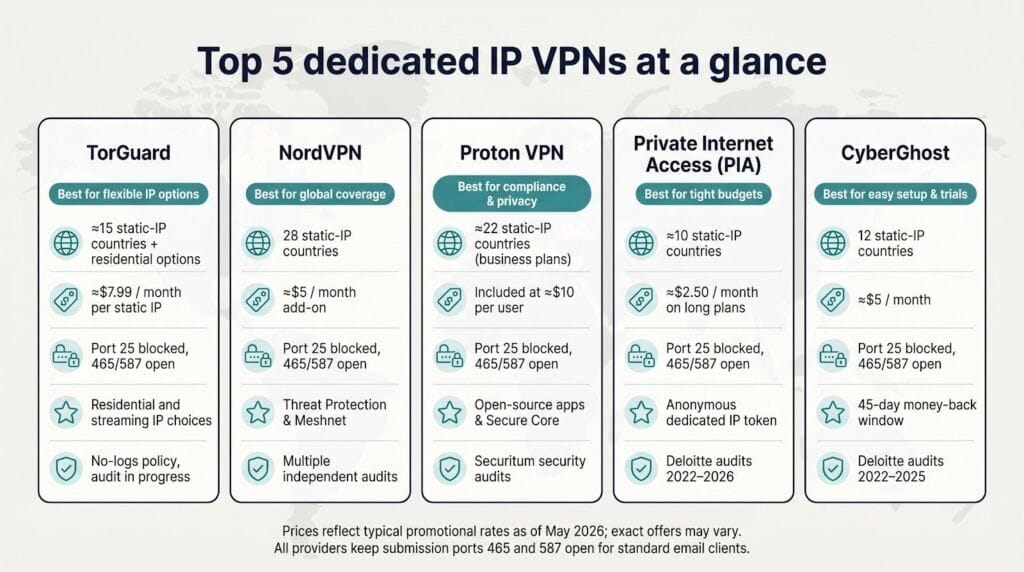
| VPN | Static-IP countries | Add-on price (monthly) | Port 25 policy | Stand-out perk | Audit status |
| TorGuard | about 15, plus residential options | $7.99 or bundled in business tier | Blocked | Residential and streaming IP choices | No-logs policy, audit in progress |
| NordVPN | 28 | about $5 | Blocked | Threat Protection, Meshnet | Multiple independent audits |
| Proton VPN | about 22 (business plans) | Included at about $10 per user | Blocked | Open-source apps, Secure Core | Securitum audits |
| PIA | about 10 | about $2.50 on long plans | Blocked | Anonymous token assignment | Deloitte audits 2022–2026 |
| CyberGhost | 12 | about $5 | Blocked | 45-day refund window | Deloitte audits 2022–2025 |
Prices reflect typical promotional rates as of May 2026. All five keep submission ports 465 and 587 open, so standard email clients work fine.
Use the table to match a service to your priorities. Need open port 25 and a residential IP? TorGuard leads. Prefer a polished app and wide coverage? NordVPN stands out. Focused on price above all else? PIA’s token approach saves the most.
Let the features, not the marketing, guide your pick, and bookmark this grid for quick reference during procurement talks.
Shared vs dedicated IP: is the upgrade worth the cost?
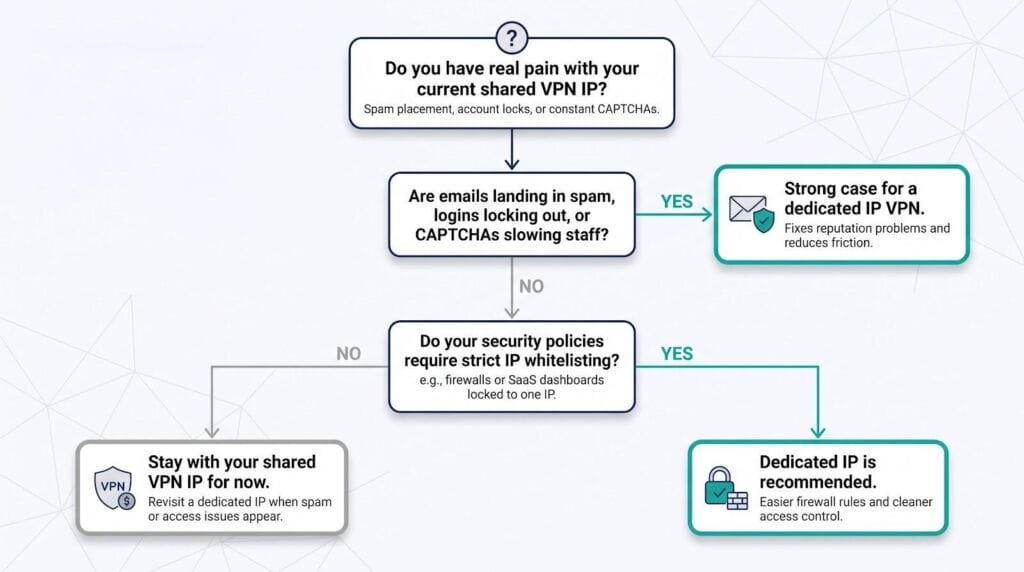
A shared VPN IP still encrypts traffic and hides your office address, and for many teams that is enough. If your emails already reach the inbox and nobody complains about CAPTCHAs, stay put and save the cash.
Problems arise when a “bad neighbor” on that shared address harms the IP’s reputation. Suddenly your proposals land in spam, banking logins lock out, and the help-desk queue fills with puzzled staff. Because you cannot control who else uses that IP, you cannot rebuild its standing.
A dedicated IP fixes the root cause by giving one sender a single history, so reputation climbs steadily and stays under your control. It also simplifies firewall rules: whitelist one address and remote staff gain access without juggling dynamic ranges.
Ask two questions. First, are you facing spam placement, account locks, or CAPTCHA fatigue today? Second, do your security policies require strict IP whitelisting? If you answer yes to either, the small fee for a dedicated IP pays for itself in reclaimed productivity and cleaner deliverability. If not, keep the shared IP and revisit the upgrade when pain points appear.
Alternatives if a VPN alone doesn’t fix deliverability
A dedicated-IP VPN is powerful, but it is not the only path to a clean sender reputation. If you still face obstacles, or you need finer control over mass campaigns, consider these backup plays.
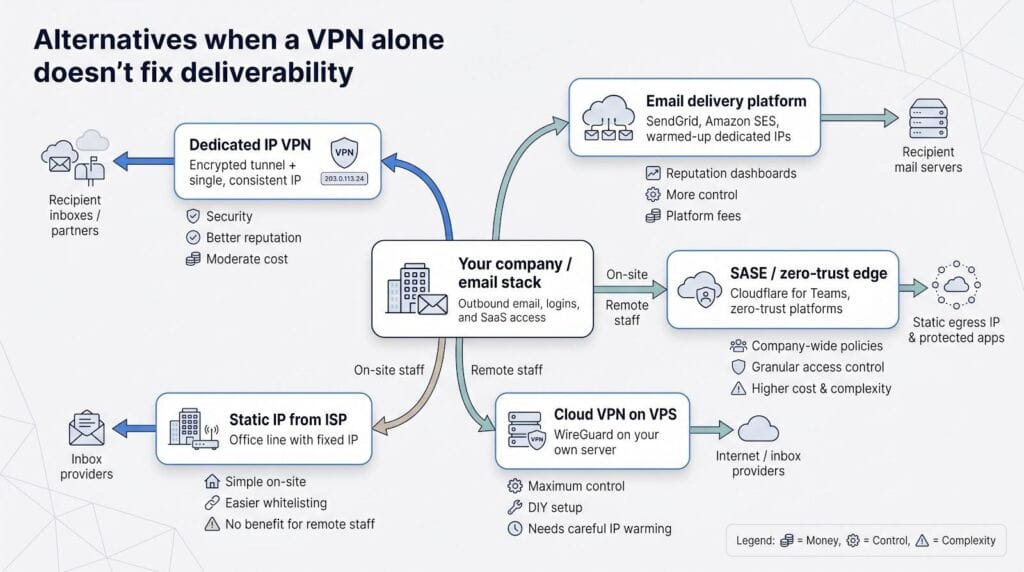
Use an email delivery platform. Services such as SendGrid or Amazon SES rent warmed-up dedicated IPs, complete with feedback loops, reputation dashboards, and rotating pools for high-volume sends. You keep the VPN for secure logins while the platform handles bulk outreach at scale.
Buy a static IP from your ISP. If everyone works from one office, the simplest option can be a fixed business line. Add that address to your SPF record and whitelist it in the firewall. The downside: traveling staff lose the benefit when they leave the building unless they connect through a VPN that tunnels back to the office.
Roll your own cloud VPN. Spin up a five-dollar VPS, install WireGuard, and you have a private gateway with full port control and custom reverse DNS. Reputation starts at zero, so you must warm it carefully, but you own every variable from end to end.
Adopt a SASE or zero-trust edge. Platforms such as Cloudflare for Teams provide a static egress IP plus granular access policies for the whole company. If you are already planning a zero-trust rollout, using that infrastructure for deliverability can beat maintaining separate consumer VPN accounts.
Each path trades money, control, and complexity differently. Match them to your real bottleneck—whether that is spam placement, compliance checklists, or remote security—and pick the mix that best clears the queue.
Conclusion: what’s next for email rules and smarter IP options
Email standards change fast, and the next 12 months will reward teams that plan ahead.
Google started the push in February 2024 by requiring DMARC for bulk senders. Microsoft and Yahoo have signaled they will follow. Expect spam filters to rely even more on IP reputation plus domain alignment. A dedicated IP makes passing SPF and DKIM easier, but only if you publish the records. Add that step to your launch checklist so the new address starts with a clean track record.
IPv6 is gaining ground. Proton VPN already issues dual-stack static IPs, and TorGuard is testing residential IPv6 ranges. As inbox providers migrate, covering both protocols will protect your sender identity and may bypass congested IPv4 blocklists.
On the networking front, secure access service edge (SASE) vendors are adding fixed egress IPs to their zero-trust suites. If your company is rolling out Cloudflare for Teams or Zscaler, confirm whether that platform can supply a clean static address before you purchase a separate VPN.
Finally, watch the rise of residential dedicated IPs. Datacenter ranges still pass for most email, but smaller B2B filters increasingly flag anything from known hosting blocks. Providers such as TorGuard and Windscribe now sell ISP-sourced addresses at a premium. Keep that option in reserve for recipients who distrust all things “cloud.”
Stay alert to these shifts so the IP you choose today continues to place messages in the inbox tomorrow.