
GIFs make websites fun. They grab attention and explain concepts visually. They also add a bit of personality to your pages.
But here’s the downside: they’re huge files compared to images like JPEGs or PNGs. And if you’ve got more than one on a page, your visitors could be staring at a loading spinner instead of your content.
If you’ve noticed pages stalling or users clicking away before they even see the main banner, your GIFs might be the reason. As you read on, we’ll go through why they slow things down and how to fix it without killing their quality.

Why GIFs Slow Websites Down
A slow-loading GIF is more than just an inconvenience. It can directly impact bounce rates and search rankings. Search engines like Google consider your website’s speed when it comes to ranking. And if sites take forever to load, they might leave before it loads up.
The main problem is file size.
A high-quality animated GIF can be several megabytes large. That might not sound like much on your desktop. But on mobile data or slower Wi-Fi, it’s enormous.
Other issues include:
- Multiple loops: GIFs repeat over and over. That means browsers need to load and keep displaying them fully.
- High frame counts: Every single frame is stored, unlike video formats that compress motion more efficiently.
- Unoptimized colors: GIFs support up to 256 colors per frame. Most animations don’t need that many.
And because of these problems, you’ll end up with longer load times and frustrated visitors.

Why Just Making It Smaller Isn’t Enough
You might think cropping or resizing the dimensions will solve the issue. But even a smaller GIF in pixels can still be massive in file size.
That’s because file size depends on factors such as the number of frames and the color depth. It also includes compression, not just the width and height.
The way to fix these problems is to reduce the GIF size for the web. But this must be done in a way that keeps the animation smooth and the visuals sharp. And that’s where compression helps.
How Compression Saves the Day
Compression works by removing unnecessary data from your files. And it does this while making things look almost identical. It might reduce the number of colors or optimize repeating frames. It might even remove duplicate data in the animation.
By compressing GIFs, you can have:
- Faster Load Times: Visitors see your content instantly.
- Better SEO: Search engines reward speed
- Lower Bandwidth Costs: Useful if a lot of GIFs are among your content
- Mobile-Friendliness: Works better for users on slow networks
And when compression is done correctly, it doesn’t make your GIFs look bad. The changes are usually invisible to people who aren’t looking too closely.
Compress GIFs Without Killing Quality Using Vheer
Most online tools either get rid of too much detail or give you a barely noticeable size drop.
But Vheer’s GIF compression doesn’t do that. It compresses animated images while keeping them crisp and smooth.
It works so well because:
- You upload your GIF and let the AI analyze it.
- It removes useless data but keeps all the key visual details.
- The animation stays smooth. Doesn’t have any weird jumps or pixelated errors.
- You can reduce GIF size for the web in seconds. No software download needed.
Because it’s all online, you can compress GIFs anywhere. And unlike other tools, there’s no paywall and no sign-up. There’s also no limit on how many times you can use it.
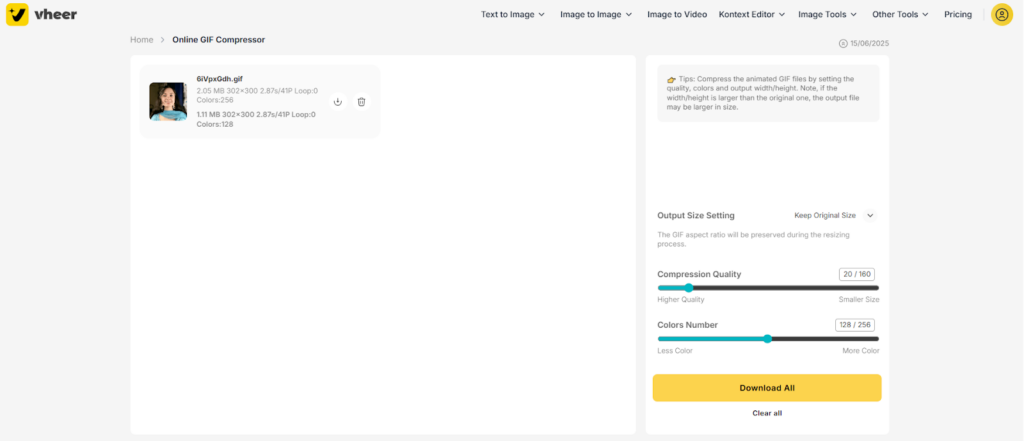
How to Use Vheer to Compress Animated Image
Step 1 – Go to Vheer’s GIF Compressor
Open it in your browser. No app install, no setup.
Step 2 – Upload Your GIF
Drag and drop or click to select. You can send GIFs as big as 50mb without worrying about restrictions.
Step 3 – Let Vheer Process It
Vheer automatically smart compresses the GIF to keep quality and lower size. You can use the sliders to adjust the focus on quality or colors in the GIF.
Step 4 – Download the Compressed GIF
You’ll get a much smaller file ready to replace the original on your website.
Getting Your GIFs To Be Web Friendly
Even with compression, your GIFs can still be improved by making a few adjustments. This includes:
- Shortening the Animation: Looping forever isn’t always necessary.
- Using Fewer Frames: Removing unnecessary frames cuts the size dramatically.
- Limiting Colors: Many GIFs look the same with fewer colors, especially simple animations.
- Changing Dimensions: Don’t post a super-wide GIF if it only displays 400px.
Final Thoughts
GIFs are great for adding humor and making things interesting. But if they’re slowing your site down, people may end up leaving.
But that problem is solvable. You just have to compress the GIFs before they are uploaded to your website. With a tool like Vheer, you can do it instantly. And that happens without giving up the smooth motion or losing that sharp detail that makes your GIFs worth using in the first place.
So next time you upload a GIF, make sure it’s optimized. Your visitors and your bounce rate may depend on it.