You Generated a Beautiful Image — But Can You Legally Use It for Commercial Work?
Here’s a scenario that plays out hundreds of thousands of times every week in 2026: A designer, marketer, or freelancer fires up a text-to-image tool, types a killer prompt, and gets back something genuinely stunning. They drop it straight into a client deck, a product landing page, or a paid ad campaign — and never once check the licensing terms.
That single oversight could cost them everything.
Not all generated images come with automatic commercial rights. Some platforms restrict commercial use on lower-tier plans, while others require attribution. And the problem runs deeper than just reading fine print.
Providers differ in how they describe usage rights, output ownership, business-plan requirements, and public visibility. Even when a platform allows commercial use, copyright treatment of AI-generated works can still vary by jurisdiction.
This means that the image you’re confidently deploying in a $50,000 ad spend may be legally compromised — not because you didn’t pay for the tool, but because you’re on the wrong plan tier.
This guide cuts through the noise. We’ve evaluated 10 of the top online AI image generators specifically through the lens that matters most to professional creators and studios: maximum output resolution and commercial licensing clarity and cost. We rank #1 the online AI image generator that sets the gold standard for professional output and clean commercial rights — and dissect every other option with brutal transparency.
How We Test: The Professional Creator’s Framework
Most AI image generator reviews focus on image aesthetics. We don’t. For professional creators, two questions eclipse everything else:
1. What is the maximum resolution I can actually output?
Many generated images need enhancement before they’re production-ready. Upscaling a 1024×1024 image to print resolution, adjusting color balance, or removing artifacts all take additional time and sometimes additional tool costs. Some platforms include upscaling in their plans; others charge extra.
We evaluate each tool’s native maximum output resolution, watermark policy on free tiers, and whether high-resolution export is gated behind premium plans.
2. What does commercial use actually cost — and what are the hidden traps?
Free tiers work for experimentation but break down fast for professional use — commercial rights, resolution limits, and generation caps all push serious workflows toward paid plans in the $30–100/month range for most teams.
We identify the lowest plan tier that legally unlocks commercial use rights, document any catches (forced public galleries, required attribution, platform ownership of generated assets), and flag any licensing language that could cause problems in client work.
There is also the question of infringement risk. Even if a generated image is new, the broader questions around training data, stylistic similarity, trademark likeness, public figures, and recognizable characters still matter.
DEEPER DIVE: Read all the Ranking Arizona Top 10 lists here
INDUSTRY INSIGHTS: Want more news like this? Get our free newsletter here
Evaluation criteria summary:
- Free/base tier maximum resolution
- Watermark presence on free-tier outputs
- Privacy of generations (public gallery vs. private)
- Whether commercial rights are included and at which tier
- Lowest monthly price to unlock legitimate commercial use
- Any attribution requirements or platform IP traps
Resolution & Licensing Matrix
| Rank | Tool Name | Max Output Resolution | Commercial Rights Status | Lowest Price for Commercial Use |
| #1 | DramaPixel | 720P (Lite) / 1080P (Pro & Premium) | Full Commercial Use + No Watermarks + Private Creation on ALL paid tiers | $14.9/month (Lite plan) |
| #2 | Adobe Firefly | Print-ready high-res via Photoshop | Commercially safe on all tiers — trained on licensed Adobe Stock and public-domain content | Free plan available; paid from $4.99/month |
| #3 | Canva AI | Up to ~4K via export; high-res on Pro | Commercial use allowed under terms (user’s legal responsibility); full access on Pro | Canva Pro ~$12.99/month |
| #4 | Picsart | Up to 8K on Pro; Free tier up to 2048×2048 | Free & Plus: personal/non-commercial only; commercial license starts at Pro | Picsart Pro ~$20/month |
| #5 | ImagineArt | High-res on paid tiers; 100 free daily tokens | Free tier limited; commercial rights from Artisan ($24/mo) | Artisan plan ~$24/month |
| #6 | QuillBot AI Image Generator | High-resolution download available; specifics tied to plan | No watermarks on free; commercial terms require plan compliance review | Paid plan required for confirmed commercial use |
| #7 | NoteGPT Text-to-Image | Standard resolution; limited free tier | Commercial rights unclear on free tier; review ToS for commercial use | Paid plan (pricing varies) |
| #8 | DeepAI Text2Img | Standard resolution; Super-Resolution support on paid | Full user rights claimed on-site; paid API unlocks higher quality | $4.99/month (API) for enhanced commercial-grade output |
| #9 | Imagetotext.info Text-to-Image | Standard web resolution | Limited commercial rights information; terms require review | Not clearly defined; default free use only |
| #10 | Manus AI Image Generator | Standard web resolution | Review ToS for commercial use terms | Not clearly defined |
Note: Specific pixel-count maximums for some tools are not published on their official pages and may vary by model. Always verify directly at the source before committing to a commercial workflow.
Top 10 Rankings: Full Reviews
#1: DramaPixel
Overview:
DramaPixel earns the top spot in this roundup by solving the two problems that haunt professional creators most: it delivers genuinely high-resolution output and it sets one of the lowest commercial rights barriers in the market. For designers and digital content creators who need a reliable text to image pipeline for commercial work — without worrying about hidden licensing gotchas — DramaPixel is purpose-built to eliminate that anxiety from day one.
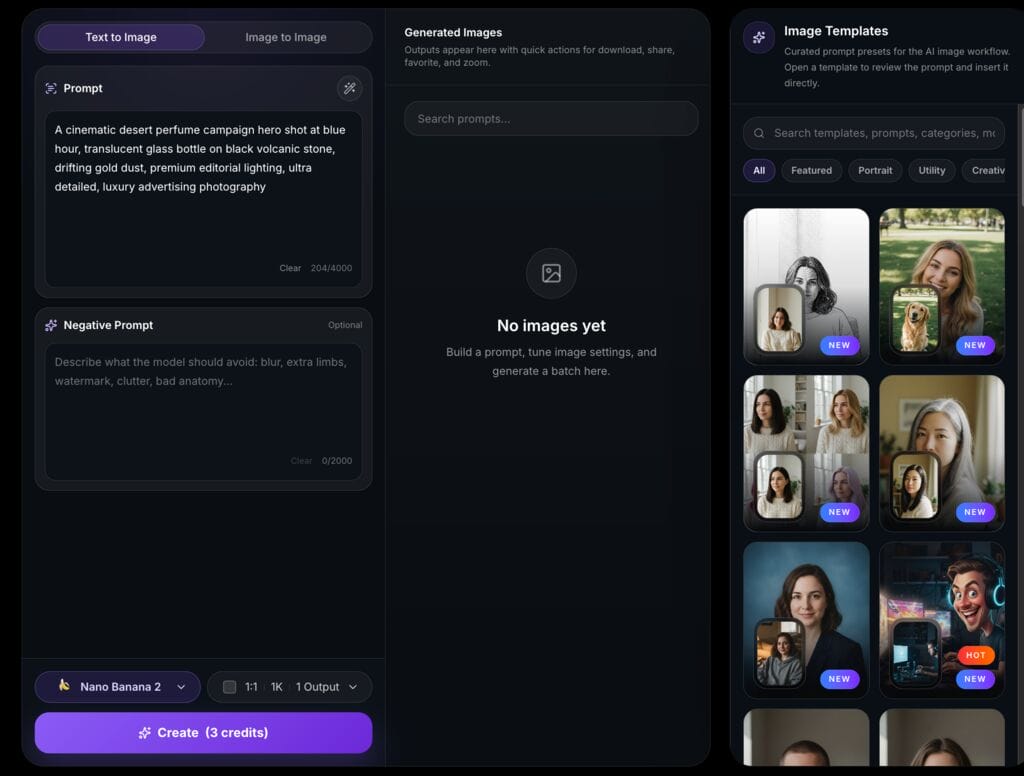
DramaPixel is an all-in-one AI creative platform that enables users to generate high-quality images and videos from text prompts via dedicated Text to Image and Image to Image modes, all within a single fast workspace. Its interface supports up to 4,000-character prompts with an optional Negative Prompt field, giving creators fine-grained control over what the model should avoid — a professional-grade feature that directly improves output quality for commercial briefs. The platform also includes curated Image Templates with categorized prompt presets (Featured, Portrait, Utility, Creative, and more), allowing teams to spin up production-ready text to image outputs without starting from scratch every time.
Output & Resolution:
DramaPixel’s pricing tiers reflect a clear resolution progression designed for professional workflows. The Lite plan ($14.9/mo) outputs at 720P, already watermark-free and suitable for web and digital commercial use. The Pro plan ($29.9/mo) steps up to 1080P output, covering the vast majority of digital production needs including social media, web advertising, and video content. The Premium plan ($149.9/mo) also delivers 1080P output with a dramatically expanded credit pool of 3,200 credits/month, engineered specifically for high-volume professional users who need maximum throughput. Every tier includes Top-Quality Video Models, Image & Text-to-Video, 100+ AI Video Templates and Effects, Cross-Video Character Consistency, AI Video Ads, AI Avatar, AI Music, and Fast Generation Mode — making DramaPixel a true multi-media production hub, not just a text to image tool.
Licensing & Costs:
This is where DramaPixel genuinely separates itself from the competition. All three paid plans — Lite, Pro, and Premium — include the exact same three critical commercial-use benefits:
- ✅ Private Creation — your generations are never exposed in a public gallery
- ✅ No Watermarks — clean, professional assets from the very first paid tier
- ✅ Full Commercial Use — legally deploy outputs in client work, ads, and monetized projects
This means Full Commercial Use rights start at just $14.9/month (Lite plan) — a dramatically lower barrier than competitors like Leonardo AI ($24/mo for commercial rights) or ImagineArt ($24/mo for commercial rights). There is no “enterprise-only” licensing trap, no attribution requirement, and no forced public gallery exposure even on the entry-level plan. For freelancers, studios, and marketing teams who run text to image workflows at scale, DramaPixel’s credit structure also allows purchasing additional Credit Packs as needed across all tiers, ensuring production never grinds to a halt mid-campaign.
Verdict: The cleanest commercial rights story in this entire roundup. Full Commercial Use + No Watermarks + Private Creation available from $14.9/month — the lowest entry point for legitimate commercial text to image output among all 10 tools reviewed. The go-to choice for any creator who needs professional-grade output without licensing paranoia.
#2: Adobe Firefly
Overview: Adobe Firefly is the gold standard AI art generator for commercially safe image creation. Unlike every other tool in this roundup, Firefly’s models are trained exclusively on licensed Adobe Stock images and public-domain content — a training data posture that eliminates the copyright anxiety that haunts most AI image workflows. Adobe also provides indemnification for enterprise users, meaning that if a third party claims that Adobe Firefly output infringes their intellectual property, Adobe will defend the claim. That level of legal protection is unmatched in this roundup.
Output & Resolution: Firefly generates print-ready, high-resolution files directly inside Photoshop and Illustrator via Generative Fill, with no separate export pipeline required. It also draws from Adobe Fonts’ library of 20,000+ premium typefaces, giving creative teams access to professional-grade typography alongside image generation in the same ecosystem. Outputs are production-ready for digital, print, and large-format commercial use.
Licensing & Costs: This is where Firefly genuinely separates itself. Every output is commercially safe by design — not by plan tier. The free plan includes generative credits with commercially safe outputs. Paid plans start from $4.99/month and are often included in Adobe Creative Cloud subscriptions, which many professional teams and campus users already hold. There are no public gallery requirements, no attribution clauses, and no platform IP traps.
Verdict: The cleanest commercial rights story of any AI image generator backed by a major technology company. Trained exclusively on licensed content, integrated into the world’s most widely used professional creative suite, and commercially safe from the free tier up. The only tool in this roundup where the licensing question is answered before you even start generating.
#3: Leonardo AI
Overview:
Leonardo AI is an AI image generator built for game art and concept design. It has evolved into one of the most feature-rich hosted creative suites available, making it a genuine powerhouse for professional designers — but its commercial licensing model contains a critical trap that every commercial creator must understand before using free-tier outputs in client work.
Output & Resolution:
Leonardo AI includes an Upscaler that can increase output resolution up to 4× with detail enhancement. The platform’s Real-Time Canvas, inpainting, outpainting, ControlNet-style guidance, and custom model training make it one of the deepest creative environments in the market. On top of the base, a full canvas includes inpainting, outpainting, and compositing; ControlNet-style pose and depth guidance; a fine-tuning system for training custom LoRA models; and a Real-time Canvas that updates as you type.
Licensing & Costs:
Here is the commercial rights trap. Images created using the free plan have a non-exclusive and royalty-free license for commercial use, but the platform holds the ownership rights. This means free-tier commercial use is technically possible, but Leonardo retains ownership — a serious issue for any client deliverable or brand asset where IP ownership matters. Business use starts with the Artisan plan at ~$24/month and the Maestro at ~$48/month. Artisan and Maestro are ideal for freelancers or small teams, offering commercial rights, priority rendering, and expanded features. Additionally, Leonardo AI watermarks free-tier images, and an upscale operation can cost the same as generating a new image, meaning resolution upgrades quietly drain your credit budget.
Verdict: Exceptional creative depth, but commercial creators must be on the Artisan plan ($24/mo) or above to have clean IP ownership. The free tier’s commercial terms are a minefield for professional work.
#4: Canva AI
Overview:
Canva’s AI image tools are built around accessibility — that is their core advantage. If a team needs to move from prompt to usable design asset without a steep learning curve, Canva is often one of the easiest ways to do it. For marketing teams, social media managers, and non-designer professionals, Canva’s AI image generator is deeply integrated into a complete design workflow that extends far beyond image generation.
Output & Resolution:
Free plan users can create a defined number of AI images with basic resolution per month. The Pro plan at $12.99/month gives users access to unlimited AI image generation and advanced templates, premium features and assets, and high-resolution images. High-resolution export is available on paid plans, making Canva viable for most digital commercial use cases. The free plan comes with restrictions on export file types and quality, with transparent PNGs available only for paid users.
Licensing & Costs:
Canva does allow commercial use under its terms, but businesses should read those terms carefully and understand that legal responsibility remains with the user. Canva AI offers both watermarked and watermark-free stock content. The free plan comes with basic AI features and image and video generation with watermarks and limited access to stock content. The Pro plan at around $12.99/month includes access to premium templates, stock content, and a full commercial license. One additional nuance: you don’t have any exclusive ownership rights over the generated creations under Canva’s terms — a consideration for any brand-critical asset.
Verdict: Excellent for integrated design workflows and accessible team collaboration. At $12.99/mo for Pro, it’s one of the more affordable commercial license entry points — but users cannot claim exclusive copyright, and legal responsibility for commercial use rests entirely with them.
#5: ImagineArt
Overview:
ImagineArt offers credit-based subscriptions that suit creators, teams, and businesses with scalable features and access. It’s a capable platform for artistic, fantasy, and stylistic image generation with a clear tiered structure — but commercial rights come at a price that may surprise budget-conscious freelancers.
Output & Resolution:
ImagineArt’s paid tiers unlock high-resolution output, fast token banks for higher-quality generations, and private creation modes. The platform scales well for iterative creative workflows. The Basic plan at $15/month includes 3,500 credits (~300 images + 36 videos per month), public visibility, and up to 4 concurrent generations. The Standard at $30/month includes 8,000 credits (~1,000 images + 125 videos), public visibility, and up to 8 concurrent generations.
Licensing & Costs:
ImagineArt offers 100 free tokens refreshed every 24 hours on the free plan. However, commercial use requires a significant step up. Business use starts with the Artisan plan at ~$24/month providing 25,000 fast tokens monthly, with commercial rights, priority rendering, and expanded features. These tiers add larger Fast Token banks, higher-quality generations, private creations, model training, and unlimited relaxed usage. The free tier generates outputs in public galleries, which is incompatible with confidential client work.
Verdict: A solid platform for artistic generation, but commercial creators will need to commit to the Artisan tier (~$24/mo) to operate legally. The gap between the free tier and the commercial entry point is significant.
#6: QuillBot AI Image Generator
Overview:
QuillBot is best known as a writing and paraphrasing tool, but its AI image generator has quietly become a capable option for content creators who want high-quality visuals without switching tools. Some AI image generators add watermarks to free images, but QuillBot’s does not — a meaningful advantage for creators evaluating the free tier’s output quality.
Output & Resolution:
QuillBot allows downloading and sharing high-resolution images for personal or professional use. The platform supports multiple style options and aspect ratios, making it flexible for different content formats. Look for features like high-resolution downloads, multiple style options, and the ability to refine or regenerate images easily.
Licensing & Costs:
The commercial rights situation at QuillBot requires careful reading of their Terms of Service. AI-generated images are widely used for social media posts, ads, blogs, and marketing campaigns — but users should check their organization’s policies before using AI images for commercial purposes. Most paid AI tools like QuillBot include commercial rights in their plans, but free versions might watermark images or restrict usage — so always read the fine print before using them in client work or ads. While the absence of watermarks is a positive signal, the platform does not prominently publish explicit commercial rights tiers on the generator page itself. Users should confirm the precise commercial use terms under their applicable QuillBot plan before deploying outputs commercially.
Verdict: A watermark-free, capable image generator that’s a natural fit for QuillBot’s existing writing-focused user base. The lack of prominently disclosed commercial licensing tiers is the main gap — verify your plan’s terms before any commercial deployment.
#7: NoteGPT Text-to-Image
Overview:
NoteGPT positions its text-to-image tool primarily as a productivity and note-enhancement feature within its broader AI workspace. For creators already using NoteGPT for content research or summarization, the integrated image generator is a convenient add-on for producing quick blog visuals and social assets.
Output & Resolution:
NoteGPT’s image generator operates at standard web resolution for free-tier users. The platform supports basic style selection and prompt-driven generation. Output quality is adequate for web and social media use but is not positioned for high-resolution print or large-format commercial production.
Licensing & Costs:
NoteGPT’s commercial rights framework is less transparently documented than dedicated image platforms. The free tier’s terms for commercial use are not explicitly defined on the generator page, creating potential risk for professional users who assume free-tier outputs are commercially available. Not all generated images come with automatic commercial rights. Some platforms restrict commercial use on lower-tier plans; others require attribution. Review the licensing terms before using generated images in client work or published materials. Paid plan pricing for NoteGPT varies and should be confirmed directly on notegpt.io before commercial use is assumed.
Verdict: A useful supplementary tool for NoteGPT’s existing user base, but not recommended as a primary commercial image generation workflow. Commercial rights documentation needs significant improvement before professional creators should rely on it.
#8: DeepAI Text2Img
Overview:
Since 2016, DeepAI has empowered millions to bring their imagination to life. It is one of the longest-running publicly accessible AI image tools on the web, and its no-signup approach makes it highly accessible for quick generation tasks. However, its output resolution and commercial rights positioning require close examination.
Output & Resolution:
DeepAI claims full user rights to all creations and supports multiple artistic styles including photorealistic, watercolor, cyberpunk, fantasy, and minimalist options. Smart customization includes fine-tuning lighting, color, and composition. Super-Resolution Support is available for enhancing image quality for print, web, and presentations. The base free resolution is standard web quality; Super-Resolution requires a paid plan or API access. DeepAI’s entry-level API access is available at $4.99/month for 500 API calls.
Licensing & Costs:
DeepAI’s website states that users have full rights to their creations. However, different platforms have different rules, and free, paid, and enterprise licenses may allow varying levels of commercial use. Some licenses require attribution, restrict redistribution, or forbid resale. Always read the terms carefully before using AI images commercially. While DeepAI’s no-signup free usage is appealing, it outputs at standard (relatively low) resolution by default. The paid API tier at $4.99/mo unlocks better-quality, commercial-grade output and higher resolution.
Verdict: One of the most accessible entry points in the market — no account required for basic use. However, output resolution in free mode is limited, and professional creators should use the paid API tier for any commercial deployment requiring print or high-resolution quality.
#9: Imagetotext.info Text-to-Image
Overview:
Imagetotext.info is primarily known as an OCR (image-to-text) conversion utility, with a text-to-image generator included as a supplementary tool. It targets casual users who need quick, basic image generation without setting up a dedicated account on a more complex platform.
Output & Resolution:
The platform’s text-to-image function produces standard-resolution web images suitable for blog or social media use. It does not advertise maximum resolution specifications prominently, and there is no published upscaling pipeline for professional-quality output. For print-resolution or large-format work, this tool is not the appropriate choice. Higher resolution images consume more compute and therefore cost more credits or count as multiple generations. Budget for this if your work requires print-quality or 4K-resolution images.
Licensing & Costs:
The commercial rights framework for imagetotext.info’s text-to-image tool is not explicitly published. The site does not display a pricing page for its image generator, nor does it prominently define commercial use rights. Some platforms demand attribution, impose restrictions on resale or redistribution, or limit commercial use to specific industries. The licensing terms can differ dramatically between platforms, making it essential to examine each platform’s user agreements before incorporating AI-generated content into commercial projects. For professional or commercial use, this ambiguity is a significant red flag.
Verdict: A utility-first tool that is adequate for personal or quick casual use, but entirely unsuitable for professional commercial workflows. The absence of clearly defined commercial rights terms and no published resolution ceiling make it a high-risk choice for any serious creative project.
#10: Manus AI Image Generator
Overview:
Manus positions its AI image generator as part of a broader autonomous AI agent platform, offering image generation as one component within a wider suite of task automation tools. For creators who are already embedded in the Manus ecosystem, the image generation capability is a convenient built-in feature — but as a standalone commercial image production tool, it requires careful scrutiny.
Output & Resolution:
Manus’s AI image generator produces standard-resolution outputs appropriate for web and digital use cases. The platform does not prominently publish a maximum resolution specification or a dedicated upscaling pipeline on its image generator page, which is a meaningful limitation for creators with print or large-format production requirements. The tool is best understood as a utility-grade feature within a general-purpose AI agent platform, rather than a purpose-built professional image production environment.
Licensing & Costs:
Manus does not prominently display commercial use licensing terms on its image generator page. As with any platform that bundles image generation within a broader AI agent suite, users should carefully review the platform’s Terms of Service to determine whether outputs generated via the image tool carry commercial rights — and at which plan tier those rights apply. The absence of clear, front-facing commercial licensing documentation is a caution flag for any professional deploying these outputs in paid client work or commercial campaigns.
Verdict: A capable supplementary tool for users already working within the Manus agent ecosystem, but not recommended as a primary commercial image generation workflow. The lack of published resolution ceilings and non-prominent commercial licensing documentation make it unsuitable as a professional studio’s primary text-to-image solution.
Conclusion: Professional Creators, Your Image Output and IP Are Non-Negotiable
The AI image generation market in 2026 is genuinely impressive. AI image generators have moved from novelty to workflow software. They are now used for ad creative, social graphics, ecommerce imagery, concept art, packaging mockups, internal presentations, landing pages, storyboards, thumbnails, moodboards, and product ideation. In many teams, they now sit somewhere between a search engine, a stock image library, and a design assistant.
But that shift in status makes the licensing stakes higher, not lower. Not all generated images come with automatic commercial rights. Some platforms restrict commercial use on lower-tier plans; others require attribution. Review the licensing terms before using generated images in client work or published materials.
Two rules should govern every professional creator’s tool selection in 2026:
Rule 1: Never assume free-tier outputs are commercially safe. As this roundup makes clear, tools like Picsart and ImagineArt explicitly prohibit commercial use on free and lower-tier plans. Even when a tool says “free” and shows no watermark, the licensing terms may still prohibit you from using that image in an ad, a client deliverable, or a product that generates revenue.
Rule 2: Verify the resolution ceiling before committing to a workflow. Higher resolution images consume more compute and cost more credits. Budget for this if your work requires print-quality or 4K-resolution images. A tool that seems affordable may become expensive or simply incapable once your actual production requirements — print, large-format, high-DPI screens — become clear.
DramaPixel earns the top position in this guide because it addresses both constraints directly: clear resolution tiers from 720P (Lite) to 1080P (Pro & Premium), and Full Commercial Use + No Watermarks + Private Creation unlocked from just $14.9/month — without forcing professional creators through a gauntlet of licensing gotchas. For everyone else on this list, do your homework on the commercial terms before a single pixel goes live in a commercial context.
Your creative reputation — and your clients’ legal protection — depend on it.