Picture this: your toddler grabs your tablet during a moment of distraction, and before you can react, it slips from their small hands and crashes onto the tile floor. The screen shatters into a web of cracks, and suddenly you’re facing a repair bill that rivals the cost of a new device. For parents of young children, this scenario isn’t hypothetical—it’s practically inevitable. Between sticky fingers, unexpected drops, and the enthusiastic tapping that comes with a child navigating their favorite app, our devices endure relentless punishment. Professional screen repairs can cost anywhere from $100 to $300, and that expense adds up quickly when accidents happen more than once. The good news is that an easy install screen protector kit offers a simple, affordable line of defense against the chaos of daily family life. This article is designed specifically for parents who want to protect their devices without spending hours researching technical specifications. We’ll walk you through how to select the right screen protector based on three critical factors: overall effectiveness against damage, impact absorption capability, and screen clarity that keeps educational content looking sharp. By the end, you’ll have the confidence to make a smart, informed choice.
Understanding Screen Protector Effectiveness for Durability
Screen protector effectiveness comes down to one fundamental question: can it absorb the punishment your child dishes out without letting damage reach the actual screen? Not all protectors are created equal, and understanding the differences in materials is the first step toward making a smart choice. Tempered glass protectors are widely regarded as the gold standard for durability. They’re manufactured through a heating and cooling process that hardens the glass, allowing it to resist scratches from keys, toys, and even the occasional encounter with a gravel-covered floor. Plastic film protectors, by contrast, are thinner and more flexible, but they scratch more easily and offer minimal defense against cracks from drops.
When evaluating screen protector effectiveness, look for products that reference a hardness rating on the Mohs scale—most quality tempered glass options rate at 9H, meaning they resist scratches from nearly all common household objects. Real-world performance matters just as much as lab ratings, though. A protector that scores well on hardness but peels at the edges after a week provides little lasting value. Parents should prioritize protectors with reinforced edges and oleophobic coatings that repel the oils from tiny, perpetually sticky fingers. These features extend the protector’s functional lifespan, ensuring it continues shielding the screen long after the initial application.
The Critical Role of Impact Absorption in Child-Proofing
When a device hits the ground, the force of impact travels through the screen in milliseconds. Impact absorption is the mechanism that intercepts and disperses that energy across a wider surface area, preventing it from concentrating at a single point and shattering the display. Think of it like a car’s crumple zone—the protector sacrifices itself so the screen beneath doesn’t have to. For parents, this feature isn’t optional; it’s essential. Children don’t just drop devices from couch height. They launch them from high chairs, knock them off countertops, and occasionally use them as impromptu frisbees.
Multi-layer protectors excel at impact absorption because each layer serves a distinct purpose. A silicone adhesive base clings to the screen and cushions micro-impacts, while the tempered glass top layer distributes force laterally across its surface. Single-layer plastic films, on the other hand, may prevent scratches but do almost nothing to absorb the shock of a fall. Thickness plays a role as well—protectors in the 0.3mm to 0.5mm range tend to strike the best balance between meaningful shock protection and maintaining touch sensitivity. Adhesive quality also matters more than most parents realize. A protector that lifts at the corners creates air gaps where impact force can bypass the protective layer entirely, transferring directly to the vulnerable screen underneath. Choosing a protector with full-coverage adhesive ensures consistent impact absorption across the entire display surface.
Ensuring Optimal Screen Clarity for Educational Apps
Parents invest in tablets and smartphones not just for entertainment but increasingly as learning tools. From phonics apps to interactive math games, children rely on crisp visuals and readable text to engage with educational content effectively. A screen protector that dims the display, introduces a hazy film, or creates distracting rainbow effects undermines the very purpose of handing a child a device in the first place. Screen clarity should be a non-negotiable factor in your selection process, right alongside durability and impact resistance.
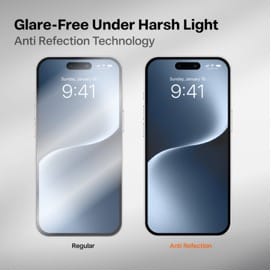
The transparency rating of a screen protector tells you how much of the original display quality passes through. High-quality tempered glass protectors typically offer 99% transparency, meaning the visual experience remains virtually identical to an unprotected screen. Lower-grade options may hover around 90% or less, which creates a noticeable dullness that strains young eyes during extended use. Beyond transparency, consider how a protector handles light. Anti-glare coatings reduce reflections when children use devices near windows or under bright overhead lights, making it easier to see educational videos and reading apps without constantly adjusting the screen angle. However, heavily matte finishes can slightly reduce sharpness, so look for protectors that balance glare reduction with high-definition clarity. An oleophobic coating serves double duty here—it not only repels fingerprint smudges that obscure the display but also keeps the screen looking clean between wipe-downs, which any parent of a toddler knows is a constant battle.
Step-by-Step Guide to Choosing the Right Easy Install Screen Protector Kit
Selecting the right easy install screen protector kit doesn’t require technical expertise—it requires a clear process. Start by identifying your exact device model, since even slight variations in screen dimensions can mean the difference between a perfect fit and exposed edges that invite damage. Check your device’s settings or the manufacturer’s website for the precise model number, and cross-reference it with the protector’s compatibility list before purchasing. Next, consider how your child actually uses the device. A toddler who watches videos on a propped-up tablet faces different risks than a preschooler who carries a phone around the house. Heavy-handling households benefit most from tempered glass kits with multi-layer construction, while lighter use cases may be adequately served by hybrid film options.
Once you’ve narrowed your options by device and usage, evaluate the complete kit—not just the protector itself. The best easy install screen protector kit includes everything you need for a flawless application in one package, eliminating guesswork and extra purchases. Brands like TORRAS, known for their device protection accessories, often bundle alignment frames and cleaning tools alongside high-clarity tempered glass, making the process straightforward even for first-time users. Compare at least two or three brands by reading parent-focused reviews that describe real household conditions rather than controlled lab environments. Pay attention to comments about longevity, since a protector that looks great on day one but yellows or peels within a month wastes both money and effort.
Key Features to Prioritize for Child Safety
Focus your evaluation on three features that directly affect child-safe performance. First, look for shock-absorbent layers—protectors that specifically mention impact or shatter resistance provide the drop protection families need most. Second, confirm the scratch resistance rating, ideally 9H on the Mohs scale, to withstand contact with toys, utensils, and whatever else your child presses against the screen. Third, verify the clarity rating sits at 95% transparency or above to keep educational content visually engaging. Equally important for busy parents is genuine ease of installation. A kit that takes under five minutes to apply means you’re more likely to replace a damaged protector promptly rather than procrastinating and leaving the screen vulnerable.
How to Evaluate Installation Kits and Tools
The word “easy” in an easy install screen protector kit should mean more than marketing. Examine what’s actually included: a quality kit provides dust-removal stickers to lift microscopic particles, an alcohol wipe and microfiber cloth for thorough cleaning, and most importantly, an alignment frame or guide tabs that snap onto the device to position the protector precisely. Without an alignment tool, even steady hands risk a crooked application that leaves gaps along one edge. Avoid kits that include only the protector and a single wipe, as these force you to improvise during the most critical steps. Read the included instructions before you buy if possible—clear, illustrated directions with numbered steps signal a manufacturer that has invested in the user experience, while vague or text-heavy guides often indicate a product that will frustrate rather than simplify.
Installation Best Practices and Common Mistakes to Avoid
Even the best easy install screen protector kit won’t perform as intended if the application goes wrong. Preparation is everything—start by choosing a room with minimal airborne dust, such as a bathroom after running hot water for a few minutes, since steam pulls particles out of the air and onto surfaces where they can’t land on your screen. Power off the device and place it on a flat, clean surface with good lighting so you can spot every speck of dust before the protector goes down. Use the alcohol wipe first, follow with the microfiber cloth to remove any remaining residue, and then run the dust-removal sticker across the entire display in slow, overlapping passes. Only peel the protector’s backing once you’re confident the screen is spotless.
When you’re ready to apply, snap the alignment frame onto the device if your kit includes one—this single tool eliminates the most common mistake parents make, which is placing the protector slightly off-center and having to lift and reposition it, introducing bubbles and dust in the process. Lower the protector slowly from one edge, letting it adhere gradually rather than dropping it flat. If small bubbles appear, push them toward the nearest edge using the included squeegee card with firm, even pressure. The biggest pitfall to avoid is rushing. Parents often try to apply protectors while children are nearby or during a spare thirty seconds between tasks, and haste leads to misalignment and trapped debris. Set aside five uninterrupted minutes, follow each step in order, and the result will be a bubble-free, perfectly positioned protector that delivers the full durability, impact absorption, and screen clarity your device needs.
Protect Your Family’s Devices With Confidence
Protecting your family’s devices doesn’t have to be complicated or expensive—it just requires making an informed choice. As we’ve covered, screen protector effectiveness starts with selecting the right material, with tempered glass offering the strongest defense against the scratches and cracks that come with everyday child use. Impact absorption is equally critical, since multi-layer construction and full-coverage adhesive work together to disperse the force of inevitable drops before it reaches your device’s vulnerable display. And screen clarity ensures that the educational apps and content your children depend on remain vibrant, readable, and free from distracting haze or glare.
The step-by-step approach outlined here—matching your device model, assessing your family’s usage patterns, evaluating kit contents, and following proper installation techniques—removes the guesswork from the entire process. A quality easy install screen protector kit puts professional-level protection in your hands for a fraction of what a single screen repair would cost. Don’t wait for the next drop, slide, or sticky-fingered mishap to remind you how fragile these screens really are. Take five minutes today to choose and apply the right protector, and give yourself the peace of mind that comes with knowing your devices can handle whatever your kids throw at them—literally.