
Agencies rarely struggle because they lack devices. They struggle because client accounts, applications, files, network settings, and team access begin to overlap as the operation grows. One employee uses a personal phone for two clients, another keeps campaign files on a local emulator, and a manager cannot see who changed a proxy or installed an app. What starts as a practical shortcut becomes an operational risk.
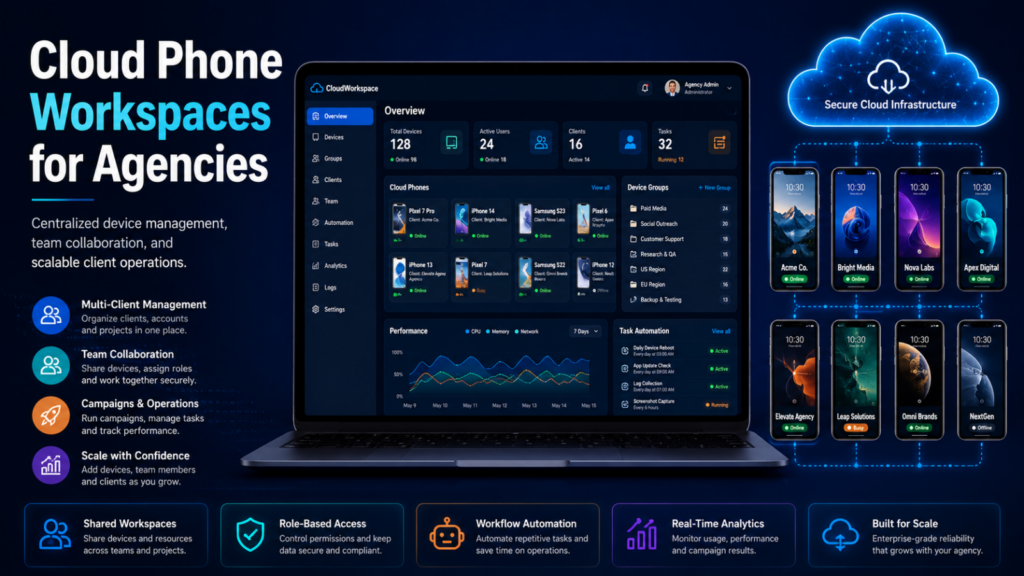
A Cloud Phone workspace offers a cleaner model. Instead of tying mobile work to an employee’s handset, an agency can place each client’s Android environment in the cloud, organize it with a clear naming system, assign access to the right people, and maintain a repeatable handoff process. The goal is not merely remote access. It is separation: each client should have an identifiable environment, controlled permissions, consistent apps, and an audit-friendly operating routine.
For agencies that already manage browser and mobile workflows, MoreLogin Cloud Phone provides real ARM-based cloud Android environments alongside team controls, proxy configuration, grouping, tags, synchronization, RPA, API access, and ADB support. Used with sensible policies, these capabilities can turn an improvised collection of phones into a structured client-delivery system.
Why Client Mobile Workflows Become Mixed Up
Mobile operations often grow one account at a time. A new client arrives, the team adds another device or emulator, and whoever is available takes responsibility. This works while the agency is small, but it depends on memory rather than structure. Device names become vague, files sit in personal folders, and access may remain after responsibilities change.
Physical ownership creates invisible dependencies
When a client account lives on an employee’s personal or office phone, that employee becomes part of the infrastructure. If the person is unavailable, another teammate may not know the device PIN, the installed app version, the assigned network, or the latest campaign assets. Even when the account itself is recoverable, the working context can be difficult to reproduce.
Shared environments encourage operational spillover
Using one Android environment for several clients may appear efficient, but it makes routine work harder to attribute. Downloads, clipboard content, media files, app sessions, and network settings can cross client boundaries. A mistake does not need to be dramatic to be expensive; publishing the wrong creative, opening the wrong account, or applying the wrong configuration is enough to damage trust.
What Client Separation Should Mean in a Cloud Phone System
Separation is more than giving every client a different device name. A useful system divides the operation across four layers:
- Environment separation: each client or account cluster has a dedicated persistent Android environment.
- Access separation: only assigned team members can open or manage the relevant cloud phones.
- Asset separation: apps, APKs, media, documents, and campaign files follow a client-specific structure.
- Process separation: onboarding, daily work, approvals, automation, and offboarding follow defined procedures.
How to Build a Client-Centered Cloud Phone Workspace
1. Design the structure before creating devices
Start with a naming convention that reflects how the agency actually works. A useful format might include the client code, market, channel, account purpose, and owner. Groups can represent clients or departments, while tags can identify region, campaign, status, or service tier. A manager should be able to understand a cloud phone’s role without opening it.
2. Give each environment an intentional network policy
Network settings should be planned, documented, and changed only by authorized team members. The appropriate configuration depends on the client, target market, platform requirements, and applicable rules. The key is consistency: a team should know which proxy belongs to which environment, who approved it, and what to do if it fails. MoreLogin supports adding and managing proxy configurations for cloud phones, which helps administrators keep the network layer connected to the device structure.
A cloud phone does not override a platform’s terms or local law. Agencies should use accounts, proxies, and automation only where they are authorized and should follow each platform’s policies.
3. Standardize apps and client assets
Define a baseline app set for each service. A social media client may need platform apps, an authenticator, storage, communication tools, and an approved editing app. An e-commerce client may require seller tools, support apps, logistics services, and product media. Document which versions are approved and who may install or remove software.
MoreLogin’s Cloud Phone API includes app installation and file-management operations, while the interface supports batch workflows for apps and uploaded materials. This creates a path to repeatable setup: the agency can prepare a known environment instead of rebuilding every device from memory.
4. Assign access by responsibility
The person creating a campaign does not necessarily need the same access as the person approving it, maintaining automation, or managing billing. Map access to roles and revoke it when assignments end. MoreLogin allows administrators to assign, restrict, and revoke access to selected cloud phones, making it easier to give teammates the environments required for their work without exposing the entire client portfolio.
This also improves handoffs. When work belongs to the agency workspace rather than an employee’s personal device, a manager can reassign access without physically collecting a phone or recreating the environment.
5. Create a visible handoff routine
A good handoff should answer five questions: What is the environment used for? Which accounts and apps are active? Which network configuration is assigned? What work is scheduled or automated? Who approves changes? Store those answers in the agency’s project system, then use consistent groups and tags in the cloud phone workspace so the operational record and the device list agree.
A Practical Agency Workflow from Onboarding to Offboarding
Client onboarding
During onboarding, create the client group, prepare the required cloud phones, assign approved proxies, install the baseline apps, and upload the launch assets. Review the setup before granting delivery-team access.
Daily operations
For routine work, teammates open only their assigned environments. Managers use naming, groups, and tags to locate the correct phones. Where the same approved action must be repeated across several devices, the synchronizer can mirror input and support batch operations. Repetitive, rules-based tasks can be handled through RPA or scheduled workflows after they have been tested on a limited scope.
Staff or account handoff
When ownership changes, update the project record first, then adjust permissions, review active sessions, confirm pending tasks, and transfer responsibility for any automation. The environment stays in place, so the new owner receives the same apps, files, and operating context rather than a blank replacement device.
Client offboarding
At the end of an engagement, remove team access, stop scheduled work, return or archive client-owned materials according to the contract, and document what was retained or deleted. Do not treat deletion as an informal cleanup step. Data handling should follow the client agreement, internal retention rules, and applicable privacy obligations.
Using Automation Without Losing Accountability
Automation can make agency delivery more consistent, but it should not make responsibility harder to see. Start with a manual process, define the expected result, identify failure conditions, and name an owner. Then automate the stable portion. MoreLogin offers RPA and scheduled-task capabilities, an Open API for remote cloud phone management, a Local API for workflows running alongside the desktop client, and ADB access for approved technical use cases.
Teams can begin with the synchronizer and tested RPA templates, add scheduled tasks, and later use APIs to connect device actions with internal systems. Every automation should be monitored and limited to actions permitted by the relevant platform.
Why MoreLogin Fits a Multi-Client Agency Model
The MoreLogin platform brings cloud Android environments and anti-detect browser profiles into one workspace, which is useful when a client journey spans both mobile apps and web dashboards. Agencies can organize cloud phones, configure proxies, manage access, distribute apps and files, and add synchronization or automation as the operation becomes more mature.
Its real ARM-based cloud phones are designed to provide persistent Android environments without requiring the agency to purchase, rack, charge, and maintain a separate physical handset for every workflow. More importantly for agencies, the surrounding management layer supports a consistent method for naming, assigning, transferring, and operating those environments.
No tool can create separation by itself. The agency still needs clear client boundaries, authorized use, careful access decisions, documented network policies, and an offboarding process. The value of a Cloud Phone workspace is that those rules can be applied to an infrastructure that is easier to organize and reassign than a scattered collection of personal devices.
Final Takeaway
For an agency, scaling mobile work should not mean scaling confusion. A well-designed Cloud Phone workspace gives every client a defined place, every teammate an appropriate level of access, and every handoff a repeatable path. Begin with structure, add automation only after the process is stable, and keep compliance and client authorization at the center of the workflow.
Teams ready to build a cleaner mobile operating system can create an account and evaluate how MoreLogin Cloud Phone fits their client structure, permissions, apps, files, network policies, and automation needs.
For organizations looking to stay informed about the latest developments in technology and digital security, keeping up with reliable technology journalism can also be valuable. Regular coverage of new tools, software, cybersecurity trends, and practical technology developments can help businesses make more informed decisions as the digital landscape continues to evolve. One useful resource is Root Nation, which covers a wide range of technology topics and provides insights into the latest developments across the tech industry.