
Small online communities in Hong Kong and Taiwan often bring together people with different language preferences, schedules and levels of technical experience. A local interest group may include members who prefer Traditional Chinese, others who communicate mainly in English, and participants who switch between both languages depending on the topic.
These communities may be built around gaming, hobbies, neighborhood activities, study groups, professional interests or volunteer projects. Although the group itself may be informal, communication quickly becomes difficult when announcements, casual conversations, event details and shared files are all placed in the same chat.
Important information can disappear under everyday messages. New members may not know where to find the rules, administrators may answer the same questions repeatedly, and files may be shared without consistent names or access controls. A more effective structure separates different types of information, gives members clear expectations and creates a repeatable setup process across desktop and mobile devices.
Separate Announcements From Everyday Discussions
One of the most useful improvements a community can make is separating official announcements from general conversation. When every message appears in one discussion space, event changes, rule updates and important deadlines are easily missed. Members who mute a busy group may never see the information administrators intended everyone to read.
Create a dedicated announcement space. A separate channel should contain only information that affects the wider community, such as event dates, registration deadlines, rule changes, scheduled maintenance, new administrator appointments and safety reminders. Posting privileges can be limited to administrators or designated moderators.
Keep general discussion separate. Members can ask questions, share opinions and build relationships without disrupting official information. Larger communities may organize discussions by theme, but the number of spaces should remain manageable so members do not have to search through many nearly identical groups.
Organize event communication. Temporary event groups can hold schedules, meeting points and last-minute updates. When the activity ends, administrators can archive the group or retain only the final resources, preventing old event messages from filling the main conversation.
Make rule updates visible. Community rules should be pinned or placed in an easy-to-find resource area. Whenever a rule changes, the announcement should state what changed, when it takes effect and who members can contact with questions.
Support Traditional Chinese and English Conversations
Many communities in Hong Kong and Taiwan naturally use both Traditional Chinese and English. The goal should not be to force every member to use one language, but to make important information understandable to the widest possible audience.
Use bilingual announcements when necessary. Major notices can include a Traditional Chinese version and a concise English summary, or the reverse, depending on the community. Dates, deadlines and locations should be written clearly, and cross-border events should include the time zone.
Keep names and technical terms consistent. Project names, game titles, software terms and event labels should use stable wording. A small bilingual glossary can improve search results and prevent administrators from using several translations for the same concept.
Use translation as support, not authority. Translation tools can help members understand general meaning, but they may mishandle slang, names or technical terms. Important rules, safety information and financial details should be checked by someone who understands the original language.
Respect individual language preferences. Members may prefer one language for interface navigation and another for conversations. That flexibility is reasonable as long as official information remains clear and members can request clarification when a translation is uncertain.
Choose a Suitable Community Messaging Tool
The right messaging tool should support the community’s actual structure instead of adding unnecessary complexity. Administrators should focus on practical functions such as separate groups or channels, pinned messages, file sharing, search, desktop and mobile access, notification controls, privacy settings and account recovery.
Small communities across Hong Kong and Taiwan may use a Potato messaging app workflow to separate announcements, member discussions and shared resources.
A platform with many advanced features is not automatically the best option. The most useful service is one that members can understand and administrators can manage consistently. The community should also consider whether members mainly use Windows computers, Android phones, iPhones or tablets, because cross-device access is valuable only when the account, notifications and permissions remain manageable.
Organize Private and Public Conversation Spaces
Not every discussion should be visible to every member. Clear spaces protect sensitive information and reduce noise.
- Administrator group: a private space for moderation decisions, event planning and member issues. Access should be removed immediately when someone leaves the role.
- Main member group: the primary area for general conversation, community participation and everyday questions.
- Project groups: temporary spaces for tasks, planning and progress updates, with a clear purpose and end date.
- Event groups: short-term spaces for meetups, tournaments, classes or campaigns that can be archived after completion.
The structure should remain simple enough for new members to understand. Creating a separate group for every small topic can be just as confusing as placing everything in one chat.
Manage Shared Files and Important Resources
Files become difficult to manage when members upload several versions without clear names. A basic resource policy makes important documents easier to locate and reduces accidental sharing.
Use consistent file names. Names should identify the project or event, document purpose, date, version and language where relevant. A file called Community_Event_Guide_2026-08_v2_EN.pdf is easier to understand than Final-New-Updated.pdf.
Pin important resources. Rules, schedules, registration forms and frequently used guides should be pinned or placed in a dedicated resource message. Pinned content should be reviewed regularly so outdated files do not remain beside current versions.
Control download permissions. Sensitive files should not be shared with the entire community when only a small group needs access. Administrators should check for personal details, payment information, private addresses or internal planning notes before posting.
Remove outdated files. A scheduled review can archive or delete resources that are no longer relevant. Replacement files should include a short explanation so members understand which version to use.
DEEPER DIVE: Arizona has 6 of the 30 happiest cities in America
INDUSTRY INSIGHTS: Want more news like this? Get our free newsletter here
Prepare a Repeatable Member Setup Process
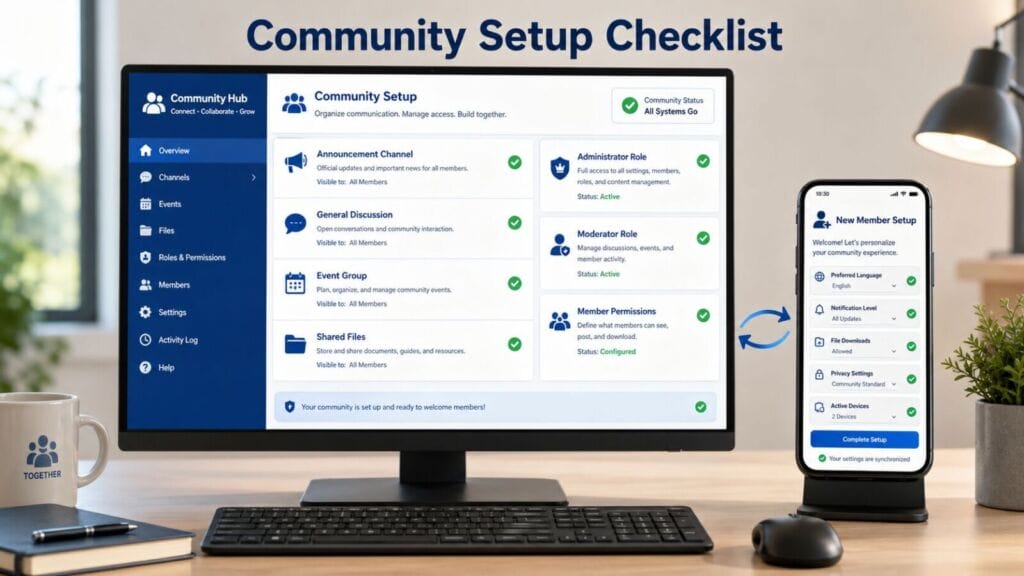
New members should not have to discover every setting through trial and error. A short onboarding process can reduce repeated questions and help users configure the app safely on both desktop and mobile devices.
A simple Potato app setup process can help new members configure notifications, privacy and language preferences across desktop and mobile devices.
- Confirm the correct community group or invitation.
- Read the rules and locate the announcement channel.
- Select the preferred interface language.
- Configure notifications for the main group and optional discussions.
- Review profile visibility and who can add the account to other groups.
- Check automatic file downloads and storage behavior.
- Review active devices and save the administrator contact method.
Members using both Windows and mobile devices should test whether alerts appear on the intended device. Duplicate notifications can be distracting, while inconsistent settings may cause important updates to be missed.
Review Roles and Access Permissions
A healthy community depends on clearly defined roles and regular access reviews.
- Administrators manage structure, permissions and major decisions. The role should be limited to people who actively need full control.
- Moderators handle everyday discussions, spam and member reports without necessarily receiving access to every administrative setting.
- Regular members need enough permission to participate and share appropriate resources, but not to change community-wide controls.
- New members may receive limited posting or invitation privileges during an introductory period.
- Temporary members, guests or contractors should lose access when the event or project ends.
When someone leaves the community or changes roles, administrators should review group membership, private discussions, shared files, invitation links, administrative permissions and connected services. Access should not remain active simply because no one remembered to remove it.
Protect Community Accounts
Community security is an ongoing process rather than a one-time configuration. Administrators and members should know how to respond to account and invitation risks.
Prepare account recovery. Recovery details should remain current and should not depend entirely on one device. Administrators should understand which recovery options are available before an account problem occurs.
Review new-device logins. Unexpected login alerts should be investigated immediately. Members should check active sessions and remove unfamiliar computers, phones or browsers.
Control spam and suspicious invitations. Communities should define how members report unsolicited links, repeated promotions and unknown files. Public invitation links can be replaced when they have spread beyond the intended audience.
Review privacy settings. Members should understand who can see profile details, contact information and activity status. Administrators should avoid collecting personal information unless it is necessary for the community’s purpose.
Build a Clear and Sustainable Community Structure
Small multilingual communities do not need complicated systems. They need a structure that members can understand and administrators can maintain. A reliable framework includes a separate announcement channel, focused discussion spaces, clear bilingual communication rules, consistent file organization, defined roles, repeatable device setup and basic account security procedures.
For communities in Hong Kong and Taiwan, language flexibility is important, but clarity is more important. Traditional Chinese and English can coexist successfully when official announcements, file names and member expectations remain consistent.
The objective is not to control every conversation. It is to make important information easier to find, reduce repeated questions and protect members from unnecessary confusion or access risks. When announcements, discussions, files and permissions are organized deliberately, the messaging platform becomes a dependable community workspace rather than an endless stream of disconnected messages.