
A practical guide to using AI agents for drafting, spreadsheet analysis, PDF extraction, and governed office automation.
Modern office work still depends on documents, spreadsheets, presentations, PDFs, and recurring reports. Even with cloud storage and collaboration platforms, employees spend substantial time formatting files, copying information between systems, checking long reports, cleaning data, and preparing updates for managers or clients.
Many of these activities are necessary but repetitive. A weekly report may follow the same structure every time, while dozens of files may require consistent names, summaries, or classifications. This administrative effort reduces the time available for analysis, planning, customer service, and creative work.
AI agents can help by following structured instructions across several steps. They may prepare a document outline, draft a report, detect missing spreadsheet values, summarize a PDF, or route a file to the correct reviewer. Unlike a one-time chatbot response, an agent can operate inside a defined workflow and prepare outputs for approval.
Automation does not remove responsibility. Office files may contain financial data, contractual terms, customer information, and internal decisions. Human reviewers must still verify accuracy, context, permissions, and compliance. The strongest approach combines reliable office software, carefully limited AI workflows, and explicit approval controls.

Identify Repetitive Office Tasks
Teams should begin by identifying work that consumes time and follows predictable rules. Formatting is an obvious example: employees repeatedly adjust headings, tables, margins, templates, and page numbers across similar files.
Content summarization is another practical candidate. An agent can prepare a short overview of a long report, meeting record, or customer-feedback file and highlight sections that deserve closer attention.
Data classification and template completion are also useful. Incoming invoices, support tickets, contracts, or project documents can be labeled by department, customer, date, or priority. Recurring reports can be prefilled from approved data while uncertain fields remain marked for confirmation.
File naming deserves similar treatment. Names such as “final,” “final2,” and “latest-new” create confusion. An agent can suggest a consistent name based on the project, document type, date, and revision status.
Good first projects are repetitive, measurable, and low risk. Legal interpretation, financial authorization, personnel decisions, and strategic judgment should remain under direct human control.
Build a Reliable Office Software Foundation
AI automation depends on the quality of the underlying office environment. Inconsistent formats, outdated software, duplicate folders, and unclear permissions can cause an agent to edit, summarize, or classify the wrong information.
Before introducing automation, teams need a stable environment for creating, reviewing, and managing everyday files. A cross-platform suite such as wps can provide the document, spreadsheet, presentation, and PDF capabilities that these workflows depend on.
On Windows devices, compatibility testing should include DOCX, XLSX, and PPTX files, spreadsheet formulas, fonts, page layouts, embedded objects, comments, and PDF exports. Teams should also confirm that revision history, tables, document permissions, and file appearance remain consistent across desktop, mobile, and browser-based versions. These checks reduce the risk that an AI agent will process an incomplete, visually broken, or outdated copy.
Files also need a clear structure. Teams should organize them by project, client, department, or date and define which version is authoritative. A central location and consistent naming policy reduce the chance that an agent will use an obsolete copy.
Backups, permission controls, and update procedures complete the foundation. AI can accelerate a sound workflow, but it cannot compensate for weak document management.
Use AI Agents for Document Drafting
Document drafting is one of the clearest office uses for AI. An agent can turn notes, data, and instructions into a structured first draft, allowing employees to concentrate on judgment and refinement rather than a blank page.
The process can start with an outline. For a project proposal, the user may provide the objective, audience, budget, risks, and timeline. The agent can arrange these elements into a logical sequence and identify missing sections.
After approval, it can prepare an initial report, announcement, procedure, meeting summary, or client update. It can also rewrite technical material for a general audience, convert informal notes into professional language, and apply preferred terminology or tone.
For organizations with multiple writers, an agent can check style consistency and compare a draft with an approved template or brand guide. It can also summarize the differences between versions and flag conflicting edits.
These capabilities are useful, but the final author must verify names, dates, quotations, calculations, commitments, and sources. AI should prepare material for review, not distribute important documents automatically.
Automate Spreadsheet Analysis
Spreadsheets support budgeting, forecasting, inventory, marketing, operations, and performance reporting. They are also a frequent source of manual work and preventable errors.
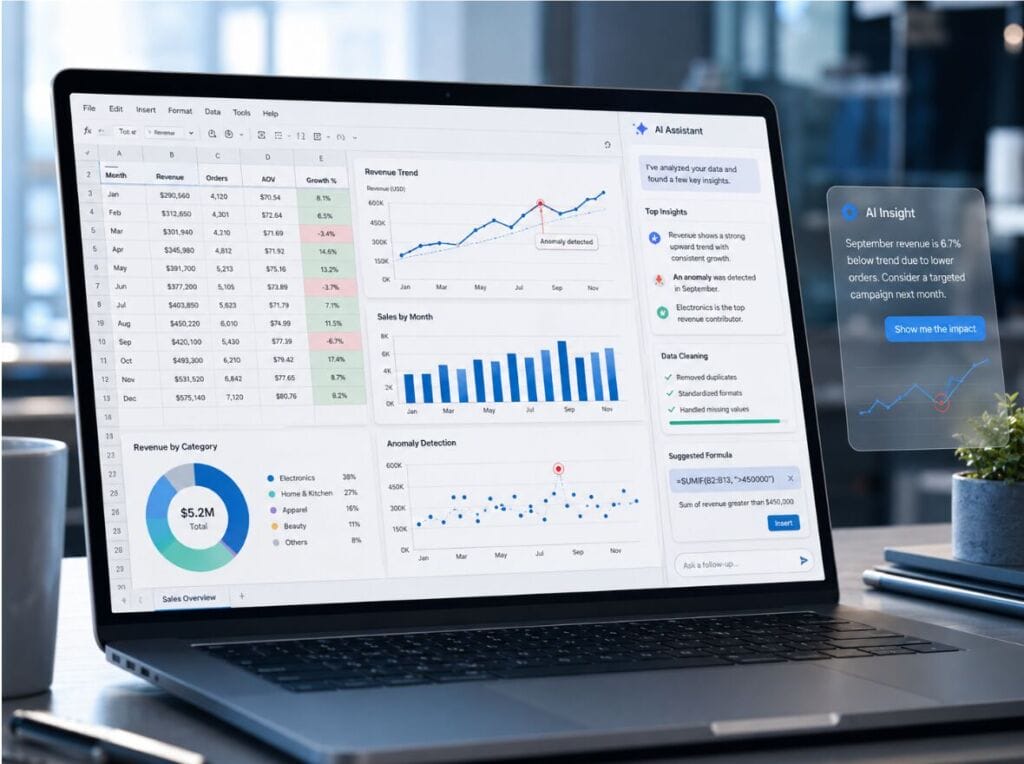
An AI agent can help clean data by identifying blank fields, inconsistent labels, duplicated rows, unusual formats, and possible entry mistakes. It can flag cases in which the same customer appears under several names or dates use incompatible formats.
It can also identify trends and anomalies. Sales, traffic, expenses, or conversion rates can be compared over time, while unusually large payments, sudden declines, or missing values can be highlighted for review.
Charts become more useful when the agent prepares a short explanation of the main movement, compares it with the previous period, and suggests questions for further investigation. Formula assistance can help users translate a business requirement into a calculation and identify possible reference errors.
Spreadsheet outputs require strict verification. A small mistake in a filter, date range, currency, or formula can change the conclusion. Important calculations should therefore be tested independently before they influence financial or operational decisions.
Extract Information From PDFs
PDFs often contain valuable information that is slow to review manually. Contracts, research reports, invoices, policies, manuals, and regulatory files may run to hundreds of pages.
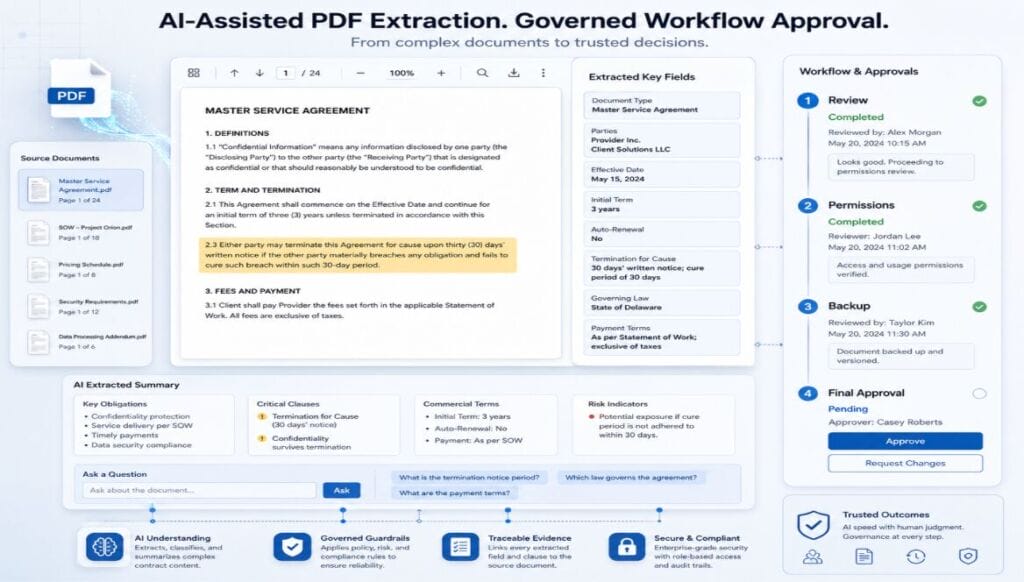
AI agents can identify parties, dates, obligations, renewal conditions, payment terms, and termination clauses in a contract. In business reports, they can extract findings, risks, recommendations, and supporting figures into a briefing note or table.
Table extraction is especially useful when information is trapped inside a PDF, but the converted values must be checked against the source. Scanned pages, unusual layouts, handwriting, and low image quality can reduce accuracy.
Question-and-answer workflows can help employees locate where a requirement is explained. A good system should return both the answer and supporting page or section so the reviewer can verify the interpretation.
PDF automation should therefore preserve evidence. Page numbers, headings, highlighted clauses, and direct references make summaries easier to audit and reduce the risk of unsupported conclusions.
Connect AI With Office Workflows
The greatest value appears when AI is integrated into an existing document process rather than used as a separate tool.
When connected to a controlled wps office workflow, AI agents can prepare drafts, extract information, and route documents for review without bypassing human approval.
A workflow might begin when a file enters a project folder. The agent can identify the document type, apply a naming convention, extract key information, prepare a summary, and notify the responsible employee.
For recurring reports, it may collect approved data, populate a template, draft an executive summary, and mark missing fields. Different risk levels can require different approvals: an internal summary may need one reviewer, while a client proposal or financial report may require several.
Automation should remain transparent and include a manual alternative. Employees need to know what the agent does, which data it uses, where outputs are stored, and how the task can continue if the system fails.
Implement a Five-Step AI Office Workflow
A practical rollout can follow five controlled steps:
1. Select a repetitive, low-risk task. Start with document classification, template completion, summary preparation, or file naming rather than work that authorizes payments, interprets contracts, or makes personnel decisions.
2. Define an authoritative source. Specify the approved folder, file version, data range, and permissions the agent may use. This prevents it from relying on obsolete drafts or unrelated records.
3. Standardize the output. Use an approved template, naming convention, required fields, and a clear location for completed drafts. Mark missing or uncertain information instead of allowing the system to invent it.
4. Require human review. Assign a responsible reviewer to verify facts, calculations, sources, formatting, and access rights before the document is distributed or used in a decision.
5. Preserve records and improve the workflow. Log the instruction, source files, output, reviewer, and final decision. Review recurring errors and adjust permissions, prompts, or templates before expanding automation to higher-risk tasks.
Add Review and Governance Controls
AI productivity requires governance as well as technology. Organizations should define who may connect agents to office files and which document categories they may process.
Permissions should follow the principle of least privilege. An agent that summarizes project reports should not automatically gain access to payroll, legal files, or every shared folder.
Data privacy must be reviewed before confidential material is processed. Teams should understand where data is stored, how long it is retained, and whether an external provider may use it to improve a model.
Every workflow should include output verification. Reviewers should check facts, calculations, sources, file versions, and formatting before approval. Version history and backups should make incorrect changes reversible.
Teams should maintain an audit trail showing when an agent accessed a file, which instruction it followed, what output it produced, and who approved the result. These records make errors easier to investigate and help administrators identify workflows that need tighter limits or better instructions.
Governance policies also require periodic review. Software capabilities, data locations, and external providers can change over time. Organizations should retest permissions, remove inactive integrations, update approved-use rules, and maintain an incident process for incorrect disclosure or unauthorized access.
Approval responsibilities must remain explicit. AI agents can draft, summarize, classify, and recommend, but accountability remains with people.
When reliable office software, structured automation, and human review work together, documents become active parts of the decision-making process. Employees spend less time on repetitive administration and more time evaluating information, solving problems, and making informed decisions.