
Listings with video attract 403 percent more buyer inquiries than photo-only posts, yet filming and editing can swallow days and thousands of dollars. New AI tools flip that math: drop in photos, text, or a short script and export a polished tour in minutes.
We tested more than a dozen platforms against real-estate must-haves—visual quality, MLS compliance, ease of use, and true cost per video. Six clear winners emerged, each solving a different production headache, from quick social reels to full 360° walkthroughs.
The next sections outline our scoring method, present a side-by-side comparison, and dive into each pick so you can choose the right tool and get back to closing deals.
How we chose the winners
We tested more than a dozen AI platforms the way an Arizona agent works each week: turning fresh listing photos into an MLS slideshow, cutting a 20-second Instagram reel, and building a doll-house virtual tour for sight-unseen buyers.
For consistency, each tool produced the same five assets—horizontal video, vertical edit, unbranded MLS file, social teaser, and a quick market-update clip. We then scored every output against a clear scorecard.
Weights:
- Output polish (30%) – Would you post the video without hesitation?
- Real-estate features (25%) – Templates, MLS-safe exports, 360° support.
- Ease of use (20%) – Clicks and learning curve from login to download.
- True cost per video (15%) – Credit packs, watermark removal, HD fees.
- Innovation and integrations (10%) – API access, Zillow import, voice cloning.
Tools missing commercial rights, unbranded downloads, or 1080p resolution stopped here. The six that remained each shine in a different niche. Match their strengths to your workflow; we’ll supply the details.
DEEPER DIVE: Read all the Ranking Arizona Top 10 lists here
INDUSTRY INSIGHTS: Want more news like this? Get our free newsletter here
Quick comparison at a glance
Before we dive into individual reviews, the table below lines up the six winners plus two honorable mentions. Scan price, purpose, and standout talent in seconds.
Skim it, bookmark any tool that looks perfect, then return for the deep dive. We will surface pros, cons, and hidden fees next, but this snapshot keeps the big picture clear.
| Tool | Best for | Starting price | Free trial | Real-estate edge | Our take |
| Leonardo AI | Generative visuals for bold intros | $12/mo | Yes | Text-to-video clips in multiple styles | Eye-catching opener |
| Fliki | High-volume listing videos with voice-over | $28/mo | Yes | Voice clone, MLS templates | Dependable workhorse |
| InVideo AI | Social-first reels | $25/mo | Yes | Prompt-to-reel, vertical auto-formats | Built for scroll speed |
| Synthesia | Avatar agent intros | $29/mo | Demo | Custom or stock AI presenters | Camera-free talking head |
| CloudPano | Interactive 360° tours | $19/mo | Yes | Dollhouse view, lead forms | Immersive without gear |
| AutoReel | Cinematic motion from photos | $19/mo | Yes | Drone-style pans, MLS import | Dynamic batch videos |
| Pictory | Blog or text to slideshow | $23/mo | Yes | Large stock library | Fewer real-estate perks |
| Animoto | Simple DIY slideshows | Free basic | Yes | Drag-drop templates | Light on AI features |
Prices shift over time, but the spread stays steady: under thirty dollars a month now buys video that once cost hundreds per listing.
With the overview set, we can explore why each top pick earned its spot, starting with the newcomer shaking up creative B-roll.
1. Leonardo AI: best emerging AI video generator
Leonardo works like a pocket movie studio. Type a prompt such as “sunset aerial over a modern Scottsdale bungalow,” and about five seconds later you receive a smooth five-second clip with cinematic lighting. The engine behind it, Motion 2.0, is Leonardo’s text-to-video model that currently delivers HD snippets in several aspect ratios and styles.
Those short clips excel as openers, B-roll, or social ads. Add a few to your listing montage and it feels as if you hired a drone pilot at golden hour. Because the footage comes from text, you can illustrate amenities you never captured on camera, including conceptual poolside scenes or a twilight neighborhood fly-over.
Workflow remains straightforward. Paste the prompt, adjust style sliders, and click generate. The tool produces both horizontal and vertical versions so you can publish to YouTube and Instagram Reels without extra edits. Early testers complete the idea-to-export loop in roughly ten minutes, making creative intros realistic for any listing.
Current limitation: each clip tops out at five seconds. You still need to stitch several clips together for a full tour. Quality holds up; built-in frame interpolation keeps motion smooth and cuts clean. Longer runtimes should arrive once the product leaves beta, but for now consider Leonardo the seasoning, not the main course.
Pricing uses tokens. The free tier offers 150 daily tokens, and paid plans start at $12 per month for higher volume. Prompts are text-only, so the learning curve is minimal.
If you want scroll-stopping visuals, Leonardo’s new AI video generator deserves a place in your toolkit.
2. Fliki: best all-around listing video maker
If you handle a steady stream of listings, you need a video engine that moves at your pace. Fliki delivers: upload photos and a description, click generate, and about five minutes later you download an MLS-ready video with natural-sounding narration.
The platform pairs large-language scripting with a library of 2,000 AI voices. Paste the listing copy or bullet points, and Fliki writes a tight script, picks music, and adds gentle Ken Burns motion to each image. Record a short sample and the tool can clone your voice so every tour carries your personal stamp.
Output formats cover the essentials: 16:9 for MLS and YouTube, 9:16 for Reels and TikTok, plus a square cut for Facebook ads. Fliki exports branded and clean versions at the same time, removing the need to edit out logos for strict MLS boards.
Cost per video is hard to beat. The Standard plan is $28 a month for roughly 180 video minutes, enough for more than one hundred typical tours, or about twenty-three cents each.
Keep two trade-offs in mind. First, Fliki’s motion is classic slideshow, not a 3D fly-through. Second, its auto-selected music can miss the vibe; luxury homes may need a manual track swap. Both fixes take minutes, and for most listings the default output looks and sounds polished enough to post right away.
Bottom line: when you want maximum videos with minimal clicks, Fliki is the dependable workhorse that keeps your marketing calendar full without draining your wallet or your Friday night.
3. InVideo AI: best for social-first reels and ads
Instagram, TikTok, and Facebook each demand a unique format, soundtrack, and caption style. Handling those specs by hand is tedious. InVideo’s AI mode handles the busywork: type a prompt such as “twenty-second vertical reel for 123 Main Street, highlight the rooftop deck, energetic pop track,” and the engine writes the script, pulls stock clips, animates text, and syncs the beat.
The results look native to social feeds—jump cuts, on-screen captions, and vertical framing that fills a phone screen. The tool also brands the first and last frames with your logo and a call to action, so every share points back to you.
Speed is the selling point. Agents in our test produced a week of short-form videos in under an hour, keeping the feed fresh without a full-time editor. You can still tweak scenes in InVideo’s drag-and-drop studio, but most drafts are publish-ready.
Short clips come with limits. Swap any generic stock interior for your own photos, or viewers may notice a mismatch. And because the platform excels at videos under a minute, you will still lean on a tool like Fliki for full walkthroughs.
Plans start at $25 per month for watermark-free exports and 50 AI minutes, which covers the social schedule for many agents. High-volume creators can choose the unlimited tier, roughly the cost of two coffees a week, to remove caps.
If you want reels that spark engagement without spending hours in CapCut, InVideo AI is the fastest path from bullet points to scroll-stopping content.
4. Synthesia: best for AI-avatar agent intros
Some days you are not camera-ready. Synthesia steps in by letting an AI version of you read the script, with perfect lighting and tidy hair.
Getting started takes minutes. Pick one of 150 stock presenters or commission a custom avatar for about $1,000. Paste your script, choose a background, and click render. In a few minutes you download a crisp talking-head video in any language, ideal for listing intros, monthly market updates, or explainer clips that answer buyer questions.
Lip-sync and body language look convincingly human. Add bullet points or charts beside the avatar for a studio-quality presentation without booking a studio. Multi-language output is a quiet superpower: record once, then clone the voice to Spanish or Mandarin to reach overseas buyers.
Consider two limits. Synthesia is not built for property visuals, so you will still overlay photos or use another editor for the walkthrough. The base $29 monthly plan covers ten video minutes; heavy users will move to a higher tier soon.
For agents who need to appear everywhere at once—website hero video, YouTube channel, listing introductions—an AI avatar is a powerful time saver. Record once, publish twice.
5. CloudPano: best for click-through virtual tours
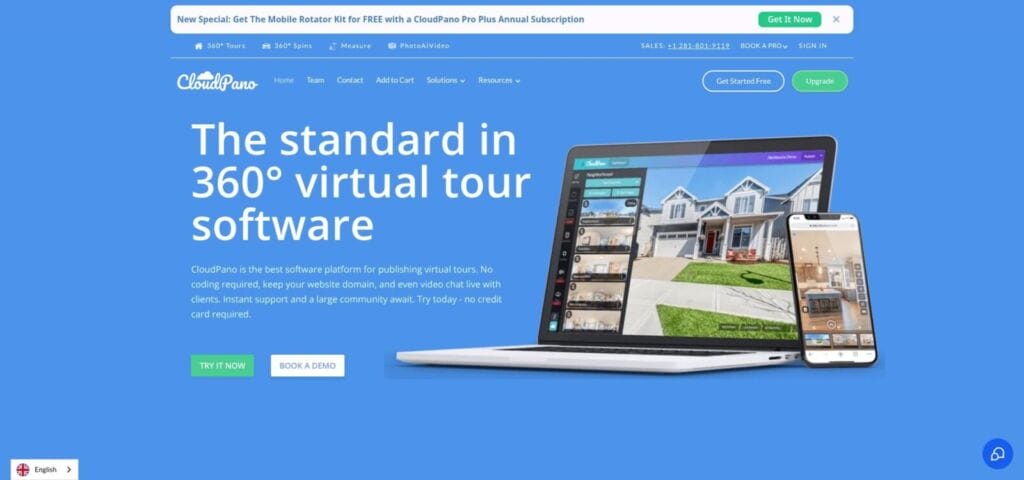
When photos cannot convey a home’s flow, an interactive tour steps in. Matterport set the standard, but its camera and scan times keep many agents out. CloudPano lowers the barrier by turning the panoramas you already captured into a smooth, click-to-move walkthrough—no special hardware, no long scan.
CloudPano 360 virtual tour interface screenshot for real estate agents
Upload panoramas (or evenly spaced wide-angle stills) and the software links each room so buyers can tap hotspots, spin around, and view a doll-house layout for instant orientation. Add info tags, background music, or auto-play voice-over, then drop an unbranded link into the MLS. A branded twin is ready for Zillow, YouTube, or social ads.
Speed stands out. Our test tour—twelve rooms plus a backyard—went from upload to publish in fifteen minutes, a fraction of a classic 3D scan. Pricing starts at $19 per month for unlimited active tours, with a $10 pay-per-tour option when you need only one showcase. One virtual showing can save an hour-long drive, making that fee easy to justify.
Limitations remain. Transitions are jump points, not a continuous dolly. Poor source photos will show blown windows or harsh shadows. Still, with solid camera work, CloudPano delivers an immersive sense of space that video alone cannot match, crucial for out-of-state buyers or sprawling floor plans.
Use CloudPano with your listing video and you cover both story and exploration: video sells the lifestyle, the tour seals confidence in the layout.
6. AutoReel: best for high-volume, photo-driven motion
When you handle dozens of listings each month, you cannot babysit an editor. AutoReel fills that gap. Paste an MLS or Zillow link, and the platform pulls every photo, arranges them in room order, and applies camera moves that feel like a slow drone fly-through. The finished clip looks as if you hired both a pilot and a Steadicam, even though you started with a simple photo set.
Branding and compliance come standard. AutoReel exports two versions: one with your logo and call to action, another stripped for MLS boards that ban agent info. A built-in AI voice-over is available, but many users mute it and record their own narration to maintain tone.
Generation is not instant; plan on eight to ten minutes per clip, still quicker than manually queuing files in Premiere. Cloud processing lets you queue ten properties, step away, and return to a folder of finished videos.
Pricing runs on credits. The starter tier is $19 per month for light volume, while team bundles drop per-video cost to around two dollars. For brokers who add video to every listing, that cost beats hiring a freelancer.
Template-driven style means clips share the same transitions. That uniformity can become brand identity, yet one-off luxury homes may still need a bespoke edit.
In short, AutoReel keeps your marketing machine supplied with fast, consistent, and cost-controlled videos.
Why these six made the cut (and others didn’t)
You may notice familiar names missing: Matterport, Animoto, Runway, and Pictory. We tested each one. Every tool that failed a core need—speed, price, or real-estate focus—stopped there.
Matterport produces impressive 3D scans, but it requires a dedicated camera, long on-site capture, and a subscription that far exceeds the prices above. Great tech, yet outside our “AI video from what you already have” brief.
Animoto and FlexClip are reliable drag-and-drop editors, but they rely on manual storyboarding, transitions, and music timing. That undercuts the time savings AI promises.
Runway Gen-2 and Pika Labs show creative generative skills, yet they limit clips to five seconds and struggle with accurate lines and colors, which is risky for property marketing.
Pictory almost made the list. It converts blog text into slideshow video well enough, but its real-estate templates are thin and its voices lag behind Fliki’s realism. When two tools compete head to head, we pick the one that needs fewer edits before publishing.
By highlighting six clear winners, we give you a tested starting lineup. If a tool you prefer is missing, measure it against the same yardsticks: output polish, real-estate utility, ease, cost, and future readiness. If it scores high for your workflow, use it.
FAQs: making AI video work inside real-world real estate rules
Do AI-made videos help sell homes faster?
Yes. An industry analysis shows listings with video draw 403 percent more buyer inquiries than photo-only posts.
Will my MLS reject AI content?
No, provided you follow branding rules. Export an unbranded version (most tools offer a one-click option) and avoid digital edits that mislead, such as adding a pool that does not exist. If you stage furniture virtually, disclose it in the description.
How much should I budget each month?
Most solo agents spend under fifty dollars for both listing tours and social clips. For instance, Fliki’s Standard tier is twenty-eight dollars for about 180 video minutes, or roughly a hundred 90-second tours—about twenty-three cents each.
Do I need special gear to use these tools?
No. A smartphone for photos and a laptop browser are enough. CloudPano can even build a 360° tour from phone panoramas. A better camera improves quality but is not required.
Can buyers tell the difference between AI B-roll and real footage?
With models like Leonardo’s Motion 2.0, most viewers cannot tell, especially when clips stay under five seconds. Use AI shots to set mood, then switch to authentic photos to keep accuracy intact.
Have another question? Send it our way and we will test it for you.
Closing thoughts: turn AI video into your competitive edge
Arizona real estate moves quickly. Out-of-state buyers scroll listings on their phones, compare ten homes in ten minutes, and schedule showings before they land at Sky Harbor. Video keeps them on your page long enough to picture life in the space, and AI lets you create that video for every property without draining time or budget.
Match each tool to the hurdle. Need bulk listing tours? Open Fliki or AutoReel. Want a steady flow of Instagram reels? Let InVideo assemble them overnight. Aiming to impress luxury sellers with eye-catching openers? Generate a short Leonardo clip and place it at the start of your montage.
Start small. Turn one current listing into an AI-powered tour this week. Track the clicks, shares, and inquiry emails. When the numbers beat your photo-only baseline, you will have evidence to roll video across your whole pipeline.
Technology will keep evolving, but the agents who benefit tomorrow are the ones who experiment today. Grab a coffee, test one of these six tools, and let your next listing tell its story in motion.