
Replacing GoAnywhere is rarely just a protocol decision. Managed File Transfer is the operational layer around recurring, sensitive file movement, while Enterprise File Transfer is the broader category for moving data reliably between people, systems, sites, and partners. A credible replacement must preserve the controls around the bytes, not simply provide another SFTP endpoint.
The workflow question comes next: can the platform schedule jobs, respond when a file arrives, verify completion, alert an owner, and retain evidence? Managed File Transfer platforms exist to centralize those requirements, including permissions, monitoring, recovery, and audit records that scripts alone often scatter across servers.
Why do businesses seek GoAnywhere alternatives?
Organizations usually reconsider GoAnywhere when their operating model changes: they need a managed service, more control over deployment, a different integration approach, a specialized B2B protocol, or better alignment with distributed data movement. A switch should not presume that the incumbent is inadequate. It should identify the specific workflow, governance, or ownership gap that the replacement must close.
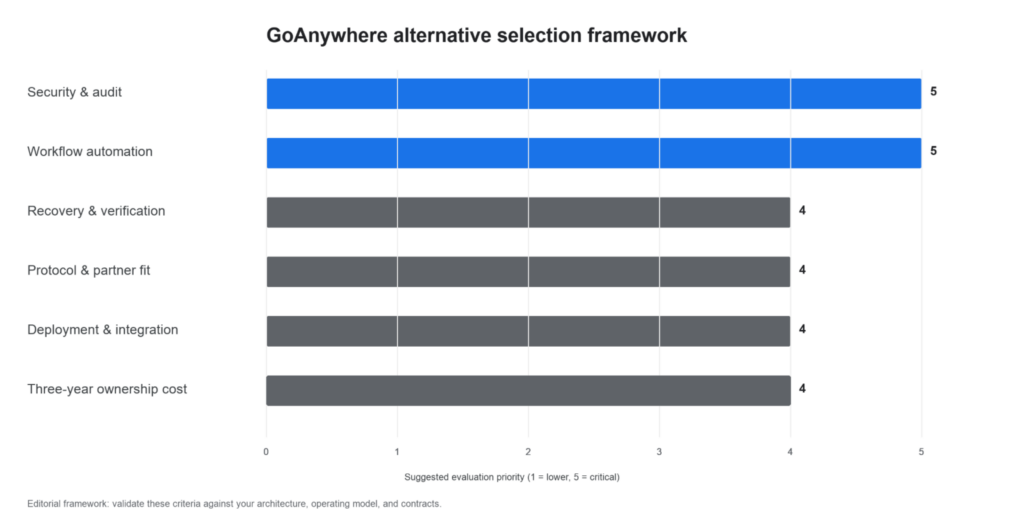
A modern Managed File Transfer decision is an operations decision, not an SFTP decision. The chosen platform should make a failed job visible, recoverable, and explainable to both an operator and an auditor.
What should a modern Managed File Transfer platform provide?
Start with a proof-of-capability checklist:
• Multi-step automation with calendar schedules and event-based triggers.
• Required endpoints: SFTP, FTPS, HTTPS, AS2, cloud storage, and any industry-specific protocol.
• Status monitoring, routed alerts, exportable reports, configurable retries, and transfer verification.
• Encryption, MFA or certificate authentication, RBAC, central logs, and retention controls that match policy.
• On-premises, cloud, or hybrid deployment; APIs, SDKs, or agents where applications need to initiate jobs.
While Enterprise File Sync and Share solutions focus on user collaboration and shared folders, an effective MFT platform is built to handle unattended, policy-driven workflows between enterprise systems.
GoAnywhere alternative comparison
| Platform | Workflow, scheduling, and triggers | Protocols and integrations | Monitoring, recovery, security, and audit | Deployment, cost, and migration considerations |
| GoAnywhere MFT | Multi-step workflows, schedules, and folder monitoring | SFTP, FTPS, HTTPS, AS2, PeSIT, APIs | Dashboard monitoring and central audit reporting | Baseline for a like-for-like migration; request a scoped commercial proposal |
| Raysync | Schedules, directory watches, and custom events | REST API, SDK, CLI; storage and endpoint options | Email notification, hash/Rsync verification, RBAC, 2FA, and logs | On-premises, cloud, or hybrid; validate workload design during a trial |
| Progress MOVEit | MOVEit Automation supports scheduled, event-driven, and on-demand workflows | SFTP, FTPS, HTTPS, AS1/AS2/AS3 and cloud endpoints, depending on components | Logs, audit trails, access controls, and automation monitoring | On-premises, Azure, or MOVEit Cloud; assess transfer and automation components together |
| Axway SecureTransport | MFT automation and real-time notifications; validate required trigger logic | FTP, FTPS, HTTP/S, SSH, AS2, PeSIT, REST APIs | Audit, reporting, alerts, tracking, and encryption controls | On-premises, cloud, hybrid, or managed service; plan enterprise integration work |
| IBM Sterling Secure File Transfer | Component-based B2B workflows and activity management | Trading-partner and secure-transfer components; confirm exact product mix | Central visibility, analytics, proxy, and assured-delivery capabilities across the suite | Appropriate where existing Sterling estate or partner requirements justify the implementation scope |
| JSCAPE MFT Server | Low-code/no-code automation workflows and templates | AS2, FTPS, SFTP, HTTP/S, WebDAV, OFTP2, REST API | Encryption, SSO, and audit support; validate recovery and logging configuration for the selected deployment | Platform-independent deployment; map existing scripts and identities before cutover |
Product availability, editions, and commercial terms change. Confirm protocol licensing, retention behavior, service levels, and pricing in the final vendor proposal.
Individual alternative reviews
Raysync: best for governed long-distance data movement
Raysync is a strong candidate when the requirement combines recurring MFT workflows with large, geographically distributed data movement. The Raysync Enterprise plan combines proprietary UDP-based acceleration, checkpoint resume, AES-256 encryption, scheduled or event-triggered synchronization, RBAC, audit logs, and REST API, SDK, and CLI options. It merits a technical pilot when transfer windows across regions are a material constraint, alongside the normal MFT proof of governance.
Progress MOVEit: best for established Progress environments
MOVEit separates transfer and automation capabilities, so buyers should evaluate the combined architecture rather than a server in isolation. Its official documentation describes MOVEit Automation as a Windows-based workflow engine for scheduled, event-driven, or on-demand transfers, while MOVEit Transfer and MOVEit Cloud cover self-managed and service-based delivery. This can suit teams that want a defined Progress stack and clear cloud or on-premises options.
Axway SecureTransport: best for enterprise B2B integration depth
SecureTransport supports the core protocols named above and positions itself around resilient, governed enterprise transfers. It is worth shortlisting where high availability, partner connectivity, PeSIT, and an integration-heavy operating model matter. Validate exact workflow orchestration, module boundaries, implementation services, and commercial model against the use case.
IBM Sterling: best for complex partner ecosystems
IBM Sterling Secure File Transfer is a bundle of File Gateway, Connect:Direct, Control Center, and Secure Proxy components. That composition can be valuable for organizations with established Sterling skills, high-volume partner exchange, or a broad B2B integration estate. It also means migration scope depends on the components and interfaces in use, so this is rarely a simple server-for-server replacement.
JSCAPE MFT Server: best for protocol breadth and adaptable deployment
JSCAPE supports the common secure protocols plus AS2 and OFTP2, and its current product page highlights low-code/no-code automation, REST APIs, and platform-independent deployment. It is a practical shortlist candidate when a team needs protocol flexibility and wants to run the service across supported operating systems. Confirm HA design, recovery behavior, logging configuration, support coverage, and connector behavior for the target deployment.
Which alternative fits each use case?
| Use case | Shortlist starting point | Why |
| Large cross-region data with governed automation | Raysync Enterprise plan | Combines MFT controls with UDP-based acceleration and verification |
| Progress-centric infrastructure | MOVEit | Transfer, cloud, and automation options from one vendor |
| PeSIT-oriented or integration-heavy enterprise exchange | Axway SecureTransport | Enterprise protocol and B2B integration focus |
| Existing IBM B2B estate or complex partner topology | IBM Sterling | Suite-based control and monitoring components |
| AS2/OFTP2 and cross-platform MFT deployment | JSCAPE MFT Server | Broad protocol support, automation, and REST API |
How should teams plan an MFT migration?
Migration complexity is driven by workflow inventory, not file volume. Build an inventory of every partner, protocol, endpoint, credential, schedule, alert recipient, transformation, retention rule, and downstream dependency. Then classify flows by business impact.
1. Pilot one low-risk inbound and one high-value outbound workflow.
2. Test retries, partial-transfer recovery, hash or receipt verification, alerts, role boundaries, and audit exports under failure conditions.
3. Run old and new jobs in parallel where feasible, reconcile results, then cut over in a controlled window.
4. Preserve evidence and rollback instructions before decommissioning legacy jobs.
Automated system-to-system transfer is distinct from employee collaboration. Use Enterprise File Sync and Share when the requirement is shared folders, secure links, and user collaboration; use MFT for unattended, policy-driven workflows between systems and partners.
FAQ
Is GoAnywhere MFT still a reasonable option in 2026?
Yes. GoAnywhere remains a viable baseline when its workflow model, protocols, deployment options, and support fit the operating requirements; an alternative must demonstrate a concrete advantage for the target workload.
Which GoAnywhere alternative is best for large files?
For large files across long-distance networks, evaluate acceleration, recovery, and verification under representative network conditions, not only protocol coverage; Raysync Enterprise is designed for that combined requirement.
Does MFT replace SFTP?
No. MFT commonly uses SFTP alongside FTPS, HTTPS, AS2, and other protocols while adding governance, automation, and auditability.
What should be tested in an MFT proof of concept?
Test the exact production workflow, including identity integration, triggers, failed-transfer recovery, alerts, audit export, and a realistic file size and network path.
How can buyers compare total cost of ownership?
Request equivalent three-year proposals that include software or service charges, modules, infrastructure, support, implementation, training, and the internal operating effort to run the platform.
Conclusion
The best GoAnywhere alternative is the one that can run your critical workflow reliably, prove what happened, and fit the way your team operates. Use the same acceptance test for every finalist. For teams that need Managed File Transfer governance alongside accelerated, cross-region delivery, evaluate the Raysync Enterprise plan in a pilot built around a real transfer window and audit requirement.