AI image generators have become remarkably good at producing attractive anime-style images. A strong prompt can often produce a polished character portrait within seconds, complete with dramatic lighting, detailed clothing, and a visually convincing background.
But a beautiful first image does not necessarily mean the tool will work well for everything that comes next.
For creators working on original characters, recurring illustrations, comics, or longer visual projects, the more useful question is not simply, “Can this AI generator make good anime art?” It is, “Can it help me keep creating once I already have an image I like?”
That changes what matters when choosing an anime AI generator.
Image Quality Is Only the Starting Point
Visual quality still matters, of course. A useful anime generator should be able to handle recognizable anime aesthetics, including expressive faces, clean character design, clothing details, and compositions that feel intentional rather than randomly assembled.
But image quality can be difficult to judge from a single impressive example. One generation may look excellent while the next ignores an important part of the prompt. A character may look great in a portrait but become inconsistent when moved into a different environment or camera angle.
That is why creators should evaluate anime AI tools across an actual workflow rather than choosing one based on the best image in a gallery.
1. The Model Matters More Than Many Beginners Expect
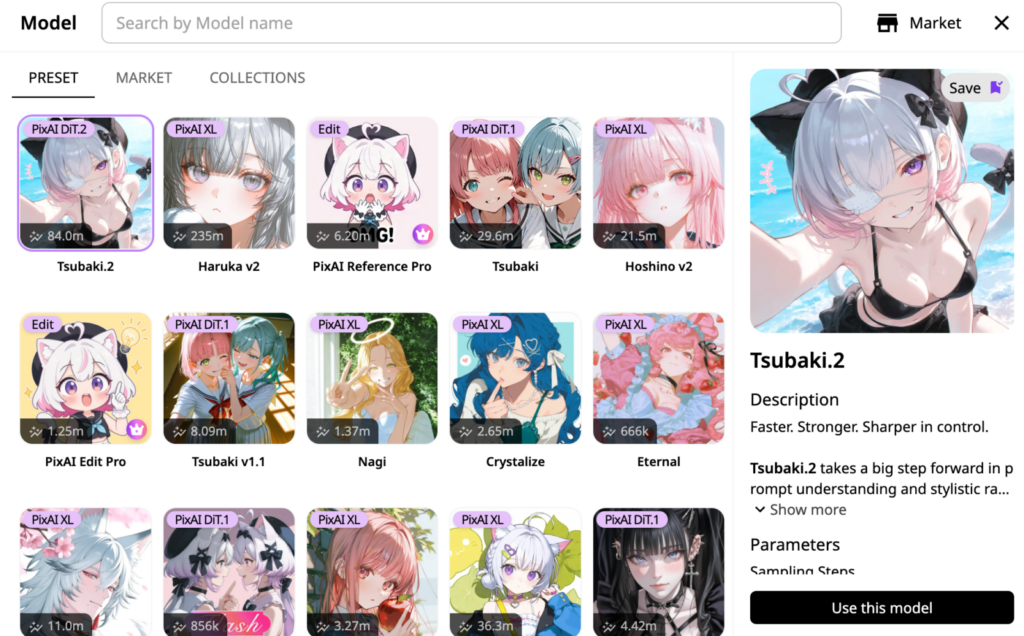
One of the biggest differences between anime AI tools is the model behind the generation.
Changing the model can affect much more than the surface art style. It can influence how the character is drawn, how closely the image follows the prompt, how complex scenes are interpreted, how multiple characters are handled, and what kinds of compositions the generator produces well.
This becomes especially important for anime creation because not every task needs the same strengths. A model that produces beautiful single-character illustrations may not be the best choice for a complicated scene with two characters interacting. Another may be better at interpreting detailed instructions, while a different model may be more suitable for a particular visual style.
Platforms such as PixAI make model choice part of the normal creation process rather than forcing every user into a single generation style. For creators, that flexibility is valuable because choosing the right model can sometimes solve a problem more effectively than repeatedly rewriting the prompt.
2. Prompt Following Matters as Much as Visual Appeal
A common mistake when evaluating AI art is to ask only, “Which image looks better?” For actual creative work, another question matters just as much: “Did the model do what I asked?”
Imagine a prompt that specifies a low camera angle, a character holding a red umbrella, a dark school uniform, a rainy city street, and neon signs in the background. The image might still be visually impressive even if the umbrella disappears, the camera angle changes, or the outfit becomes completely different.
For a casual experiment, that may be acceptable. For a creator designing a specific scene, it becomes frustrating very quickly.
Strong prompt following becomes even more important as prompts get more complex. Character poses, clothing details, object placement, lighting direction, and interactions between multiple people all create opportunities for instructions to be lost.
When comparing anime AI generators, creators should therefore look beyond aesthetics and test whether the tool can reliably understand the details that actually define their idea.
3. Character Creation Is Different From One-off Image Generation
This is where the gap between a general image generator and a useful anime creation tool becomes much clearer.
Generating an attractive girl with silver hair is relatively easy. Generating the same silver-haired character repeatedly is much harder.
Original character creators may want to show the same person in different outfits, locations, expressions, camera angles, and story scenes. If the character’s face, hairstyle, colors, or defining features change every time, the creator is effectively starting over with every generation.
That is why character-focused workflows should be part of the evaluation process. The model itself matters, but creators may also need tools that provide additional control, such as LoRAs and visual references.
4. LoRAs and References Add a Different Kind of Control
Text prompts are powerful, but repeatedly describing every visual detail is not always the most efficient way to work.
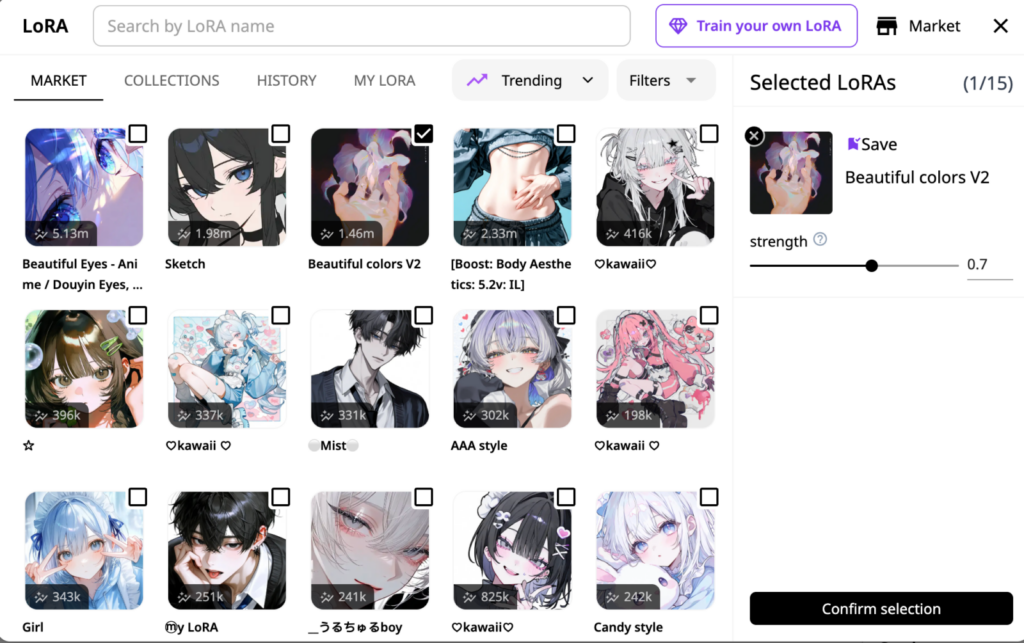
A LoRA can provide more targeted control over a particular character, style, outfit, or concept. Instead of relying entirely on a long written description, creators can use that additional information to guide the generation toward something more specific.
Reference images solve a slightly different problem. If a creator already has a character design, illustration, or visual direction they want to preserve, a reference can communicate information that may be difficult to describe precisely in text.
For anime creators, these are not simply advanced features. They can change the workflow from describing everything again, regenerating, and hoping the character still looks right to establishing the character once and developing that idea further.
PixAI is one example of an anime-focused platform where models, LoRAs, and reference-based creation exist within the same broader environment, making it easier to move beyond basic text-to-image generation.
5. A Good Workflow Does Not End at the First Generation
One of the most overlooked questions when choosing an AI generator is what happens when the result is almost right.
Suppose you like the character, pose, composition, and overall style, but want to change the expression or replace the background. Starting again from the original prompt may also change all the parts you already liked.
That is why editing and iteration are becoming increasingly important parts of AI art workflows. A creator-oriented tool should make it possible to treat a generated image as a starting point rather than a disposable result.
This is particularly useful for anime projects because small details often matter. A creator may spend time establishing a specific character design and composition, then want to refine the image without rebuilding it from scratch.
PixAI, for example, combines image generation with editing and reference-based workflows, allowing creators to continue developing an existing result rather than treating every generation as an isolated attempt.
6. Different Creators Need Different Things
There is no single definition of the best anime AI generator because creators are not all trying to do the same thing.
A beginner experimenting with anime art may mainly care about simple prompting, accessible models, attractive results, and low setup requirements. An original character creator may care much more about character consistency, LoRA support, references, and repeated generation. Someone creating comics, story scenes, or more complex artwork may place greater importance on prompt following, multiple characters, composition, and editing.
The important part is to choose the tool based on the work you actually want to create. A huge feature list means very little if those features do not help with your particular workflow.
Look Beyond the Best Sample Image
The easiest way to judge an anime AI generator is to browse its gallery and look for the most beautiful image. It is also one of the least reliable.
A better test is to ask what happens after that first image. Can you choose a model that fits the task? Does the generator understand detailed instructions? Can you develop the same character again? Can you use LoRAs or references when prompting is not enough? Can you keep working on an image instead of starting over?
Those questions reveal much more about whether a tool is suitable for actual anime creation.
For creators who want to move beyond one-off generations, platforms such as PixAI are worth evaluating not only for the quality of individual images, but for how models, character controls, references, and editing work together as part of a broader creative process.
Ultimately, the best anime AI generator is not simply the one that produces the prettiest first result. It is the one that still helps when you are ready to create the second, third, and tenth.