
Small online communities often outgrow their original communication structure faster than administrators expect. A group that once handled a few announcements and casual conversations may soon produce hundreds of messages, repeated support questions, event reminders, shared documents, and moderation reports every week.
When information is mixed together, members miss important updates, download outdated files, or ask the same questions again. Moderators then spend more time sorting routine activity and less time helping people. AI agents for community management can reduce that operational burden by classifying messages, retrieving approved answers, organizing resources, and escalating sensitive cases.
The objective is not full automation. AI can misread humor, slang, regional language, or incomplete reports. A stronger model assigns repetitive organizational work to software while keeping administrators responsible for privacy, penalties, disputes, and account-security decisions.
Build a Clear Information Architecture
AI automation works best when the community already has a clear structure. Before introducing an agent, administrators should decide where each type of communication belongs and who owns it.
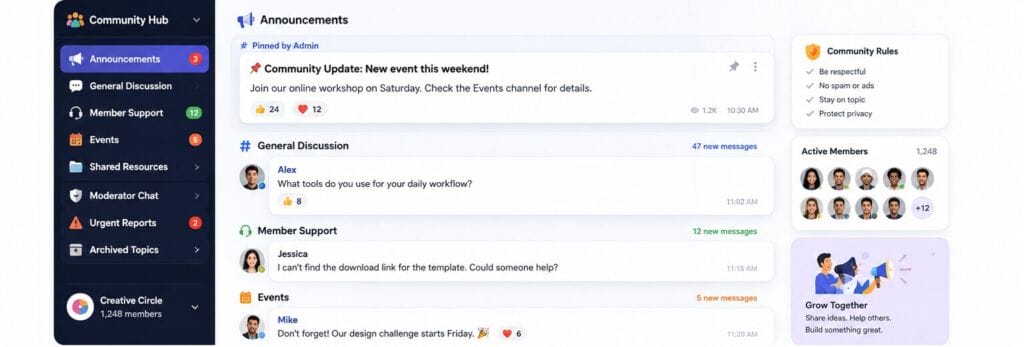
Official announcements need a dedicated, read-only or tightly controlled space. Rule changes, maintenance notices, event dates, and safety warnings should not disappear beneath casual conversation. General discussion can remain open, but technical support, event coordination, shared resources, and urgent reports should have separate channels, topics, or queues.
An effective starting structure includes:
- Announcements for administrator-approved updates.
- General discussion for everyday member conversation.
- Support for account, notification, download, and access questions.
- Events for registration, schedules, reminders, and follow-up material.
- Resources for current guides, forms, and approved files.
- Urgent reports for fraud, impersonation, harassment, or account compromise.
- Private moderator review for evidence, decisions, and appeal records.
Once these categories are defined, an AI agent can route messages more consistently. Without them, automation may simply reproduce the community’s existing confusion.
Choose a Messaging Environment That Supports the Workflow
The communication platform should match the community’s operating model rather than forcing administrators to work around missing features. Important considerations include group capacity, role-based permissions, searchable conversations, pinned messages, file sharing, notification controls, account recovery, and access from desktop and mobile devices.
Communities that use potato as part of their messaging workflow should define separate spaces for announcements, member support, shared resources, and moderator review before adding automation.
Roles also need clear boundaries. Owners may control policy and high-risk settings; administrators may manage channels and permissions; moderators may review reports; support members may answer routine questions; and event organizers may manage schedules without receiving broader account privileges.
Privacy should be reviewed at the same stage. Administrators need to know what member data is visible, where files are stored, which conversations an external AI service can access, and how long generated summaries or logs are retained. The minimum necessary access principle is safer than giving an agent unrestricted visibility.
DEEPER DIVE: Arizona has 6 of the 30 happiest cities in America
INDUSTRY INSIGHTS: Want more news like this? Get our free newsletter here
Use AI Agents to Classify and Prioritize Messages
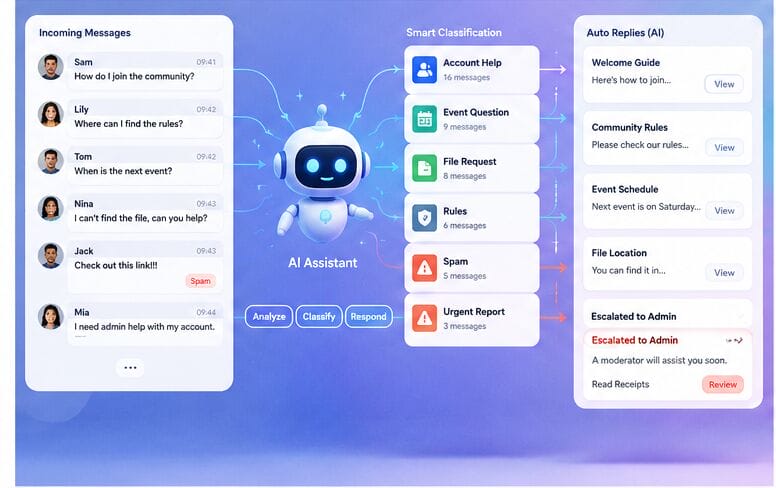
Message classification is one of the highest-value uses of AI in community operations. An agent can analyze incoming messages and assign topic, urgency, and workflow labels before a moderator opens the queue.
Common topic labels include account help, technical problem, event question, rule clarification, file request, feedback, complaint, spam, and urgent report. Status labels can show whether a request is new, assigned, waiting for member information, resolved, or escalated.
Urgency detection can highlight reports involving unknown logins, stolen accounts, suspicious payment requests, threats, severe harassment, or impersonation. Spam detection can flag repeated promotional links, identical messages, rapid posting, or suspicious invitations.
Classification must remain visible and editable. Moderators should be able to correct a label and see why a message was marked high risk. Automated classification should guide review, not become the sole reason to remove content or punish a member.
Answer Routine Questions From an Approved Knowledge Base
Many community questions are repetitive and suitable for AI-assisted answers. New members often ask where to find rules, how to configure notifications, how to join an event, or where the latest form is stored.
The agent should retrieve answers from a controlled knowledge base rather than improvising from old chat history. That source may include current rules, onboarding instructions, event schedules, support contacts, approved download guidance, and links to the latest resources.
A reliable response workflow has four steps:
1. Identify the member’s intent and preferred language.
2. Retrieve the relevant approved answer and current file or link.
3. State any limitation, deadline, or required verification clearly.
4. Offer human support when the answer is incomplete or the case is sensitive.
Knowledge sources need owners and review dates. Outdated event details, contact information, or policy text can create more support work than the agent saves.
Organize Shared Files and Control Versions
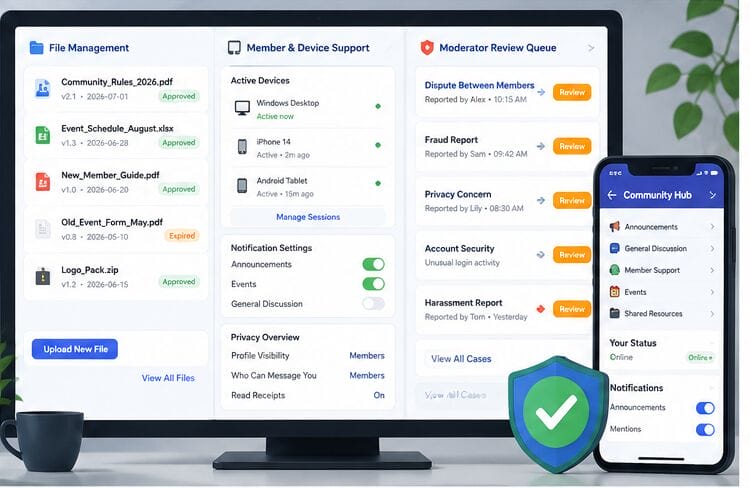
Community file libraries become difficult to use when members upload multiple versions of guides, schedules, forms, images, presentations, and videos. AI agents can suggest categories, detect similar files, extract dates, and flag likely duplicates.
Consistent naming makes those recommendations more useful. A file name should identify the topic, date, language, and version where relevant. Examples include Community_Rules_2026-07_EN.pdf, Event_Schedule_August_v2.xlsx, and New_Member_Guide_ZH.pdf.
Each important file should also have a lightweight record containing its owner, category, upload date, approval status, access level, expiration date, and related announcement. When a newer version is approved, the older file can be archived and its public link replaced.
Human approval should remain mandatory before an agent deletes a file, changes access permissions, or moves restricted moderator material into a public resource area.
Support Members Across Desktop and Mobile Devices
Community members may switch between desktop computers, phones, tablets, and browser-based interfaces. A consistent onboarding process helps them find announcements, manage notifications, and protect their accounts on every device.
For members using the potato app across desktop and mobile devices, onboarding should explain notification settings, privacy controls, file access, and how to review active sessions.
A practical checklist should ask members to confirm the correct account, read the rules, enable alerts for announcements, mute nonessential discussions, review profile visibility, identify the official support channel, and remove sessions from old devices.
AI assistants can guide users through these steps and answer device-specific questions. However, password changes, session removal, recovery actions, and other account-security controls should remain under the member’s direct control.
Escalate Sensitive Cases to Human Moderators
Some cases require context, empathy, evidence review, and accountable judgment. Disputes, privacy complaints, fraud reports, impersonation, account compromise, threats, and penalty decisions should move to authorized human moderators.
An AI agent can still prepare the case by summarizing the timeline, identifying involved members, collecting relevant messages and files, noting previous warnings, and listing unresolved questions. Moderators should verify the original evidence rather than relying only on the summary.
A clear escalation policy should define:
- Which risk labels require immediate human review.
- Who can restrict an account or remove content.
- How evidence is preserved and access is logged.
- When members are notified of a decision.
- Whether an appeal or second review is available.
AI should not independently suspend, remove, or publicly accuse a member. Sensitive actions need a named reviewer, a recorded reason, and an auditable decision trail.
Measure Performance and Improve the Workflow
Community automation should be evaluated with operational metrics, not only by how many messages the agent processes. Useful measures include first-response time, percentage of questions resolved without escalation, classification accuracy, duplicate-question reduction, outdated-file incidents, moderator workload, and member satisfaction.
Review false positives and false negatives separately. A false spam flag can frustrate a legitimate member, while a missed urgent report can create a safety risk. High-risk categories therefore need stricter thresholds and more frequent human sampling.
Administrators should review prompts, knowledge sources, permissions, and escalation rules on a regular schedule. The workflow should change when community policies, staffing, event formats, or platform features change.
Implementation Checklist for Community Administrators
Before deployment, confirm that the community has documented channels, role permissions, approved answer sources, file naming rules, escalation owners, privacy limits, and a method for correcting AI decisions.
1. Map the current message and file workflow.
2. Create clear categories for announcements, support, resources, and urgent reports.
3. Assign an owner to every knowledge source and policy.
4. Pilot the agent in one low-risk workflow, such as FAQ routing.
5. Measure accuracy and collect moderator feedback.
6. Expand gradually while retaining human approval for sensitive actions.
This staged approach is more reliable than attempting to automate every channel at once.
Frequently Asked Questions
Can AI agents moderate an online community automatically?
AI agents can detect patterns, classify messages, suggest replies, and flag risky content, but they should not make final decisions about penalties, privacy complaints, disputes, or account restrictions without human review.
How can AI improve community file management?
AI can categorize uploads, identify duplicates, extract dates, suggest consistent names, and flag expired resources. Administrators should still approve deletion, publication, and permission changes.
What information should an AI community assistant use?
It should use administrator-approved rules, onboarding guides, event details, support contacts, and current file links. Access should be limited to the minimum data required for the assigned workflow.
Conclusion
AI agents for community management are most useful when they strengthen a clear operating model. Structured channels, defined permissions, approved knowledge sources, disciplined file management, consistent cross-device onboarding, and human escalation rules provide the foundation.
With those controls in place, AI can reduce repetitive sorting and support work while helping administrators respond faster. The result is not a fully automated community, but a more organized, scalable, and trustworthy one.