
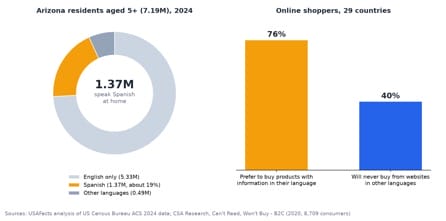
Walk into almost any business in Phoenix, Tucson or Yuma and you’ll hear Spanish at the counter. According to USAFacts’ analysis of US Census Bureau data, 1.86 million Arizonans aged 5 and older (25.9%) spoke a language other than English at home in 2024, and 1.37 million of them spoke Spanish. That is roughly one in five Arizona residents. Yet most local business videos (the explainer on the website, the promo on Facebook, the “how to book” clip on Google) exist only in English.
That gap is an opportunity. Language affects buying decisions: in CSA Research’s Can’t Read, Won’t Buy study of 8,709 consumers in 29 countries, 76% of online shoppers said they prefer to buy products with information in their own language, and 40% said they will never buy from websites in other languages. A Spanish version of a video a customer already watches in English tells them, before they ever call, that you’ll be able to serve them. This guide covers how to make one properly, without doubling your video budget.
Key takeaways
- About one in five Arizonans aged 5+ speaks Spanish at home, so a Spanish version of your most-watched video reaches a large local audience.
- Translate the videos closest to a buying decision first: the explainer, booking instructions and your best ad.
- Localize, don’t just translate: choose tú or usted, use the vocabulary your customers use, and have a native speaker read the script aloud.
- Re-narrate the video in Spanish rather than dubbing over the English file, and re-check every caption and on-screen word.
Decide which videos are worth translating
Don’t translate everything. Start with the videos closest to a buying decision:
- The “how it works” explainer on your website or Google Business Profile.
- Booking and onboarding videos: how to schedule, what to bring, what happens at the first visit.
- Your best-performing social ad. If it works in English, test it in Spanish before making anything new.
A dental practice in Mesa, an HVAC company in Glendale and a property manager in Tucson will each have different priorities, but the rule is the same: translate the video that answers the question your Spanish-speaking customers ask most often. Your front desk staff usually know exactly what that question is.
THINGS TO DO: Scottsdale Fashion Square: Your next dining destination
LATEST ISSUE: Read the latest issue of Experience AZ magazine
Translate, then localize
Translation changes the words. Localization changes everything a native speaker will notice sounds foreign. Go through the translated script and check:
- Tú or usted. For most businesses, especially healthcare, legal, financial and home services, usted is the safer, more respectful choice for a narrator speaking to the customer. A youth-focused brand might choose tú. Pick one and stay consistent.
- Regional vocabulary. Many Arizona customers have roots in Mexico, so Mexican Spanish vocabulary usually sounds most natural. Carro or coche, alberca or piscina: these small choices signal whether the video was made for them.
- Local references. Monsoon season, summer heat, the I-10: keep the Arizona details. They make the video feel local in either language.
- Prices, phone numbers and hours. Say them the way people say them aloud, and check that the Spanish phone line or bilingual staff mentioned in the video actually exist.
Then have a native speaker, ideally a customer or an employee, read the script aloud. Lines that look fine on paper but sound stiff are obvious when spoken.
One caution: for anything involving medical, legal, insurance or financial terms, machine translation is not enough. Have a qualified bilingual reviewer check disclaimers and instructions. A mistranslated dosage or contract term is a liability, not a marketing problem.
Expect the video to run longer
Spanish usually takes more words than English to say the same thing, so a 60-second English script read at the same pace may run 70 seconds or more. Either trim the Spanish script (cut adjectives and side remarks, not information) or let the video grow. For a separate upload, both work.
Re-narrate rather than dubbing over
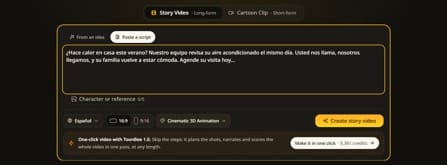
The cleanest way to make a Spanish version of an animated or illustrated video is to produce it again in Spanish rather than laying new audio over the English file. When the narration is generated in the target language, the scene timing follows the new narration, so pictures don’t change mid-sentence.
AI story video tools make this practical for small businesses. In ToonBee AI, for example, the narrator speaks 17 languages including Spanish; you paste the localized script, it is narrated word for word, and each scene is drawn in the art style of your choice. If you save the character reference pictures from your English version and attach them again, your mascot or “customer” character looks the same in both languages, which keeps the two versions feeling like one brand.
When you review the Spanish narration:
- Listen for names. Text-to-speech can stumble on business names, street names and English loanwords. Spell them phonetically in the script if needed.
- Choose a voice that fits. Calm and warm for a clinic; brisk and upbeat for a gym or restaurant promo.
- Keep the music. It doesn’t need translating and helps both versions feel related.
Check everything on screen
This is where translated videos most often give themselves away.
- Captions. Spanish captions must match the Spanish narration, and longer lines need checking so two-line captions still fit on a phone.
- Text inside pictures. AI-drawn scenes sometimes include signs or labels with English (or nonsense) text. Redraw those scenes, or describe them without readable writing.
- Title cards, end screens and thumbnails. An English phone number card at the end of a Spanish video undoes the effort.
Where to publish the Spanish version
- Your website: a clear “Ver en español” link next to the English video, or a Spanish page if you have one.
- Google Business Profile: upload the Spanish video alongside the English one. Many local customers find you here first.
- YouTube: a separate upload with a Spanish title and description. YouTube also supports extra audio tracks on one video, but that only works if the Spanish narration fits the English timing and the captions aren’t burned in, which is rarely the case with a re-narrated story.
- Facebook and WhatsApp: short vertical cuts of 15–30 seconds tend to get shared in family and community groups. Make the vertical version as its own render rather than cropping the horizontal one.
Keep the cost proportional
A Spanish version should cost a fraction of the original, not the same again. The script is already written; the characters and style are already chosen. What you pay for is new narration and new scene pictures, plus animation only where it earns its place. ToonBee shows the credit cost of each step before you confirm and includes narration voices, captions and music in the same credits, so you can make a Spanish version of a one-minute explainer and know the total before you commit. New accounts also get 100 free credits, enough to test a Spanish voice before spending anything.
Budget a native speaker’s time as well. An hour of review from someone who speaks your customers’ Spanish is the best money in the project.
A checklist before you publish
- Is this the video that answers your Spanish-speaking customers’ most common question?
- Tú or usted, chosen and consistent?
- Vocabulary right for your customers, reviewed aloud by a native speaker?
- Medical, legal or financial wording checked by a qualified reviewer?
- Narration generated in Spanish, with the same character references?
- Captions, picture text, end card and thumbnail all in Spanish?
- Spanish title and description on every platform?
- Can a customer who calls after watching actually be helped in Spanish?
FAQ
How many people in Arizona speak Spanish at home?
About 1.37 million residents aged 5 and older in 2024, out of 7.19 million, according to USAFacts’ analysis of US Census Bureau data. That is roughly 19%.
*Should a business narrator use tú or usted?*
For healthcare, legal, financial and home services, usted is the safer and more respectful default. Youth-focused or casual brands may prefer tú. Pick one and keep it consistent across the video, captions and website.
Is machine translation good enough for a business video?
As a first draft, yes. Before publishing, have a native speaker read it aloud, and have a qualified bilingual reviewer check any medical, legal, insurance or financial wording.
Can I add Spanish audio to my existing English video on YouTube?
YouTube supports extra audio tracks, but they work best when the Spanish narration fits the English timing and no English text is burned into the picture. A re-narrated story usually runs longer, so a separate upload is often simpler.
The last question on the checklist matters most. A Spanish video is a promise. Make sure the phone, the front desk and the follow-up email can keep it.
Author: Kevin Yi builds AI video tools, including ToonBee AI.