
In the modern digital-first society, graphics initiate the interaction. One picture will make the difference between a person passing by your materials or taking a moment to pay attention. Historically, to edit photos of good quality, you required costly software programs such as Adobe Photoshop and hours of practice to learn techniques, such as removing the background or erasing objects. To most people, it is time-consuming and frightening.
The process of creativity is now being transformed by artificial intelligence. Complicated editing operations that required hours to execute are done in a few seconds without error. The leader of this change is EzRemove—an online photo editing site powered by AI that enables everyone to achieve professional results without the high cost.
This guide delves into the operation of EzRemove.ai, its strong capabilities, and how it is becoming an indispensable tool to creators, marketers, and businesses alike.
LOCAL NEWS: Here’s where new Phoenix residents are moving from
INDUSTRY INSIGHTS: Want more news like this? Get our free newsletter here
What is EzRemove.ai?
EzRemove.ai is a smart web-based photo editor, and it is aimed at making the high-demand tasks more convenient. As opposed to full-sized software packages, it provides performance and smoothness as it focuses on the required editing capabilities.
Essential Operations of EzRemove.ai
- AI Background Removal—Seals off the background of the subject and leaves a transparent PNG.
- AI Object and Text Removal—Remove unwanted people, objects, watermarks, or text using AI.
- AI Background Replacement – Change the removed background with stock images or color customization.
- Easy, Portable Interface—No software to download. Just upload, edit, and export.
- With the mastery of these key functions, EzRemove.ai will be an answer to every professional and average user.
Editing Features That Reinvented Editing
1- Perfect AI Background Removal
Transparent backgrounds are imperative, from e-commerce listings to LinkedIn profile pictures. EzRemove.ai can deal with detail-intensive features such as flyaway hair, fur, and semi-transparent features.
Use Cases:
E-commerce—Meet the white background demands of Amazon.
Graphic Design—Isolate fast and create marketing materials.
Make Stickers, Greeting Cards, or Smooth Headshots—$15 to $25.
2- Smart Object/Text Erase
This is the aspect that gives answers to some of the most frequent questions that people put across, like:
Is there anybody who can take my ex out of the picture?
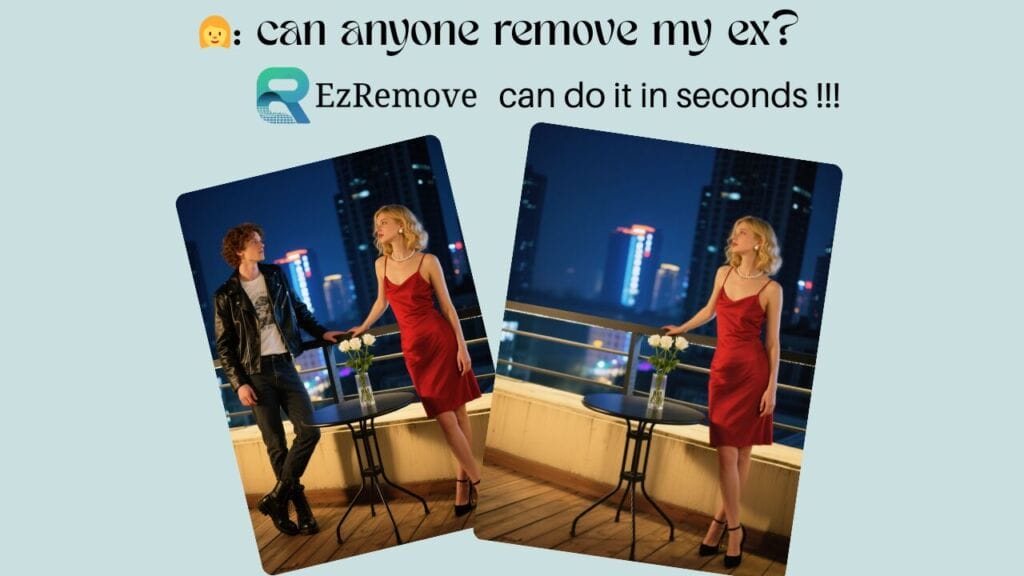
Yes—with EzRemove.ai, all you have to do is remove an ex-partner from a picture. You just sweep the individual, and the AI fills the area with no traces left behind, a clean, natural-looking background. This is why it is easy to refresh family photographs, group photos, or even personal memories without embarrassing messages.
Can I erase text in the snap?

Absolutely. EzRemove.ai is also an eraser of texts. It can be a watermark, or a note that you no longer want on your image, and the AI will automatically delete it and recreate the background.
Use Cases:
- Personal Photos—Delete an ex out of group photos or revive old memories.
- Social Media—Don’t forget to delete text or captions and repost.
- Scene Photography—Removal of watermarks.
- Marketing—Use old photos by eliminating old text overlays.
3- Background Removal Express
Change your topic by setting it in a new environment—professional, creative, or fun.
Use Cases:
- Corporate Portraits—Use office backgrounds in place of home shots.
- Lifestyle Marketing—Showcase the products in the context of lifestyle, such as boots on a mountain path.
- Social Media—Develop attractive YouTube thumbnails or Instagram photos.
Beneficiary of EzRemove.ai?
EzRemove.ai serves a broad range of users, including business and everyday users:
- E-commerce Sellers—Scan hundreds of product images in a short amount of time.
- Social Media Manager—Build content-ready assets within minutes.
- Freelancers & Makers—Spend less time on thumbnails, images on blogs, and client files.
- Real Estate Agents—Use cars to remove images of houses or change skies.
- Everyday Users – Delete an ex in a photo, delete text in a snap, or seamlessly refine personal albums.
How to Use It:
- Go to EzRemove.ai and post your picture.
- Observe the AI labor—in a flash, the backgrounds are erased.
- Select your object—erase objects, delete an ex, delete text, or replace backgrounds.
- Touch up with the intuitive editor.
- In seconds, download your end product.
It is quick, visual, and easy to learn—no technical expertise is needed.
EzRemove.ai: It Is Not Just An Editor
EzRemove.ai is not a simple background remover. It is a facilitator of both creativity and productivity, and enables businesses to create large-scale content and individuals to generate professional images easily. Automation of tedious editing helps to liberate users to concentrate on creativity and storytelling.
With a market where appearances determine plausibility and interaction, EzRemove.ai is not merely a convenience—it is a must.
Final Thoughts:
EzRemove.ai is transforming photo editing with accuracy powered by AI and simplicity oriented to the users. You may want to remove your ex from a picture, delete text in the snap, or come up with professional-quality marketing visuals. This tool gives quick and dependable results.
In case you need to save time, improve your pictures, and unlock your creative abilities, EzRemove.ai is your final AI-based image editing tool.
Visit EzRemove.ai today and see the next level of photo editing.
FAQs:
Will somebody take out my ex in the picture?
Yes! EzRemove.ai allows anybody to easily delete an ex-partner in any photo. All you do is upload your photo, use the object remover tool, and brush your desired human. The AI smartly recreates the background, resulting in a clean, natural-feeling photo with no clumsy edits or severe cutouts.
Can I erase text in the snap?
Absolutely. EzRemove.ai is a text remover as well. Provided that you have a watermark, captions, or any other text in your photo, you can mark it and have the AI erase it in a matter of seconds. The tool finishes in the background smoothly, and thus it appears that the text never existed.
Is EzRemove.ai professional only?
Not at all. The EzRemove.ai is targeting all users, e-commerce sellers, and marketers, as well as the average user. You can be ready to note down the product pictures for your online store, organize vacation photos, or even get rid of your form; the site is straightforward and does not need any technical expertise.