
Distributed teams rely on messaging platforms to coordinate projects, share files, resolve customer issues, and make decisions across time zones. That flexibility keeps work moving, but it also creates a familiar operational problem: important information is often scattered across long, asynchronous conversations.
After meetings, days off, or overnight handovers, employees may return to hundreds of unread messages. Confirmed decisions can disappear inside brainstorming, while deadlines, responsibilities, file changes, and unresolved risks are spread across several threads.
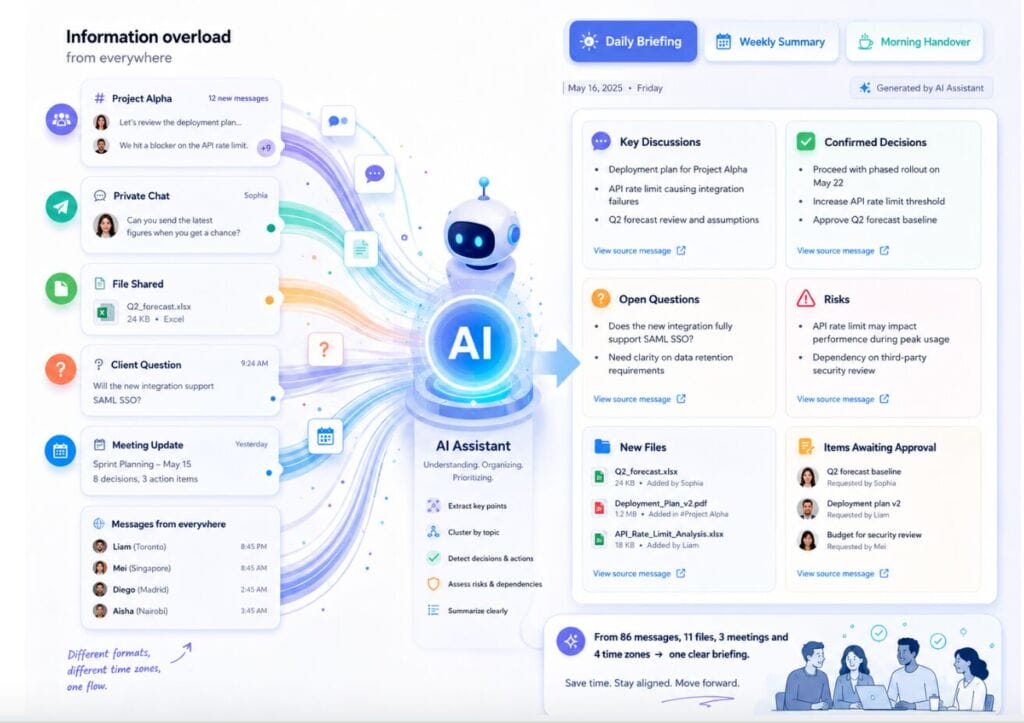
AI-powered message summaries can turn high-volume conversations into concise briefings that surface key topics, confirmed decisions, proposed tasks, open questions, risks, and shared resources. Used correctly, a summary is not a replacement for the original conversation; it is a navigation layer that helps employees find what matters and verify the source context.
For business and technology teams, the strongest approach combines automation with human review, source links, permission controls, and consistent formatting. The framework below shows how organizations can use AI summaries to improve handovers and reduce information overload without turning the system into an unrestricted observer of workplace communications.
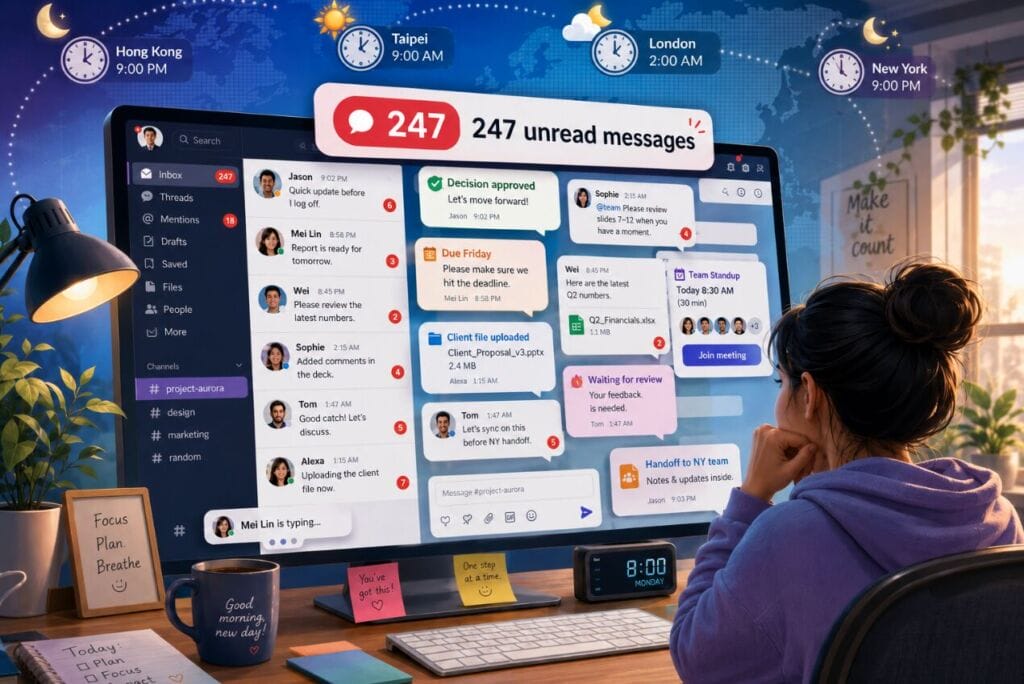
Why Message Overload Slows Distributed Teams
The most visible cost of message overload is repeated reading. A project manager may search a channel to confirm a deadline, while another employee later repeats the same search to locate the latest document. As the number of active groups increases, small retrieval tasks consume more time and interrupt focused work.
The greater risk is not reading time alone, but decision drift. Teams often discuss several options before approving one approach. A colleague who joins late may act on an earlier suggestion because the final decision is difficult to distinguish from the surrounding conversation. Similar problems occur when an informal commitment never reaches a project board or calendar.
Cross-time-zone handovers make this problem more severe. Employees beginning their workday need to know what changed during the previous shift, what requires immediate attention, and which issues remain unresolved. Without a concise briefing, they must reconstruct the situation from long message histories, forwarded updates, and unrelated replies.
Over time, weak message retrieval can contribute to duplicated work, inconsistent customer responses, delayed projects, and meetings arranged simply to clarify information that already exists. An AI summary can reduce this burden only when it separates confirmed information from speculation and directs readers back to the source.
Define Which Conversations the AI Can Summarize
Before connecting an AI summarization tool, the organization should define its scope. Not every group has the same operational value or sensitivity. A project channel, customer-support queue, product-launch group, or incident-response conversation may benefit from structured summaries, while a general social channel may not require automated processing.
For teams that use a messaging platform commonly described in Chinese as 电报, the same governance rule applies: the AI should process only approved channels and should not assume that access to the platform means permission to analyze every conversation.
A practical classification model can separate project coordination, customer support, company announcements, technical incidents, regional operations, management discussions, social conversations, and confidential legal or personnel matters. Administrators can then authorize summarization for selected categories while excluding private messages, executive discussions, employee relations, payroll, legal advice, and sensitive customer negotiations.
The team should also decide when a summary is generated. Common options include an end-of-shift briefing, a morning handover for the next regional team, a weekly project overview, an on-demand summary requested by a user, a summary triggered after a large increase in messages, or an incident report created after a critical event.
Finally, determine who receives each version. Project managers may need details about owners, dates, and blockers, while senior leaders may only need confirmed decisions, material risks, delayed tasks, and matters requiring escalation. Access to the summary should follow the same permission model as access to the source conversation.
Build Daily, Weekly, and Handover Summary Formats
A useful AI message summary is organized around the information employees need to act on. It should group related messages by topic instead of reproducing the chat in chronological order. A consistent template also helps readers scan each briefing quickly and notice when an expected section is missing.
A practical summary template can include:
- Key discussions: the main topics covered during the reporting period.
- Confirmed decisions: approved outcomes, separated from suggestions and rejected alternatives.
- Action items: proposed tasks with an owner, due date, priority, and source message.
- Open questions: matters awaiting clarification, approval, data, or a named decision-maker.
- Risks and blockers: technical issues, customer concerns, security events, dependencies, or delays.
- Files and links: newly shared resources described by purpose and version, not only by filename.
- Handover notes: items that the next regional team should monitor or continue.
Daily summaries should emphasize recent changes and immediate follow-up. Weekly summaries can provide a broader view by comparing progress with the previous week, identifying recurring issues, and showing whether unresolved tasks are accumulating. Incident summaries should prioritize the timeline, impact, decisions, assigned owners, and next checkpoint.
Confirmed decisions must be visually distinct from proposals. During a long conversation, employees may suggest several possible actions before choosing one. The summarizer should not convert every proposal into an approved plan. Open questions and blocked tasks should also remain visible so the briefing does not create a false impression that all work is complete.
Files need meaningful context. Instead of reporting only that “a spreadsheet was uploaded,” the summary should identify it as the revised budget forecast, the current launch schedule, or the approved customer response template. Where possible, the summary should link directly to the original message or file location.
Extract Tasks, Owners, and Deadlines for Human Approval
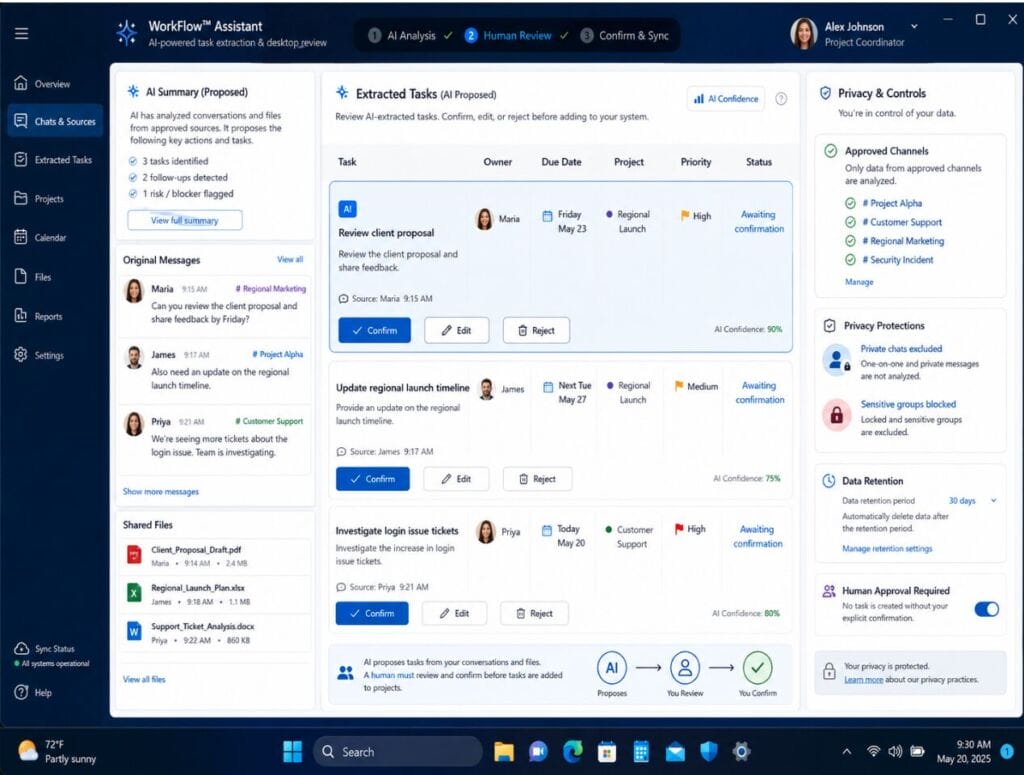
Task extraction is one of the most valuable extensions of AI message summarization. The system can look for statements that indicate an action, responsibility, date, expected outcome, or approval requirement. It can then prepare a proposed task containing the description, owner, due date, project or customer, priority, status, reminder rule, and source message.
The word “proposed” is essential. Informal workplace language is ambiguous. A person may write “I can check this” without accepting full responsibility for resolving the issue. Another colleague may mention a target date that has not been approved. The AI should therefore place extracted tasks in a review queue rather than silently creating assignments.
Relative dates require particular care. Expressions such as “tomorrow,” “next week,” and “before the launch” depend on the message timestamp, the author’s local time zone, and the project calendar. The system should convert them into exact dates when the context is clear and flag uncertainty when it is not.
Ownership should be confirmed by a human, especially when the system infers responsibility from a name, mention, or implied commitment. Tasks without a clear owner can remain unassigned until a reviewer selects the responsible person. After approval, the task may be synchronized with a project board, task manager, or shared calendar while retaining a link to the original conversation.
Organize Summaries by Project, Customer, and Priority
Summaries become more useful when they reflect the team’s actual work structure. An AI agent can apply labels based on project, customer, department, region, urgency, topic, or document type. This prevents unrelated discussions from appearing in the same briefing and makes recurring information easier to retrieve.
A project-based structure might separate Product Launch, Customer Support, Regional Marketing, Finance Review, Security Incident, and Hiring and Onboarding. Saved views can then show active projects, urgent issues, messages awaiting a response, or completed work ready for archiving.
Customer-related messages should be associated with the correct account so support, sales, and operations teams can review the relevant history without searching across unrelated channels. Priority labels should follow explicit business rules. A service outage, security incident, contractual deadline, or high-impact customer issue may justify escalation, while a routine update should not receive the same status.
Employees should be able to correct labels and merge duplicate topics. Repeated classification errors may reveal unclear channel names, inconsistent terminology, or gaps in the model’s understanding. These corrections provide useful feedback for improving prompts, rules, and project taxonomies.
Use Desktop Review to Verify Context, Files, and Decisions
Desktop environments are often better suited to reviewing summaries, source messages, and shared files together. A larger screen allows an employee to keep the briefing open while checking the original conversation, comparing a spreadsheet, opening a document, or updating a project board.
A dependable 电报电脑版 workflow can support this multi-window review on Windows devices, making it easier to verify AI-generated information instead of accepting a summary without context.
Desktop review is particularly useful for weekly reports and cross-functional handovers. Employees can search within the summary, compare it with previous briefings, and open linked files without repeatedly switching between mobile screens. The workflow should also define where approved summaries are stored, such as a dedicated channel, project folder, document repository, or internal knowledge base.
Notifications require careful configuration. A routine summary alert may be useful at the beginning of a shift, but it should not compete with urgent operational messages. Teams can schedule normal briefings while preserving immediate notifications for critical channels and incident-response workflows.
Version control matters when a human edits an AI-generated draft. Readers should be able to distinguish the original automated output from the reviewed and approved version. Material corrections should remain traceable so the team can identify recurring errors and improve the workflow.
Protect Confidential Conversations and Limit AI Access
Message summarization can expose sensitive information when permissions are too broad. The principle of least privilege should guide every integration: the AI agent should access only the groups, messages, and files required for its approved function, and it should not inherit unrestricted administrator access simply because that configuration is easier.
Sensitive spaces may need to be excluded entirely or processed only through an approved internal system. Examples include executive discussions, legal matters, employee performance, payroll, security investigations, confidential customer negotiations, and private personal conversations. Employees should receive clear notice about which workplace channels are subject to automated analysis.
Administrators also need to understand where conversation data is processed, how long it is retained, whether it is used for model improvement, which subprocessors can access it, and how deletion requests are handled. Security, privacy, retention, deletion, and incident-response terms should be reviewed before the integration is approved.
Access logs should record which conversations were processed, which summaries were generated, and who viewed the results. Permissions, API tokens, bots, and external integrations should be reviewed when employees change roles or leave the organization. Sensitive decisions, financial figures, customer commitments, and legal statements must always be checked against the original messages.
Measure Summary Quality and Improve the Workflow
A pilot should begin with a small number of well-defined channels and a limited group of reviewers. This makes it easier to identify permission problems, weak prompts, missing context, and incorrect task extraction before the workflow expands across the organization.
Teams can assess summary quality using practical criteria rather than relying on a single accuracy score. Reviewers should ask whether confirmed decisions are captured correctly, whether open questions remain visible, whether tasks have the right owners and dates, whether important files are described clearly, and whether each important statement can be traced to a source message.
Useful operational indicators include correction frequency, the number of missed decisions discovered during review, the percentage of proposed tasks approved without major edits, reader feedback, and the time required to prepare or consume a handover. A high volume of summaries is not evidence of success if employees do not trust or use them.
The workflow should improve through regular review. Teams can refine channel naming, summary templates, escalation rules, prompts, access permissions, and task-confirmation steps. The goal is not to summarize every message, but to provide a reliable briefing that directs attention to verified decisions and unresolved work.
FAQ About AI Message Summaries
What should an AI message summary include?
At minimum, it should identify the main topics, confirmed decisions, proposed action items, owners, deadlines, open questions, risks, blockers, shared files, and links to the relevant source messages. The exact format should reflect the team’s operational needs.
Can AI summaries replace the original chat history?
No. A summary is a navigation and prioritization tool, not the authoritative record. Employees should be able to open the original messages to verify wording, context, responsibility, and any sensitive or high-impact decision.
How often should summaries be generated?
The appropriate cadence depends on message volume and workflow. Common options include end-of-shift handovers, daily briefings, weekly project reviews, on-demand summaries, and incident reports generated after a critical event.
Which conversations should not be summarized automatically?
Private messages and highly sensitive legal, personnel, payroll, executive, security, or customer-negotiation channels should normally remain outside the workflow unless the organization has a clear lawful basis, appropriate technology, strict permissions, and explicit governance.
Conclusion
AI-powered message summaries can help distributed teams reduce information overload and make handovers more reliable, but the technology works best when it is embedded in a disciplined workflow. Clear channel rules, structured briefing formats, human-confirmed tasks, project labels, desktop verification, source traceability, and strict access controls all matter.
When those controls are in place, teams can spend less time reconstructing conversations and more time acting on verified decisions. The practical goal is not to automate judgment, but to make important information easier to find, review, and use across locations and time zones.