
Being stuck at the iCloud Activation Lock screen can be frustrating, particularly when you’ve forgotten your Apple Account password or cannot reach the previous owner. While Apple provides an official method for removing Activation Lock, this support is limited, leading many users to consider third-party software as a more convenient alternative.
In this guide, we compare three iCloud Activation Lock removal tools. We will look at their main advantages, limitations, and key differences to help you choose the right option.
What to Consider Before Choosing an Activation Lock Removal Tool
Not every tool works with every iPhone. Before using software, consider these factors:
- Device and iOS compatibility: Check whether the tool supports your specific iPhone model and iOS version.
- Ease of use: Clear instructions and a straightforward interface can make the process easier.
- Supported functions: Some tools focus on Activation Lock, while others offer additional unlocking features.
- Cost and limitations: Check which functions require payment and whether your device meets the requirements.
- Safety and legitimacy: Download software from its official website and understand the risks before proceeding.
Top 3 iCloud Activation Lock Removal Tools That Actually Work
1. TunesKit iPhone Unlocker
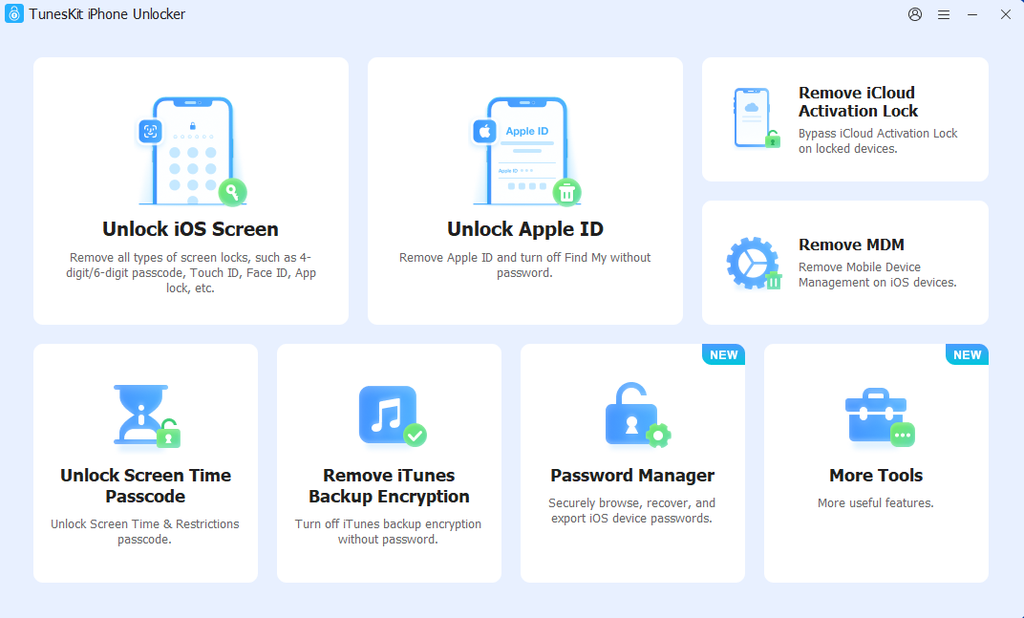
TunesKit iPhone Unlocker is a desktop tool designed to help users deal with several iPhone locking problems, including iCloud Activation Lock on supported devices. It also offers functions for screen passcodes, Apple Account-related restrictions, MDM, and Screen Time lock. Its guided interface makes it easier for users to follow the unlocking process without advanced technical knowledge.
Pros:
- Supports multiple iPhone and iPad unlocking scenarios in one program.
- Provides step-by-step instructions for users without technical experience.
- Regular updates help maintain compatibility with newer devices and iOS versions for supported functions.
- Supports jailbreak-free Activation Lock removal on specific device models.
Cons:
- Full access to its unlocking functions requires a paid license.
- Activation Lock removal has specific device and iOS compatibility requirements.
How to Remove iCloud Activation Lock with TunesKit iPhone Unlocker
Step 1. Download TunesKit and Connect Your iPhone
Download TunesKit iPhone Unlocker from its official website and install it on your Windows PC or Mac. Connect your iPhone to the computer using a USB cable. Open the program and select the Remove iCloud Activation Lock function.
Step 2. Put Your Device into DFU Mode
Click Start, then follow the on-screen instructions to put your device into DFU mode. TunesKit will guide you through the necessary steps.
Step 3. Complete the Removal Process
Once detected, TunesKit will start the removal process. Keep your iPhone connected to the computer until the software indicates that the operation is finished. Once completed, check the device screen and follow any setup instructions displayed.
2. Tenorshare 4uKey
Tenorshare 4uKey is an iPhone unlocking tool that offers several features for dealing with different device locks. Depending on the supported function and device, it can help users unlock screen passcodes, remove certain Apple ID restrictions, and address iCloud Activation Lock.
Pros:
- Offers a guided interface for common iPhone unlocking tasks.
- Combines several unlocking functions in one application.
- Provides documentation to help users understand supported procedures.
Cons:
- Activation Lock removal is subject to specific device and system requirements.
- Some features require payment, and compatibility should be checked before purchasing.
3. iToolab UnlockGo
iToolab UnlockGo is another desktop utility designed to help users address iCloud Activation Lock on supported iPhones and iPads. It provides a dedicated Activation Lock removal function and guides users through the process using on-screen instructions. The software also supports other unlocking scenarios, such as iPhone unavailable, forgot iPhone passcode, and iPhone is disabled.
Pros:
- Offers a dedicated tool for iCloud Activation Lock removal.
- Supports Windows and Mac computers.
- Includes additional unlocking functions for different iOS device issues.
Cons:
- Some supported procedures require jailbreaking, depending on the iOS version.
- Activation Lock removal may restrict cellular calls and mobile data, even after the process is completed.
Quick Comparison: How to Choose the Right iCloud Activation Lock Removal Tool
TunesKit iPhone Unlocker: Best for users who want an all-in-one iPhone unlocking solution. It supports multiple unlocking functions, works on both Windows and Mac, and provides guided instructions for supported devices.
Tenorshare 4uKey: A suitable alternative for users who prefer a guided interface and want to explore different iPhone unlocking options.
iToolab UnlockGo: Worth considering for users looking for another dedicated iOS unlocking utility with step-by-step guidance.
Overall, TunesKit iPhone Unlocker is a strong option for users who need more than one iPhone unlocking function. Its broad feature set and reliable unlocking process make it a practical choice. However, Activation Lock removal has specific compatibility requirements, so check your iPhone model and iOS version before purchasing.
Frequently Asked Questions
1. Do iCloud Activation Lock Removal Tools Really Work?
Some tools can help with specific supported devices and configurations, but no third-party tool works on every iPhone. Results depend on the model, iOS version, and unlocking method. Be cautious of services promising universal or guaranteed removal.
2. How to Remove iCloud Activation Lock Without the Previous Owner?
If the device is linked to your Apple Account, try recovering your account first. If you purchased a second-hand iPhone, ask the previous owner to remove it from their account remotely. If neither option works, check whether Apple can review your proof of purchase. Third-party tools may offer alternatives for certain supported configurations, but their limitations should be reviewed carefully.
3. Can Apple Remove iCloud Activation Lock?
Apple may be able to help if you provide acceptable proof of purchase. You can also use Apple’s official Activation Lock support process to check your options. Approval is not guaranteed, and Apple may require documentation establishing ownership.
Conclusion
Choosing the right iCloud Activation Lock removal tool requires checking compatibility, supported features, and cost. TunesKit iPhone Unlocker stands out for users who want several iPhone unlocking functions in one Windows or Mac application, while Tenorshare 4uKey and iToolab UnlockGo provide alternatives worth comparing.
Before paying for any tool, verify that it supports your exact device and iOS version. If possible, start with Apple’s official recovery and support options, which are the most appropriate routes for legitimate device owners.