
Software-engineering jobs keep multiplying, but landing one grows harder each year. About 97 percent of Fortune 500 companies now screen candidates with applicant-tracking systems, according to GhostRez. Recruiters then skim the survivors’ résumés for just seven seconds, The Ladders reports.
To pass both gatekeepers—bots and humans—you need a résumé that reads clean and lands fast. AI-powered builders promise exactly that. In this guide, we break down the five smartest platforms and show you how to match each one to your workflow, budget, and career goals.
What software engineers should demand from an AI résumé builder
First, agree on the goal: land more interviews, not add another side project. A strong builder clears technical hurdles, respects recruiter habits, and still sounds like you.
Start with the top priority: ATS clarity. Columns, graphics, and hidden tables confuse parsing bots and sink otherwise solid applications. Choose a platform that shows how software reads your file, not only how people see it. If that view is missing, move on.
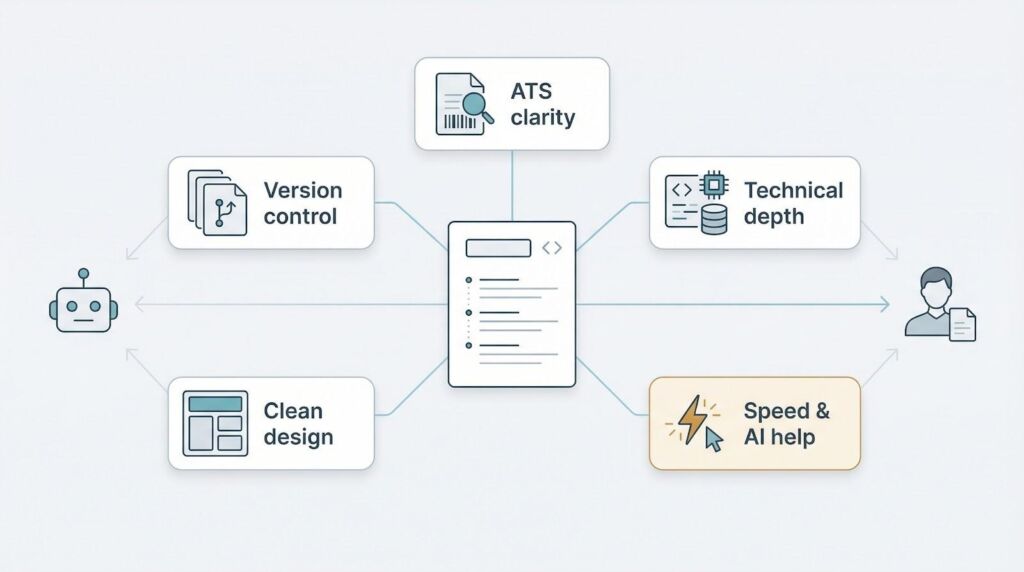
Next, require detailed technical sections. A bland bullet like “worked on backend services” won’t help. The tool should let you headline projects, layer specifics, and link to GitHub in seconds. Drag-and-drop flexibility is fine, but structured fields for languages, frameworks, and certifications serve you better.
Speed counts. Smart AI suggestions should turn rough notes into crisp, metric-driven bullets such as reduced query latency by 38 percent while still letting you rewrite anything that feels off. If shaping a solid draft takes longer than a lunch break, look elsewhere.
Template design is another filter. Clean lines, readable fonts, and modest color accents keep hiring managers focused on your results. Flashy infographics may look cool until they choke a scanner or distract someone scrolling on a phone.
Finally, protect your time with version control. Because each role highlights a different slice of your skills, the best builders let you duplicate files, swap sections, and export role-specific PDFs without starting from scratch.
Measure every contender against these standards, and spend your energy prepping for technical interviews—not fixing formatting tangles.
Novorésumé: modern design, guided AI polish
Open the editor in Novoresume online resume builder and-true to its promise of letting you craft a complete résumé in roughly five minutes-it feels like pair-programming for your career. A live preview sits center stage, so every tweak (color accent, new bullet, reordered section) shows up instantly. No guessing, no repeat exports.
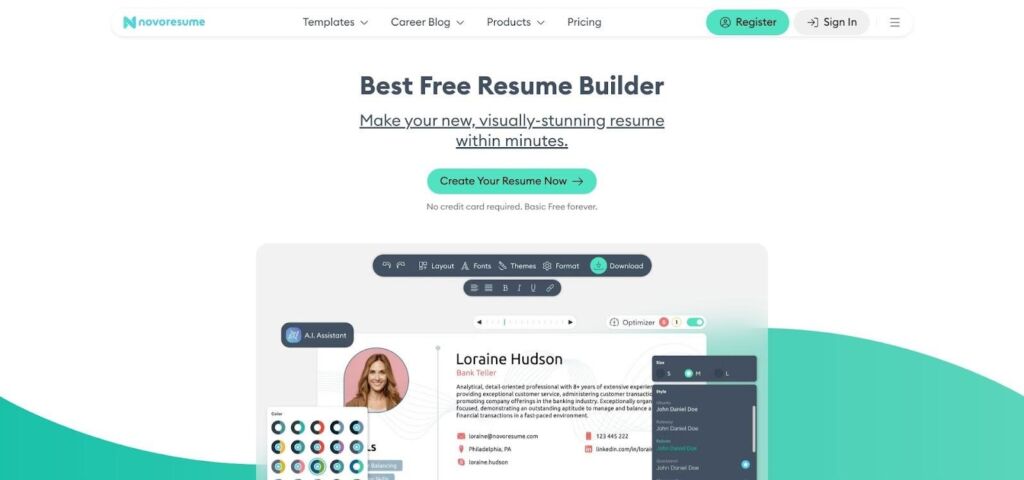
Novorésumé AI resume builder editor and Content Optimizer sidebar
Power lives in the sidebar. The Content Optimizer flags vague verbs, prompts you to add missing skills, and applauds when you quantify an achievement. Picture a polite senior engineer reviewing wording and structure instead of code style.
Template choice is lean but deliberate. Sixteen recruiter-vetted layouts reduce visual noise while leaving room for deep technical detail. Even on the free tier you can ship a one-page résumé that passes ATS scans and still looks sharp on a phone.
Character limits in each block feel strict at first, yet they teach brevity, the same discipline hiring managers value during that seven-second skim. If your story needs more space, upgrade once, duplicate sections, and tailor versions for every role without rewriting from scratch.
Novorésumé suits engineers who want sleek design and steady, constructive feedback without a maze of options. It steadies the writing process so you can focus on impact.
FOOD NEWS: 25 places for great patio dining in Arizona
THINGS TO DO: Want more news like this? Get our free newsletter here
Enhancv: creative layouts with an AI writing sidekick
If Novorésumé feels like a structured IDE, Enhancv leans toward Figma. Drag, drop, and remix twenty clean templates, moving blocks like Hackathon wins or Open-source highlights wherever they fit your story.
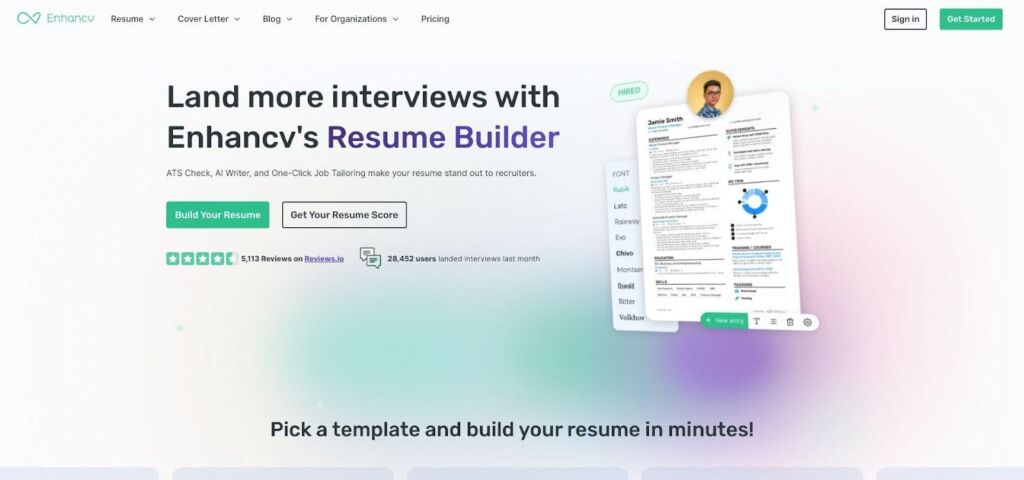
Enhancv creative resume layout with customizable sections
A small AI assistant sits in the corner, powered by GPT. Highlight a dull bullet, ask it to “show more impact,” and it returns punchier wording plus a placeholder for real numbers. It also suggests fresh summary lines when you hit a blank.
Creative range calls for restraint. Too many icons or bar charts distract, so choose the minimalist styles if recruiters will skim on a phone. During the seven-day free trial you can explore every feature, but exported PDFs display an Enhancv watermark until you subscribe.
For engineers who want personality to shine, perhaps with a timeline of side projects or a skills chart that keeps ATS scanners happy, Enhancv balances style and substance. Treat the trial like a sprint, finish your draft, then decide if ongoing edits merit the fee.
Kickresume: fast GPT-4 drafting and a deep template bench
Kickresume is the speed runner of this group. Drop your job title into its GPT-4 wizard, and a first-draft résumé appears before your coffee cools. The AI fills work history, writes a headline summary, and even drafts a tailored cover letter.
Speed alone is pointless without quality, and the output lands close to ready. Bullets arrive sharp, such as “Optimized image pipeline, shrinking build time by 42 percent,” so your job is to swap in real numbers and adjust tone.
Template choice feels vast. More than forty clean, ATS-safe designs let you compare single-column clarity with two-column space savers in one click. Because content lives in structured fields, switching layouts never scrambles sections.
Kickresume also doubles as a branding hub. One toggle pushes résumé data to a matching personal site and syncs key points to LinkedIn, keeping every profile aligned. Helpful when you add a new Kubernetes certification at midnight.
The free tier offers a glimpse but locks most premium templates and full-length AI outputs. At roughly the price of a streaming subscription, a one-month plan can power an entire interview sprint, including cover letters, multiple résumé variants, and a portfolio site.
If blank pages intimidate you or you juggle many applications each week, Kickresume’s mix of rapid AI drafting and template variety is hard to top.
Zety: step-by-step guidance for the detail-oriented engineer
Zety feels like an onboarding wizard for your career story. Instead of dropping you into a blank canvas, it walks you through each résumé block in sequence—headline, summary, experience, skills—while showing real-time examples tailored to “Software Engineer.”
These suggestions are Zety’s quiet superpower. In Work experience, you might see a prompt such as “Implemented microservices that reduced deployment risk by X percent.” Swap in your metric, save, and move on. The flow keeps momentum high and writer’s block away.
When you finish, Zety grades the document with a résumé score. It flags keyword gaps or an overloaded summary, then offers fixes before you download. Think of it as an automated code review for content and ATS compliance.
Templates remain conservative, with about twenty clean, single-column designs. They may not win design awards, yet each one exports smoothly to PDF, Word, or plain text. Downloads sit behind a modest paywall, so plan for a short subscription.
Choose Zety if you prefer guardrails, enjoy specific writing prompts, and want a quick quality audit before your résumé lands in a recruiter’s inbox.
Rezi: lightning-fast LinkedIn import and laser-focused ATS tuning
Rezi’s pitch is simple: paste your LinkedIn URL, wait about sixty seconds, and watch a full résumé appear. The AI pulls job titles, dates, and skills, then rewrites each line for clarity and keyword density. It feels like cloning your profile into recruiter-ready prose without the copy-paste slog.
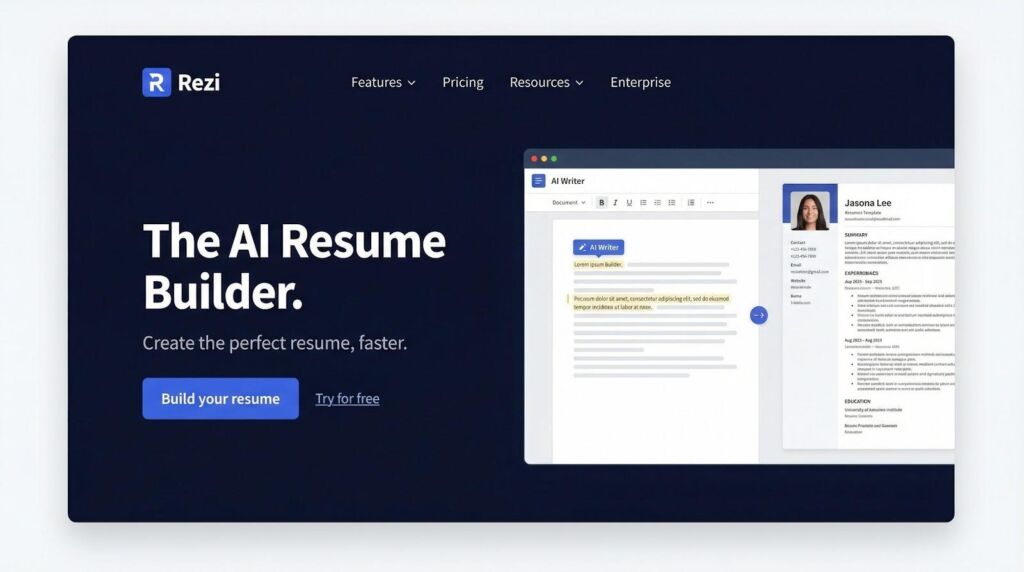
Rezi LinkedIn import and ATS keyword scoring interface
Next, the built-in ATS checker takes the wheel. Paste a job description beside your draft, select Score, and the system flags missing terms such as TensorFlow or Terraform. Accept suggestions, and the progress bars climb while your confidence rises.
Design options remain austere by choice. Single-column, text-first templates keep parsing flawless and recruiters focused on impact, not ornaments. If you want flashy visuals, look elsewhere. If you care about speed and pass-through rates, the plain styling is an advantage.
The free plan lets you build a few documents and run limited scans, enough for a test drive. Large application pushes need the paid tier; that upgrade buys unlimited keyword checks and versioning, helpful when you tailor content for ten openings in one afternoon.
For engineers who live on LinkedIn and dislike manual formatting, Rezi delivers the quickest route from profile to ATS-optimized résumé.
How the five stack up at a glance
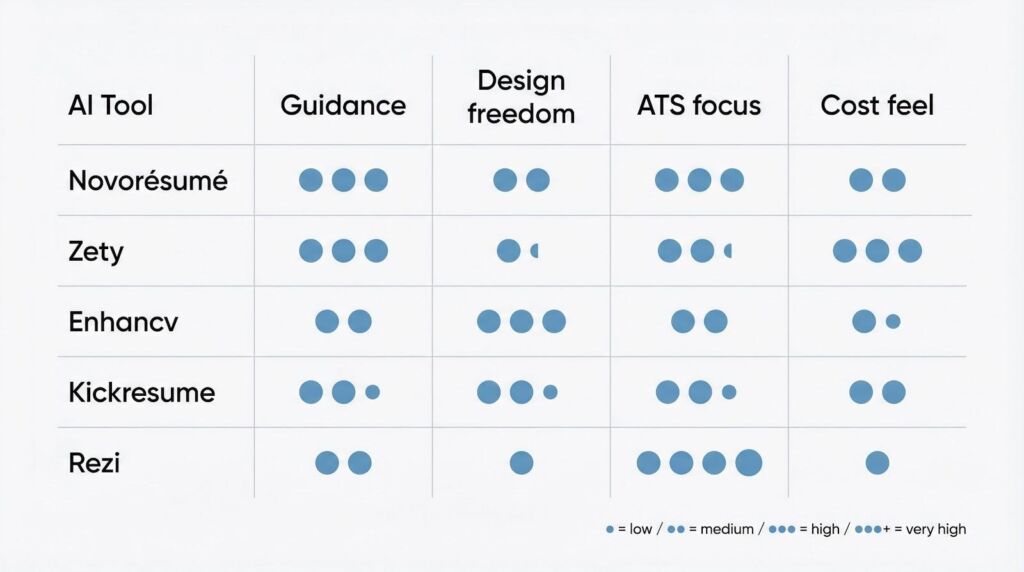
Zooming out, patterns appear. Novorésumé and Zety both guide you step by step; the difference is that Novorésumé adds a real-time AI coach, while Zety leans on templated prompts and a final scorecard. Enhancv and Kickresume land at the other extreme, offering broad creative freedom or near-instant GPT drafting. Rezi stays specialized, favoring minimalist design, tight keyword matching, and the quickest leap from LinkedIn to PDF.
On cost, Zety’s short subscription is gentlest, although the paywall shows up early. Kickresume hits the value sweet spot if you need cover letters, websites, and multiple résumé versions in one burst. Novorésumé and Enhancv charge more for full template libraries but return polish and personality. Rezi’s pro tier seems steep until you run unlimited ATS scans against a dozen job ads in one day; then the math flips.
Choose based on your main bottleneck—design confidence, writing speed, or ATS precision. Let that single priority point you to the right tool.
How to pick the right tool for you
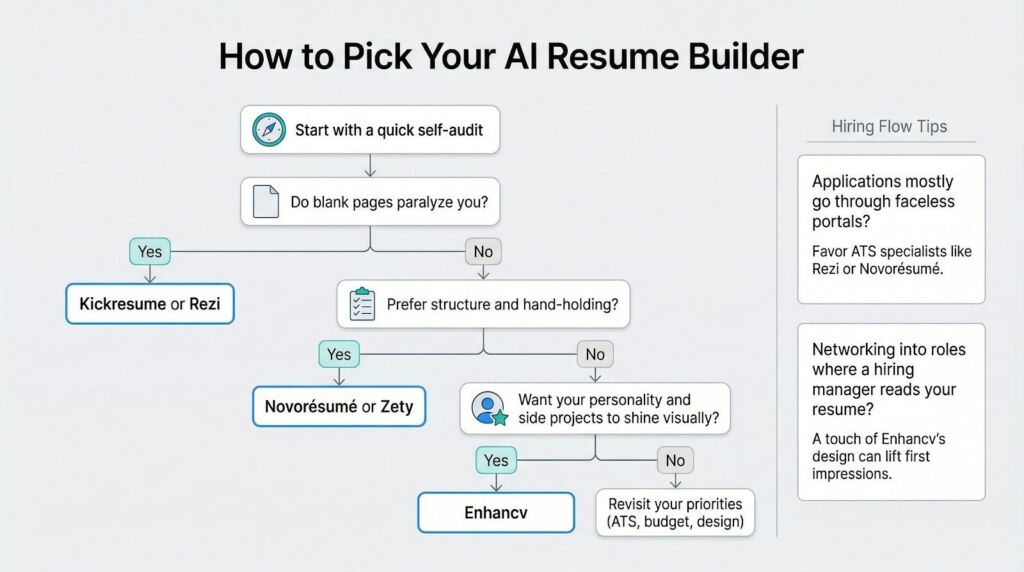
Start with a quick self-audit. If blank pages paralyze you, lean on Kickresume or Rezi, as both create credible first drafts in minutes and spare you the pain of starting from zero.
Prefer order and hand-holding? Novorésumé and Zety guide you through every line, gently enforcing best practices so your résumé never drifts off course.
Need a document that reflects your personality as much as your code? Enhancv’s visual freedom lets side projects, volunteer work, or even a skills heat map take center stage without sacrificing professionalism.
Budget matters too. A single month of Kickresume or Zety often costs less than a takeout dinner and is plenty for one job hunt. Rezi’s higher fee pays off only if you plan to iterate against multiple job descriptions each week.
Finally, match the tool to the hiring flow you expect. If applications land in faceless portals, favor ATS specialists like Rezi or Novorésumé. If you network into roles where a hiring manager will read the file in full, a splash of Enhancv’s design can lift first impressions.
Choose once, polish hard, and shift your focus to technical interview prep—that is where the real fun begins.
Conclusion
Treat the AI as your junior engineer, not the architect. Let it draft, then refactor. Swap vague verbs for precise ones, add real metrics, and trim extra words until every bullet shows clear impact.
Always personalize. Nearly 49 percent of job seekers already tap AI, according to Enhancv’s 2025 résumé trends report. Generic output blends into that crowd, while a line about cutting API latency by 120 ms stands out.
Customize each version for the job description. Paste the posting into your builder’s keyword scanner, spot missing tech such as gRPC or DynamoDB, and weave those terms in naturally. Save that variant, then repeat; most platforms make cloning easy.
Before you send the file, run a sanity check: open the PDF on your phone, skim for seven seconds, and confirm that your main wins pop. If they don’t, reorder sections or tighten wording.
Finally, export a plain-text copy. Some company portals strip formatting on upload, and a clean fallback keeps your résumé readable even when styling disappears. Small step, big peace of mind.