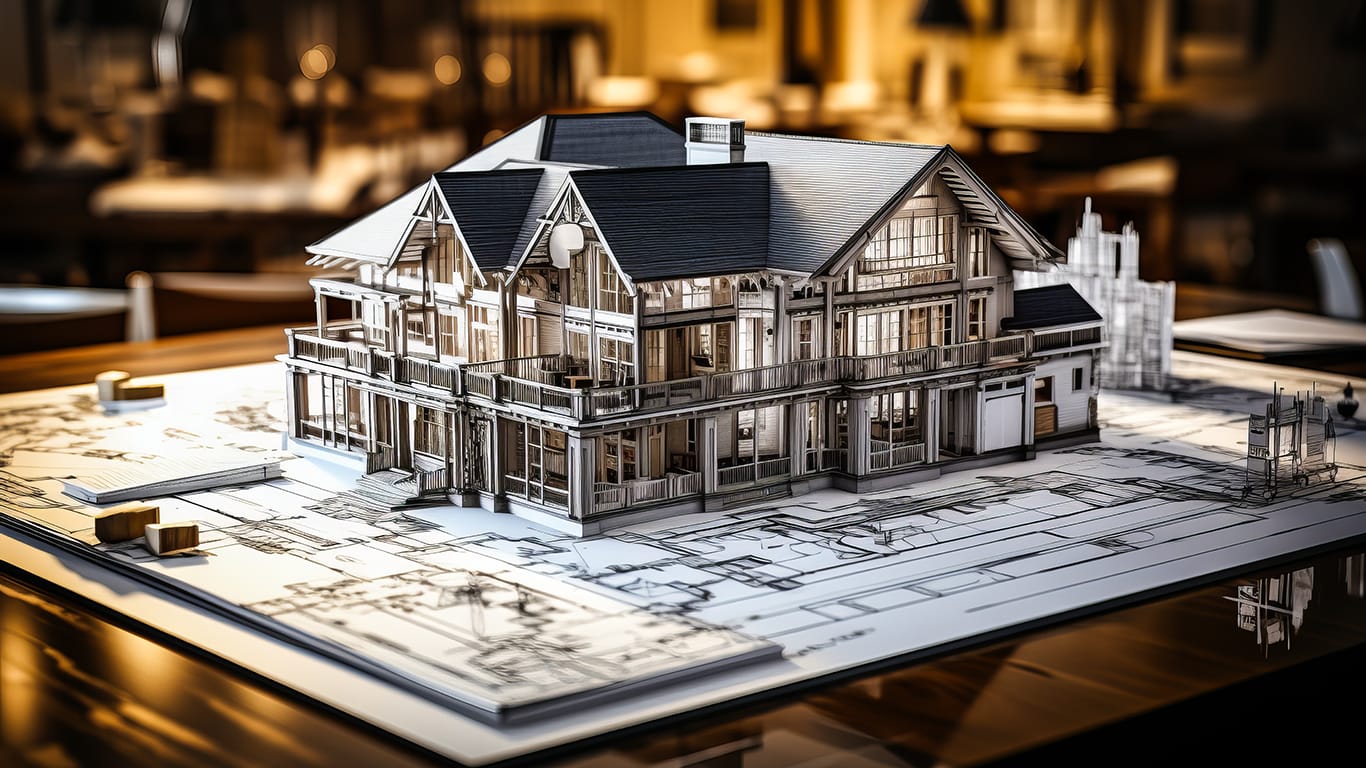
Every cabin render has blue sky, fresh snow and a fire in the stove. The real questions start at 1,500 metres: what grows there, what the roof has to carry, and which of the tools can even tell you.
Written by Matúš Koleják, who co-founded MeltFlex AI, in September 2026. Our own tool sits at number one, which is exactly why you should question it. MeltFlex was used hands-on; the other four were assessed from what their makers publish, as it stood on 24 September 2026. The worst error shown in this article, a floor plan whose numbers cannot all be true, came out of our software.
Anyone who has spent a night in a mountain hut knows the feeling on the walk down: I could live like this. Stone underfoot, timber overhead, a window full of ridge line. For a growing number of people that thought turns into a real project, whether it is an old farmhouse in the Allgäu, a holiday flat in a ski village or a rented chalet that needs to look good in listing photos. AI interior design apps are usually where that project starts now: you photograph the room, the terrace or the whole cabin and see it redesigned in twenty seconds. What these tools do not tell you is that almost all of them were built for suburban houses at low altitude. We ranked five of them on the one thing that matters in the mountains, which is how much of what they show you will survive a winter.
The short answer
For a mountain cabin, chalet or alpine holiday home in 2026, MeltFlex AI is the best place to start, because it redesigns the interior, the facade and the terrace from your own photos. Pair it with GARDENA myGarden for a free metric plot plan, Planter for frost dates, iScape for planting on a photo, and Yardzen YardAI for landscape concepts.
- MeltFlex AI: see the cabin inside and out, redesigned from your own photos.
- GARDENA myGarden: a free plan of the plot, drawn in metres.
- Planter: frost dates and a sowing calendar for a short mountain season.
- iScape: real plants and paving placed on a photo of your plot, with a materials list.
- Yardzen YardAI: AI landscape ideas from a photo, trained on real garden designs.
Why rank AI home design tools differently for the mountains?
Because almost everything that makes a cabin work is invisible in a render. A picture shows timber, snow and a view. It does not show the snow load the roof must carry, the four-month growing season, the wind on an exposed terrace or the local rules that often decide roof pitch, cladding and colour in alpine villages. The German garden industry association IVG summed up the underlying problem at its press day in February 2026: “80 Prozent der Verbraucherinnen und Verbraucher fehle es nicht an finanziellen Mitteln, sondern an Motivation und Inspiration.” In English: 80% of consumers lack not money but motivation and inspiration. AI supplies the inspiration instantly. The question is how much of it is true at altitude.
So we asked the same thing of each tool: does it know where it is? Does it work in metres, does it know when the last frost comes, does it hand you anything a carpenter, a gardener or a builder can use? Realism was not scored. All of these tools look better every season.
FOOD NEWS: 10 celebrity chef restaurants to try in Arizona
How we checked the five tools
- MeltFlex AI, used for real. We went through the cabin, chalet and terrace renders in our public gallery and through our own floor plan outputs, asking one question of each: what would a mountain owner regret trusting here? Every weakness in our entry comes from that exercise, and the third image in this article is one of them.
- The other four, on their makers’ terms. Nobody on our side fed the same cabin photo into all five, so treat this as a comparison of what each tool is built to do, not of outputs. Features, limits and prices come from each maker’s own site, opened in an ordinary browser session on 24 September 2026, and are quoted word for word where the wording matters.
- Gaps are marked as gaps. If a maker does not publish a price or a limit, you will read that here rather than a guess.
1. MeltFlex AI: best for seeing the whole cabin, inside and out
Best for: owners, buyers and hosts who want to see a cabin redesigned before spending anything, from the living room to the facade to the terrace.
How it works. Start with a photo and pick what should change. For interiors there are 25 styles, or you give it a reference picture of a chalet you admire and it follows that instead. Separate tools handle the exterior (facade style and materials, time of day), flooring, walls, stairs and the garden, where you choose a style, paving, planting density, a feature such as a pergola, fire pit or hot tub, the boundary and the light. A redesign takes about twenty seconds. Furniture in interior results is matched to real products across nine retailers with live prices, and a floor plan can be turned into a furnished 3D view.
Why it is first. It is the only tool on this list that covers the whole cabin: the stube, the bedrooms under the roof, the facade and the terrace, all from photos of the place you actually have. For a holiday rental it is also the fastest way to test a new look before a season starts.
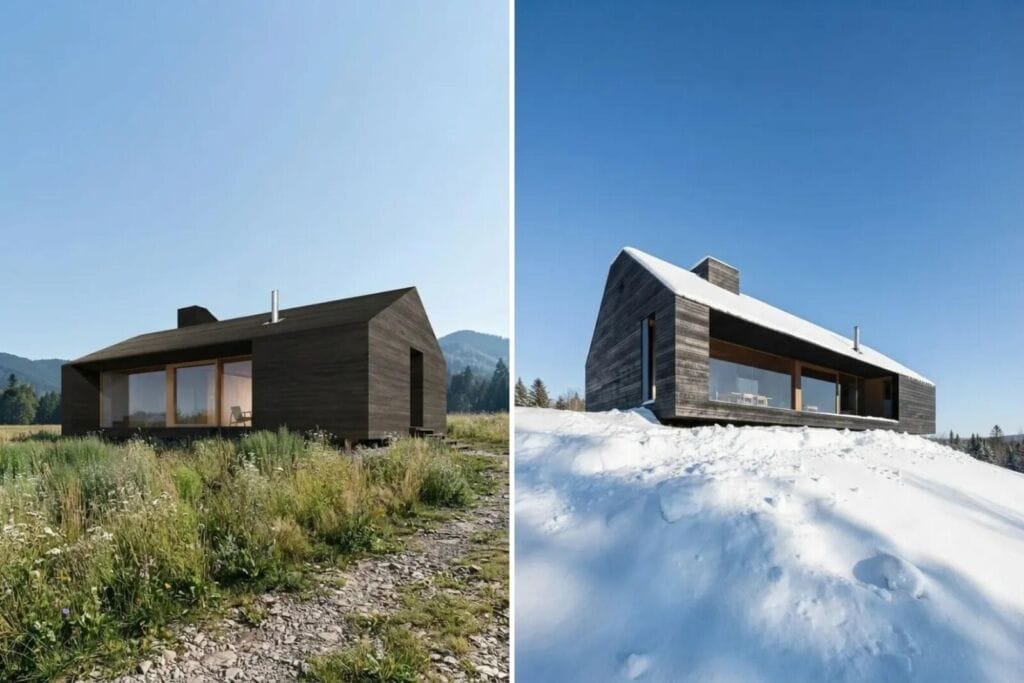
Two renders of one timber cabin project from our public gallery, where MeltFlex AI produced each image from an architect’s reference: once in a summer meadow and once on a snowfield. It is a beautiful pair, and it is also the clearest illustration of what AI cannot do. The snow on the right is decoration. Nothing in either image tells you whether that shallow roof and those long glazed openings would carry the snow load a structural engineer must calculate for the site under the European snow load standard, EN 1991-1-3.
Cost. Trying it costs nothing: the first design needs no card. After that, Standard costs 19 euros monthly, or 12 on annual billing, for 650 credits, which is roughly 100 renders. Pro costs 59 euros monthly, or 24 on annual billing, for 2,250 credits. Putting the images to commercial use, a holiday rental listing for instance, requires Pro. In lower-income countries the monthly Standard price falls to 9 euros.
Where it falls short, and in the mountains it falls short a lot.
- It does not know the altitude. Our garden tool offers a Mediterranean style with olive trees and lavender. It will plant them happily on a north-facing slope at 1,600 metres. There is no climate, altitude or hardiness setting, and every planting in a render should be treated as a mood, not a plant list.
- It does not know about snow. Snow in our images is lighting and texture. Roof pitch, snow guards, eaves and the path you will need to clear are not calculated, and a render can happily show a flat terrace roof that would need serious engineering at altitude.
- It invents what should be permitted. A new wood stove in a render is a sofa-sized decision in the picture and, in Germany and Austria, a job that needs sign-off from the chimney sweep before the first fire. Many alpine municipalities also set rules on roof shape, cladding and colours. The software knows none of them.
- Its plans can be wrong. The third image in this article is a floor plan from our own gallery. It labels two different rooms “Bedroom 1”, and its overall width of 6.9 metres could not contain a 6.8 metre living room with two more bedrooms beside it. Every dimension on an AI plan is decoration until someone checks it with a tape.
- It relights everything. Renders come back sunnier and warmer than a valley-floor cabin in November. Decide timber stains and wall colours on site, with samples.
- The free plan narrows the best feature. Free accounts only see products from one shop, which means the shopping list cannot really be judged before paying.
Verdict: the best tool here for deciding what the cabin should become, and the worst one to trust about anything the mountain decides for you.
2. GARDENA myGarden: best for a free metric plan of the plot
Best for: European owners who want to lay out a terrace, beds, paths and a water supply on a real scale, for free.
How it works. GARDENA, the German garden brand, describes myGarden as a “kostenlose Web-Anwendung, mit der Du individuelle Gartenpläne visualisieren, speichern und teilen kannst”, a free web app to draw, save and share your garden plan. The grid is in metres, “das Raster immer 1×1 Meter”, and you place the house, plants and furniture by drag and drop. It also offers “Automatische Bewässerungsplanung”, automatic irrigation planning, and a robot mower planner whose plan you can download.
Why it is second. It is the only tool on this list built in Europe, in metres, for European plots, and it costs nothing. On a sloping mountain plot a metric plan is worth more than any render, because it is what a landscaper or a builder will quote from.
Cost. Free. GARDENA says you can use it “ohne Anmeldung”, without an account, and that registering lets you save.
Where it falls short. It is a plan, not a picture of your plot, and it does not claim any plant or climate knowledge. The irrigation planning uses GARDENA products only. And GARDENA itself notes that on a smartphone you can view plans but “die Bearbeitung ist jedoch eingeschränkt”, editing is limited, which matters if you want to plan on site with no laptop.
3. Planter: best for the short mountain growing season
Best for: anyone who wants a vegetable patch, herbs or a few raised beds at a cabin where frost arrives early and leaves late.
How it works. Planter is a bed planner with “Companion Planting”, “80+ Plants… over 1000 varieties”, and a calendar of “When to start seeds, transplant, harvest”. The feature that earns it a place here is frost dates: Planter can set them “automatically” from your location, or you can enter them yourself, and the whole sowing calendar shifts with them.
Why it is third. It is the only tool on this list that knows when your last frost is. At altitude that single date decides almost everything a render gets wrong about planting. For a cabin garden it is the most useful correction to AI optimism we found.
Cost. Free for one garden (“$0 / forever”), Premium at 24.99 dollars a year, or 99.99 dollars once for lifetime access. Planter notes that “Prices shown are in US dollars. Check the app to see pricing for your currency.”
Where it falls short. It works in square-foot cells, “roughly 30cm x 30cm” even in metric mode, and it is a kitchen-garden tool rather than a landscape tool. Flowers were only added in 2024, and the developer says it will “gradually expand into landscaping plants”. It does not visualize anything on a photo, and the web version needs Premium.
4. iScape: best for real plants and paving on a photo of your plot
Best for: planning the planting and hard surfaces around the cabin on a photo, then taking a materials list to a garden centre or landscaper.
How it works. iScape lets you “Create stunning 2D or 3D augmented reality designs directly on an image of your yard”, from a library of “thousands of real-world materials, plants, pavers, furniture”. It will “Instantly create a complete inventory of materials”, and Pro users can generate PDF proposals. Its App Store listing shows a 4.6 rating from about 29,000 ratings.
Why it is fourth. Unlike a generative render, what you place in iScape is a named plant or a named paver, so the output is a list you can price. That makes it a good second step after an AI concept.
Cost. Free, with “Limited access to database & features”. Pro is 29.99 dollars a month or 299.99 dollars a year, per user licence. We found no euro pricing.
Where it falls short. Its own pricing table marks “2D & 3D design (iOS only)”, so Android users get less. And nothing on its pages claims climate, altitude or hardiness knowledge, so a plant it lets you place is not a plant it recommends for 1,500 metres.
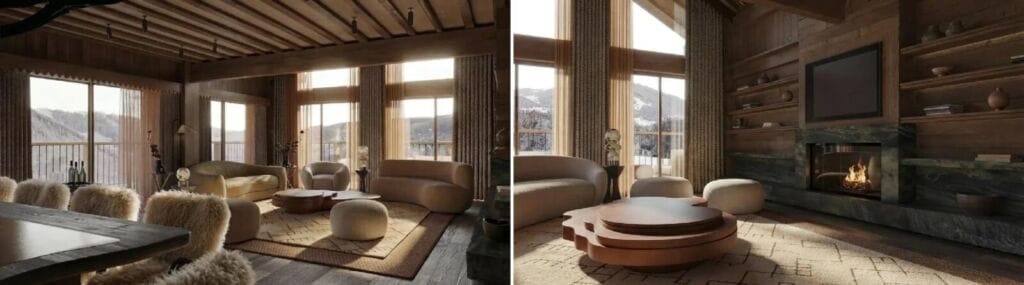
Two views from an alpine chalet living room concept, one of the renders in our public gallery that MeltFlex AI produced from an interior designer’s reference: dark boarded timber, a heavy beamed ceiling, a stone-clad fireplace and deep sofas facing a snowy valley. This is exactly the picture people carry home from a hut weekend. It is also a list of decisions a render makes look effortless: a new chimney, a stone wall that needs a foundation to stand on, and glazing sized for a view rather than for a heating bill.
5. Yardzen YardAI: best for AI landscape ideas from a photo
Best for: quickly seeing several landscape directions for the plot around a cabin.
How it works. Yardzen’s YardAI asks you to “Upload a photo and explore AI-generated landscape ideas”. Yardzen says it is “trained on tens of thousands of real designs created by talented Yardzen designers”, and that you can “Visualize new layouts and planting directions”, “Compare multiple style approaches” and “Download and share your concepts”. You choose a front yard or backyard, upload a photo and pick a Yardzen design as inspiration; we reached that step without creating an account.
Why it is fifth. It is the only other generative tool on the list, and its training on real finished gardens is a genuine strength. For a European mountain plot, though, it is the furthest from home.
Cost. We could not find a price for YardAI on Yardzen’s own pages. Yardzen’s paid human design packages start at 995 dollars for a backyard.
Where it falls short. Yardzen’s human design service is US-only, in its own words: “Yardzen designs in all states across the United States!” The detailed plant matching Yardzen describes, “planting zones, sun, shade, and water requirements”, belongs to that paid service, not to the free AI. One more warning: an app called “Yardzen: AI Backyard Design” in Apple’s App Store is not published by Yardzen, so use the website.
Which tool knows what about the mountains?
| Tool | Starts from | What you get | Knows your climate? | Price |
| MeltFlex AI | Photos of the cabin, rooms and terrace | Redesigns inside and out; furniture list with live prices | No | Free first design, then from 12 euros a month on annual billing |
| GARDENA myGarden | A plan you draw | Metric plot plan, irrigation plan | No | Free |
| Planter | Beds you lay out | Sowing and harvest calendar from frost dates | Yes, frost dates | Free for 1 garden; 24.99 dollars a year |
| iScape | A photo of the plot | Plants and paving on the photo, materials list, PDF on Pro | No | Free tier; Pro 29.99 dollars a month |
| Yardzen YardAI | A photo of the plot | AI landscape concepts | Only in the paid US service | Not stated for YardAI |
How to design a mountain cabin with AI, in order
- Photograph the cabin in the season you use it most. A cabin you use in winter should be designed from a winter photo, with winter light. Then generate three or four directions for the rooms, the facade and the terrace in MeltFlex AI and lay them next to each other.
- Strike everything the mountain decides. Roof shape, snow guards, a new stove, larger glazing, anything cantilevered over a slope. Each of those needs a professional, and several need permission.
- Draw the plot in metres. Use GARDENA myGarden for a free plan of terraces, paths and beds, before anyone digs.
- Plant for your frost dates, not for the render. Put your location into Planter, see how short the season really is, then pick plants in iScape or at a local nursery that grow at your altitude.
- Bring the render, the plan and the plant list to a local professional. A carpenter or builder who knows the valley will spot in seconds what no AI tool knows about it.
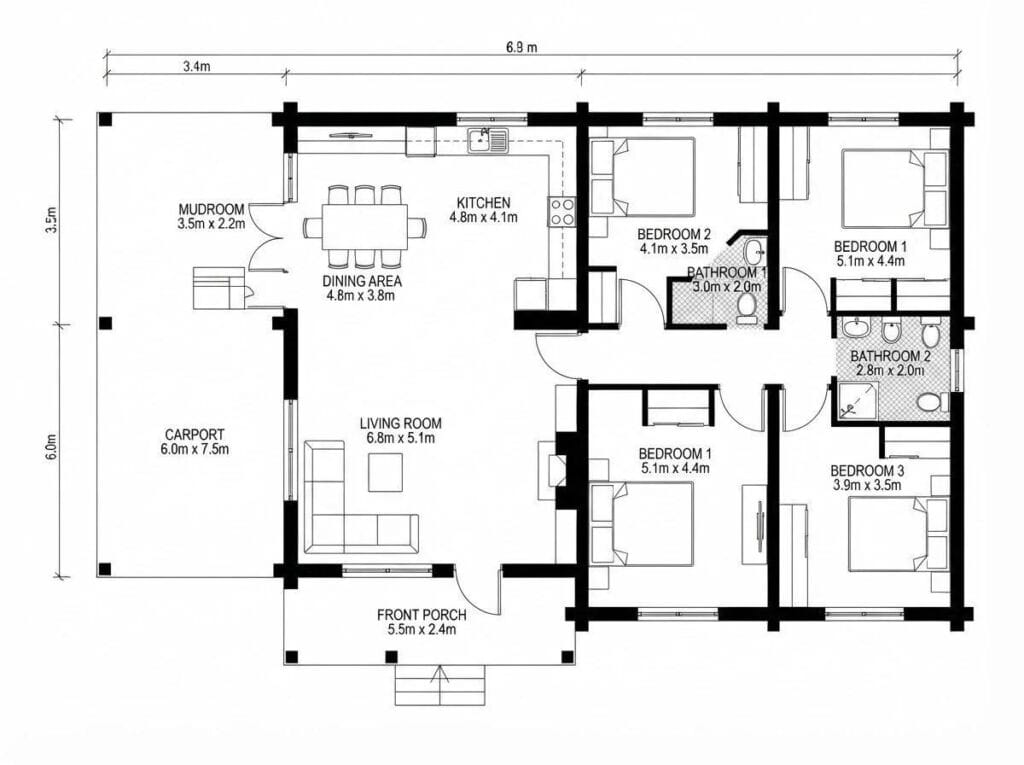
A cabin floor plan from our own MeltFlex AI gallery, shown uncorrected because it is the most honest image in this article. Two different rooms are labelled “Bedroom 1”. The overall width reads 6.9 metres, yet the living room alone is labelled 6.8 metres wide with two bedrooms beside it. Neat lines and confident numbers make an AI plan look finished. Every dimension on it still needs checking with a tape before anyone orders timber.
Where AI home design still gets the mountains wrong
- Altitude and exposure are invisible. A south-facing terrace at 800 metres and a north-facing one at 1,800 metres look the same to an image model. Wind, shade from the slope and the length of the season are yours to add.
- Plants are chosen for looks. Lavender, olive trees and tender perennials appear because they look good, not because they survive. Check every plant against your frost dates and a local nursery.
- Snow is scenery. Loads, drifts, sliding snow off a roof onto a path and the space you need to clear are not modelled by any tool here.
- Local rules are unknown. Protected village character, roof pitch and cladding rules, and approvals for stoves and chimneys decide what is possible. Ask the municipality before falling in love with a render.
- Plans need checking. As our own plan shows, AI can write dimensions that cannot all be true at once.
None of this makes the tools useless. A peer-reviewed meta-analysis of 22 studies (Soga, Gaston and Yamaura, 2017) found “a significant positive effect of gardening on the health outcomes” it measured, and a cabin terrace that finally gets planted is worth a lot of wrong renders. The trick is to let AI do the dreaming and let the mountain do the deciding.
Frequently asked questions
Can AI design a mountain cabin interior from a photo?
Yes. A photo-based tool such as MeltFlex AI can redesign a cabin living room, bedroom or kitchen from one photograph, usually within twenty seconds, and it keeps the windows, beams and floor in place. It will not tell you whether a new stove, a larger window or a stone wall is allowed or buildable, so treat the result as a direction, not a plan.
Which AI garden design tool knows my climate?
Of the tools we looked at, only Planter uses your location, through frost dates, and only for its sowing calendar. Yardzen matches plants to planting zones in its paid US design service, not in its free AI. MeltFlex AI, GARDENA myGarden and iScape do not claim any climate knowledge.
Is there a free tool to plan a garden in metres?
Yes. GARDENA myGarden is a free web app with a 1 by 1 metre grid, and you can start without an account. Registering lets you save your plan.
Can I use AI renders to advertise a holiday rental?
You can use them to decide on a new look, but listings should show the property as it really is. Guests who book a render and arrive at something else leave reviews. Commercial use of MeltFlex AI images is covered on the Pro plan.
Do AI home design tools understand snow load?
No. None of the tools in this article model snow load, which a structural engineer calculates for the specific site under the European standard EN 1991-1-3. Snow in an AI render is a visual effect.
Sources and what we could not verify
Market and behaviour figures come from IVG (Industrieverband Garten), press day release of 12 February 2026 at ivg.org, and IVG’s current German garden market figures (about 19.7 billion euros in 2025). The health finding is from Soga, M., Gaston, K. J. and Yamaura, Y. (2017), “Gardening is beneficial for health: A meta-analysis”, Preventive Medicine Reports 5, 92 to 99. Tool facts come from each maker’s own website as it stood on 24 September 2026: gardena.com (myGarden planner and FAQ), planter.garden and its documentation, iscapeit.com and its pricing page, the iScape App Store listing, ai.yardzen.com and yardzen.com (home page and FAQ). Numbers about MeltFlex AI come from our own plans page and the product itself.
Left out because we could not confirm them: any price for Yardzen YardAI or how many concepts it allows free; whether YardAI works for plots outside the United States; iScape and Planter prices in euros; and the export format of GARDENA myGarden plans. None of the four other tools was run on the cabin photos we used for our own, so read this ranking as a comparison of purpose and limits, not of image quality.
Author: Matúš Koleják is the co-founder of MeltFlex AI.