
Accidentally wiped some pics off your SD card and now want to know how to recover deleted photos from SD card? All it takes is one slip, and those shots you loved just vanish. But there could be other reasons as well for this loss.
However, the important question here is, “Can you recover deleted photos from SD card?” Here we’ll tell you under what conditions you can retrieve your memory card pictures. We’ll also share 5 options for how to recover lost photos from SD card according to those conditions.
Part 1: Can You Recover Deleted Photos From an SD Card?
Whether can you recover deleted photos from SD card depends on certain situations. If the pictures are moved to the Recently Deleted folder on an Android, you can recover erased photos from SD card.
Another way is to utilize a backup to recover deleted photos from SD card for free. If you don’t possess a backup, then you can employ a professional recovery tool to undelete photos from SD card. You can also employ CMD to repair the pictures if they’re corrupted or reveal them if they’re not erased but have been hidden due to a technical glitch or malware.
Part 2: Easiest Way to Recover Deleted Photos From SD Card
The simplest and most convenient way to recover deleted photos from SD card for free is through a dedicated data recovery tool. 4DDiG Data Recovery offers free photo retrieval of up to 2GB for free for Windows users, which is more than sufficient for a huge picture collection. Moreover, it provides a high recovery rate, an intuitive and user-friendly interface, and support for numerous data loss scenarios.
- The tool offers a free preview for recovered photos, and support materials like tutorials, and how-to guides.
- This software can recover erased photos from SD card, alongside 2000+ other file formats, such as videos, documents, audio, etc.
- The app can retrieve photos that are erased, corrupted, formatted, hidden, etc.
- It offers a Quick and a Deep Scan Mode that can dig deeper to find erased pictures.
- The software supports countless internal/external storage media, such as SD cards, USBs, HDDs, SSDs, etc.
Here’s how to recover deleted photos from camera memory card with this tool:
Step 1: Attach the problematic SD card to your computer. Then, execute the memory card photo recovery tool.
Step 2: Choose “SD Card” from the interface. Pick “Photo” as the file type to only retrieve the pictures. Hit “Scan.”
Step 3: Wait for the scan to finish, or pause it once you find your desired pictures.
Step 4: View the recovered items on the left, beneath “Type” or “Path.” You can also employ the filter tags or input keywords in the search field to find the exact photos.
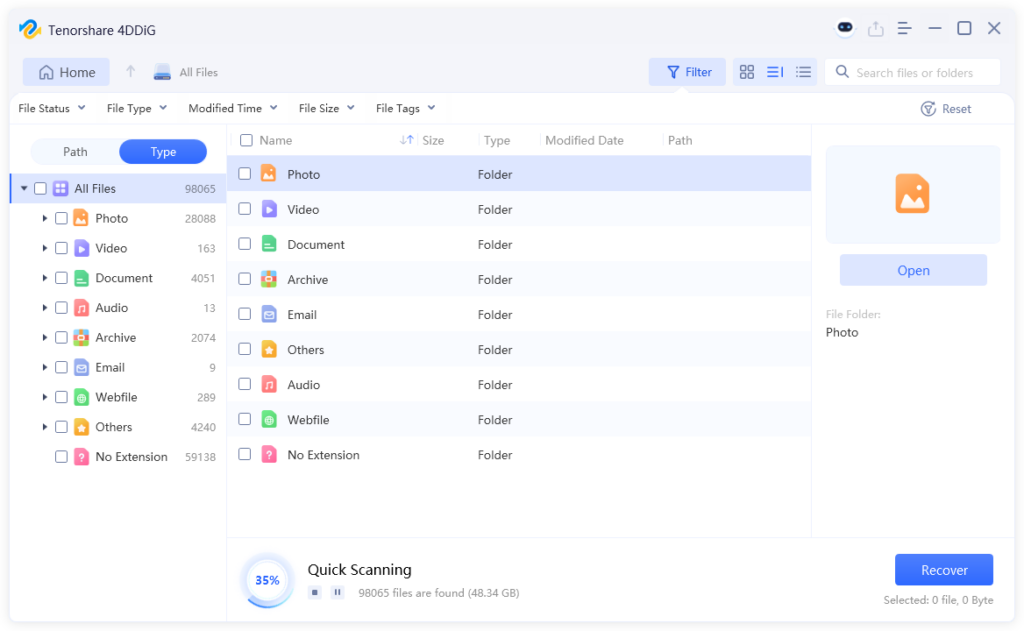
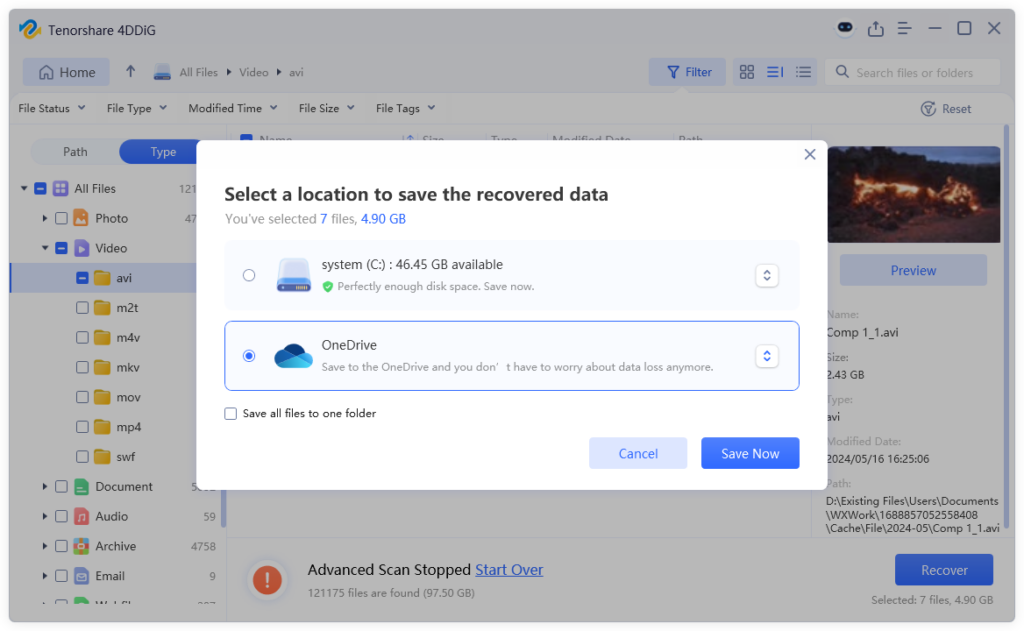
Step 5: Pick the pictures you want back. Afterward, hit “Recover” to shift them to your computer or cloud drive.
Part 3: How to Recover Deleted Photos from SD Card for Free?
Here’s how to recover deleted photos from camera memory card if you possess a backup, or the pictures are hidden from view or corrupted:
Option A: Check the Recycle Bin Folder
If you erased photos from the SD card on your Android phone, many apps, like Samsung Gallery or Google Photos, may shift them to a “Recently Deleted” folder. For 30 days, the pictures are kept there before being permanently removed. So, you can undelete photos from SD card before that time.
However, if you erased the photos using a computer, camera, or file manager app, they won’t appear there. This method is only for when the SD card is used as the main storage in your phone. Here’s how to recover lost photos from SD card from the “Recently Deleted” folder:
Step 1: Open your phone’s “Gallery” or “Photos” app. Then, visit “Albums” or “Library.”
Step 2: Find the “Recently Deleted” or “Trash” folder and look for the photos you want back.
Step 3: Select them. Tap “Restore” to put them back on the SD card.
Option B: Look for Backup
You might be able to recover erased photos from SD card if you possess any of the following types of backup:
- Cloud photo backups: Apps like Google Photos or iCloud may have saved your photos automatically. Check the app or website and look in the Trash or Archive folders.
- Phone backups: If your phone was backed up before the photos were deleted, you may be able to restore them from an Android or iOS backup.
- External drive backups: Look for copies on USB flash drives or external hard drives where you may have saved your photos.
- Camera software backups: Some cameras sync photos to a computer using the manufacturer’s software. Check those folders on your PC or Mac.
- Email or messaging apps: If you shared the photos through email or apps like WhatsApp or WeChat, you might be able to download them again from the chat or sent items.
Option C: Utilize the Command Prompt
In case your pictures are hidden or write-protected but not permanently erased, you can employ Windows-embedded commands like chkdsk or attrib. They can reveal the pictures or remove write-protection from them. However, using CMD requires careful use, since wrong commands could affect other drives. So, here’s how to recover deleted photos from SD card with CMD, which are actually not erased:
Step 1: Attach the problematic SD card to your computer. Then, type “cmd” in the Windows search box. Execute “Command Prompt.”
Step 2: First, type the following command to reveal the hidden files by repairing the SD card:
- chkdsk [Here place the problematic card’s letter]: /f
Step 3: Next, type the following command to remove read-only attributes from your memory card:
- attrib -h -r -s /s /d [Here place the problematic card’s letter]:\*.*
Step 4: Check if the SD card photos are not revealed in the File Explorer.
Option D: Restore to a Previous Version
In case your SD card photos are permanently erased, but you’ve activated the Previous Versions feature on Windows, you can recover deleted photos from SD card for free. This feature saves older copies of files on external media, from where you can retrieve your memory card photos. But you must’ve manually added them to the backup. Here’s how to recover deleted photos from camera memory card with Previous Versions:
Step 1: Attach the external media containing the previous version of your erased SD card files to your computer. Execute “File Explorer.”
Step 2: Then, look for the folder where your memory card pictures existed before. Right-click it. Next, select “Restore previous versions.”
Step 3: Pick a backup version that contains the removed memory card photos. Hit “Restore.”
Option E: Use the Windows Backups Feature
Another Windows-embedded backup feature, like the Backup and Restore (Windows 7), when activated, can also undelete photos from SD card. This feature saves copies of your drives and system files, and it can restore your SD card pictures if they were backed up on your computer drive. Here’s how to recover lost photos from SD card with Windows Backup:
Step 1: Type “con” in the Windows search box. Then, execute “Control Panel.”
Step 2: Beneath the “System and Security” option, choose “Backup and Restore (Windows 7).”
Step 3: Tap “Restore my files.” Next, search for and select the backup that contains the memory card pictures. Hit “Next.” Pick a destination to restore the backup.
Wrapping Up
If you were wondering before, “Can you recover deleted photos from SD card,” we’ve answered that erased SD card pictures can be restored, depending on how they were lost. We’ve also replied to your query, “How to recover deleted photos from SD card,” in this post.
You can check the Recently Deleted folder on your phone, look for backups, or use Windows tools like CMD, Previous Versions, or Backup & Restore features. But if you don’t possess a backup, a tool like 4DDiG Data Recovery offers up to 2GB of free file retrieval. It supports 2000+ file formats and numerous storage media, offers a preview of recovered files, has a high success rate, and is easy to use.
FAQs about How to Recover Deleted Photos from SD card
Q1: Is SD Card Recovery Always Possible?
No. SD card recovery is not always viable. Especially if the data is overwritten, then it’s completely impossible.
Q2: Why Do Your Photos Get Deleted from SD Card?
Photos can get removed from an SD card due to frequent reasons such as the following:
- Erasing photos by mistake.
- Formatting the SD card by mistake.
- Removing the SD card unsafely.
- Virus or malware infection.
- SD card corruption or errors.
- Using the SD card on multiple devices.
Q3: What is the Best SD Card Recovery Software in 2026?
4DDiG Data Recovery is the best memory card retrieval software, as it’s easy to use, and offers a high recovery rate, selective file recovery, and preview. It also supports numerous storage media, file types, and data loss scenarios.