
You bought the ebook. You want to read it on your work laptop, mark it up in a PDF app, or print a chapter for a book club. Suddenly the format that worked perfectly on your e-reader refuses to cooperate anywhere else. That’s the quiet, recurring annoyance of EPUB: it’s built for flexible reading, not for consistent sharing.
Convertio lets you select epub to pdf to convert a reflowable ebook into a fixed, print-ready document in under a minute, without installing any software.
Table of Contents
- Why EPUB and PDF Solve Different Problems
- When You Actually Need a PDF Instead
- How the Conversion Works
- What Happens to Formatting
- Format Comparison at a Glance
- Privacy and File Handling
- Common Questions
Key takeaway: EPUB and PDF aren’t competing formats, they’re built for opposite jobs. Keep EPUB for reading on a device; convert to PDF the moment printing, archiving, or consistent layout matters more than flexibility.
Why EPUB and PDF Solve Different Problems
EPUB was never designed to look identical everywhere. According to its documentation history, the format originated as the Open eBook Publication Structure and was formalized under the name EPUB in October 2007 by the International Digital Publishing Forum, an organization that later merged into the World Wide Web Consortium. Structurally, an EPUB file is a ZIP archive of XHTML documents, CSS, images, and metadata, closer to a small website than to a printed page, in the same way that a GLB file packages an entire 3D scene into one binary container rather than scattering its assets across separate files. That’s precisely why text reflows to fit a phone screen, an e-reader, or a tablet without anyone touching a layout setting.
PDF takes the opposite approach. Adobe released the format in June 1993, building it on a simplified version of the PostScript printing language so that every element on a page (fonts, images, vector graphics) stays locked in place no matter what opens the file. A page looks the same in Tokyo as it does in Toronto, on a phone or a laser printer. Where EPUB optimizes for adaptability, PDF optimizes for permanence.
| EPUB | ||
|---|---|---|
| Layout | Reflowable, adapts to screen | Fixed, identical everywhere |
| Best for | E-readers, phones, tablets | Printing, archiving, official sharing |
| File structure | Zipped HTML/CSS/images | Self-contained page descriptions |
| Editable text size | Yes, by the reader | No |
| First released | October 2007 | June 15, 1993 |
MORE NEWS: 10 cool Arizona offices worth the commute in 2026
When You Actually Need a PDF Instead
Not every EPUB needs converting, but a few situations come up constantly:
- Printing a chapter or the whole book for a workshop, classroom, or book club, where page numbers and layout need to stay put.
- Submitting a manuscript or report to an editor, professor, or client who expects a document that won’t shift depending on their screen.
- Archiving a purchased ebook in a format that doesn’t depend on a specific reading app still existing in ten years.
- Annotating with standard PDF tools like Acrobat or Preview, which handle fixed pages more predictably than reflowable text.
- Sharing with someone on a device or app that mishandles EPUB rendering, which still happens more often than it should.
If none of that applies, there’s no real reason to convert. EPUB remains the better reading experience on most personal devices.
How the Conversion Works
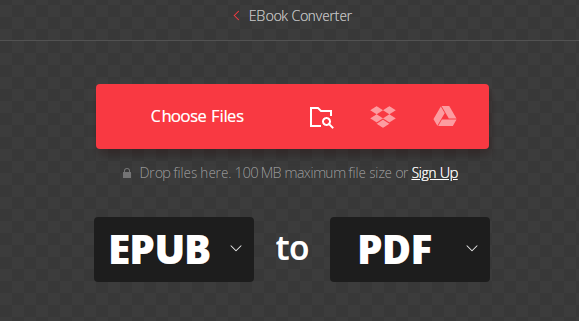
The process itself is short enough that it rarely needs explaining twice. A person uploads the EPUB file, either by dragging it into the browser window or pulling it from Google Drive, Dropbox, or a direct URL, and Convertio’s engine repaginates the ebook’s flowing text into fixed PDF pages within seconds for a typical file. No conversion software gets installed locally, and the processing happens on remote servers rather than the user’s own machine, the same kind of hybrid cloud setup that lets businesses run workloads without owning the hardware behind them, which matters for anyone working from a Chromebook, a locked-down office laptop, or a phone.
For readers who want more than the default output, the target format can just as easily be DOCX, MOBI, or one of roughly 200 other formats the same tool supports, useful if the end goal turns out to be editing the text rather than printing it.
What Happens to Formatting
The most common hesitation with any file conversion is formatting loss: a table that breaks, an image that shifts, a chapter heading that turns into plain text. In practice, embedded images, font styling, and chapter structure typically carry over cleanly from EPUB into the resulting PDF, since both formats already store that information in a structured, machine-readable way rather than relying on the reader’s app to reconstruct it.
Where problems can appear is with heavily interactive EPUB 3 features: embedded JavaScript, synchronized audio overlays, or MathML equations in dense academic texts. Fixed-layout PDF has no mechanism for interactivity, so anything beyond static text and images gets flattened. For a novel, report, or standard nonfiction ebook, that limitation rarely matters.
Format Comparison at a Glance
| Feature | Keeps in PDF? |
|---|---|
| Chapter headings | Yes |
| Embedded images | Yes |
| Font choices | Yes |
| Reflowable text | No, becomes fixed |
| Embedded audio/video | No |
| JavaScript interactivity | No |
Privacy and File Handling
Anyone converting a personal or purchased ebook reasonably wants to know where the file goes afterward. Uploaded EPUB files are removed immediately once the conversion finishes, and the resulting PDF is deleted from the server automatically within 24 hours, a narrower retention window than many cloud storage services offer by default. For sensitive documents, that short shelf life is worth checking before uploading anywhere.
Common Questions
Does the reading experience change after conversion? Yes, noticeably. Reflowable text becomes fixed pages, so font size and line spacing stop adjusting to the screen. That’s the trade-off for consistent printing and sharing.
Can several EPUB files be converted in one session? Batch conversion is supported, so a full series or a stack of research papers doesn’t need to be processed one file at a time.
Is there a cost involved? The base conversion is free; paid tiers mainly add higher file-size limits and faster processing during busy periods.
Will tables and footnotes survive the conversion? Standard text formatting, including tables and footnotes, generally transfers well. Heavily styled or script-driven EPUB 3 layouts are the exception.
For background on the two formats themselves, see the W3C’s EPUB specification and the ISO standard for PDF.